
Tired of spending hours crafting PBR textures from scratch? The new AI PBR Material Snap in D5 Render revolutionizes how you get free PBR textures—instantly generating production-ready materials. Simply take a photo, and let our ‘AI PBR Material Snap’ transform it into professional-quality textures—complete with accurate roughness and normal maps—in just seconds. No complex software, no technical headaches. Discover how D5 Render makes realistic material creation faster and more accessible than ever before.
Key Takeaways on AI PBR Material Snap in D5 Render
- La pregunta está vacía. Por favor, introduce un texto para traducirlo. One-Click Photorealistic Textures : D5 ‘s AI PBR Material Snap turns any reference photo into production-ready materials with textures (albedo/roughness/normal maps) in seconds—no manual sculpting or multi-app hopping required. La pregunta está vacía. Por favor, introduce un texto para traducirlo.
- Smart Material Recommendations : After analyzing your image, D5 intelligently suggests matching materials from its built-in extensive Asset Library —saving search time while sparking new creative directions. La pregunta está vacía. Por favor, introduce un texto para traducirlo.
- Real-Time Control Meets Instant Results : Preview and tweak AI-generated types of textures live in D5 Render , then save them to your permanent library—blazing-fast iterations with professional-grade outcomes.

1. The AI Revolution in Free PBR Texture Creation
Physically Based Rendering (PBR) materials form the foundation of realistic 3D visuals, using scientifically accurate properties like roughness and reflectivity to mimic real-world surfaces. However, crafting these types of textures manually requires hours of painstaking adjustments to texture maps—a process demanding both artistic skill and technical knowledge. This creates a steep learning curve for beginners and bottlenecks productivity for seasoned artists.
D5 Render: The Ultimate AI-Powered Solution
The latest version of D5 Render tackles these challenges with its AI PBR Material Snap feature, a game-changing tool that converts photos into free PBR textures with a single click. Simply upload a reference image, and the AI automatically analyzes its properties to generate fully optimized PBR textures—complete with albedo, roughness, and normal maps. Artists retain full control, either applying textures immediately or refining them in D5s real-time environment. The system even recommends similar materials from D5’s asset library, accelerating workflow efficiency.
Note: The uploaded reference image supports resolutions of up to 6K.
By automating the technical heavy lifting while preserving creative authority, D5’s AI bridges the gap between speed and quality—letting artists focus on design, not tedious manual work.
👉 Discover D5 Render’s latest full feature update!
👉Explore All AI Updates in D5 Render 2.11
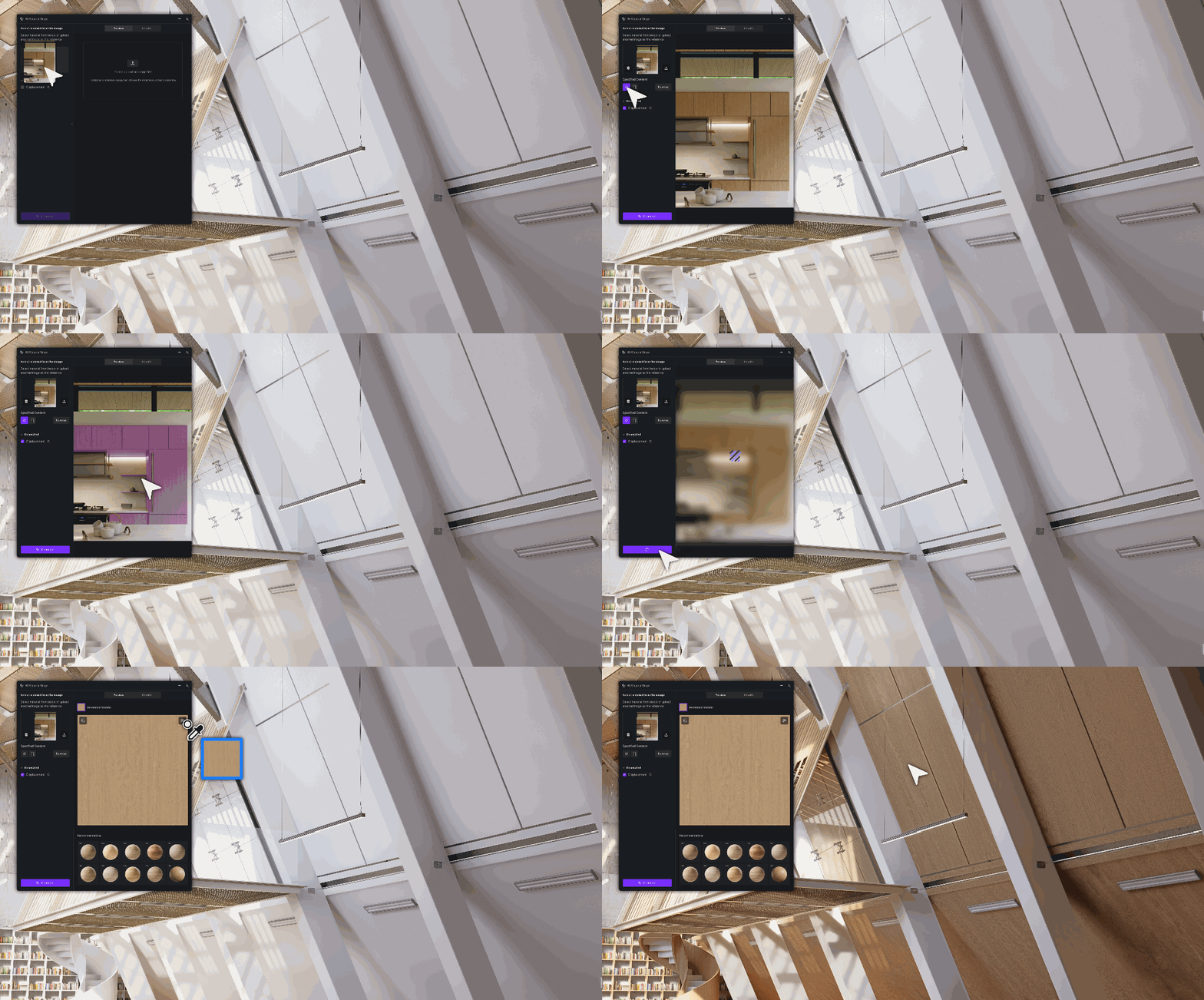
2. How to Create Free PBR Textures with AI PBR Material Snap in D5 Render
STEP1: Make Sure You’re Running D5 Render 2.11 or Later
STEP2: Upload & Select Your Base Image
Navigate to the Asset Library > Online > Materials section (located in the top-left interface). Upload any local reference photo (supports up to 6K resolution) to create free PBR textures.
Need just part of the image? Simply click and drag to select specific details like wood grain or fabric weave for focused material analysis – perfect for generating different types of textures (For detailed steps, refer to the visual guide below👇).
Pro Tip: For best AI PBR Material Snap results, use well-lit reference photos with clear surface details.
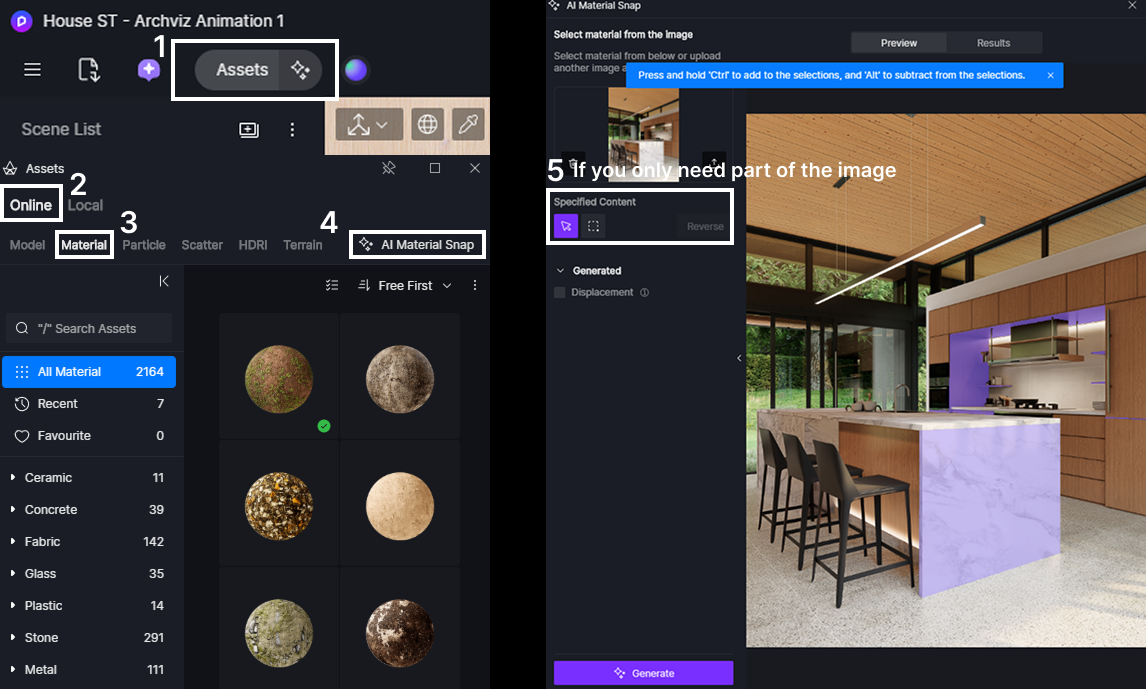
La pregunta está vacía. Por favor, introduce un texto para traducirlo.
STEP3: One-Click AI Generation
D5 ‘s AI automatically converts your image into a complete PBR material set – including albedo, roughness, and normal maps. The system simultaneously scans D5’s online library to suggest stylistically similar premade materials in the sidebar (perfect for quick alternatives).
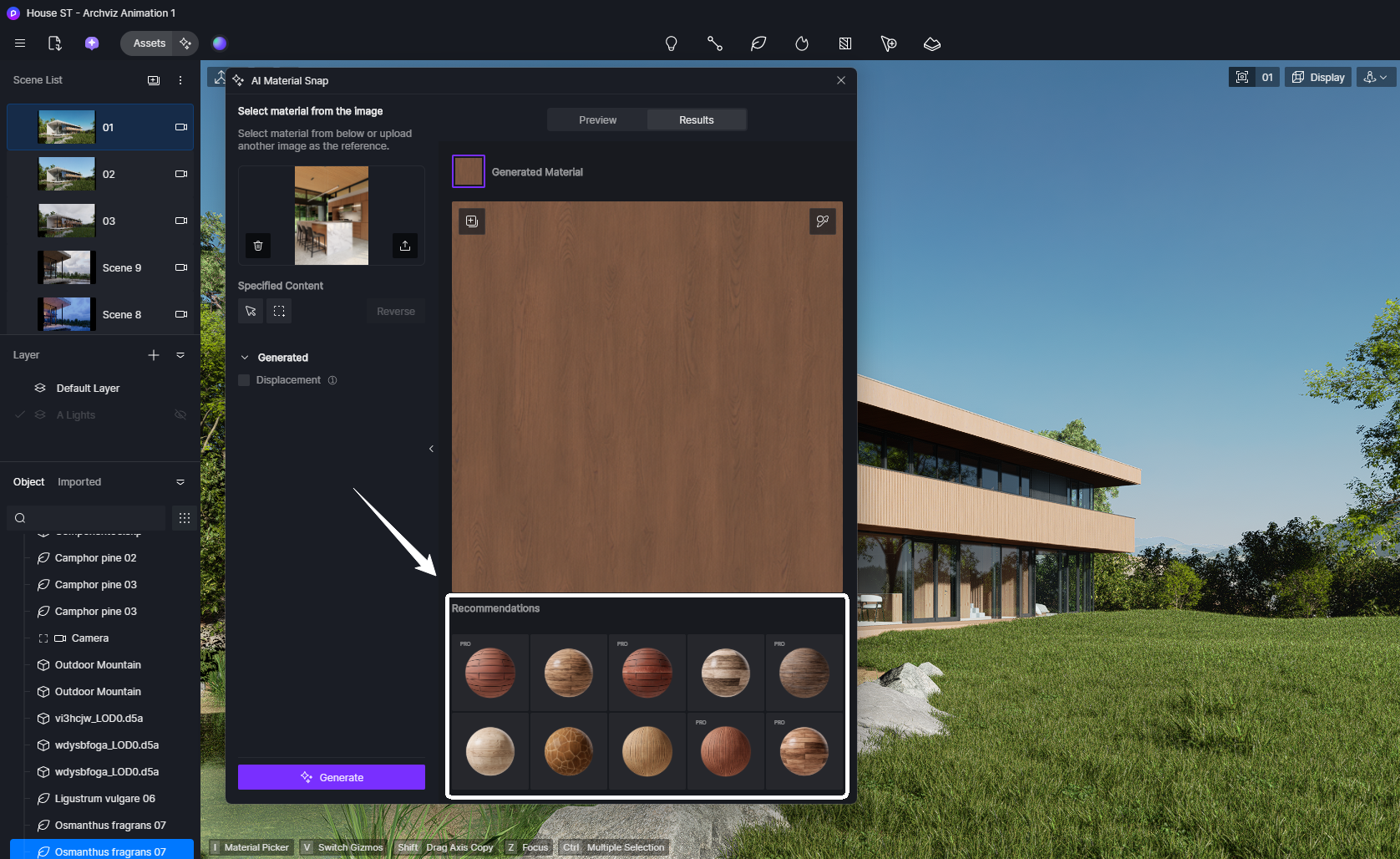
La pregunta está vacía. Por favor, introduce un texto para traducirlo.
STEP3: Apply or Save for Later
Instantly test the AI-generated material on your 3D model with real-time rendering, or fine-tune properties using D5 ‘s parameter panel on the right.
Love how it looks? Save directly to your local library with one click – these textures become your permanent asset collection.
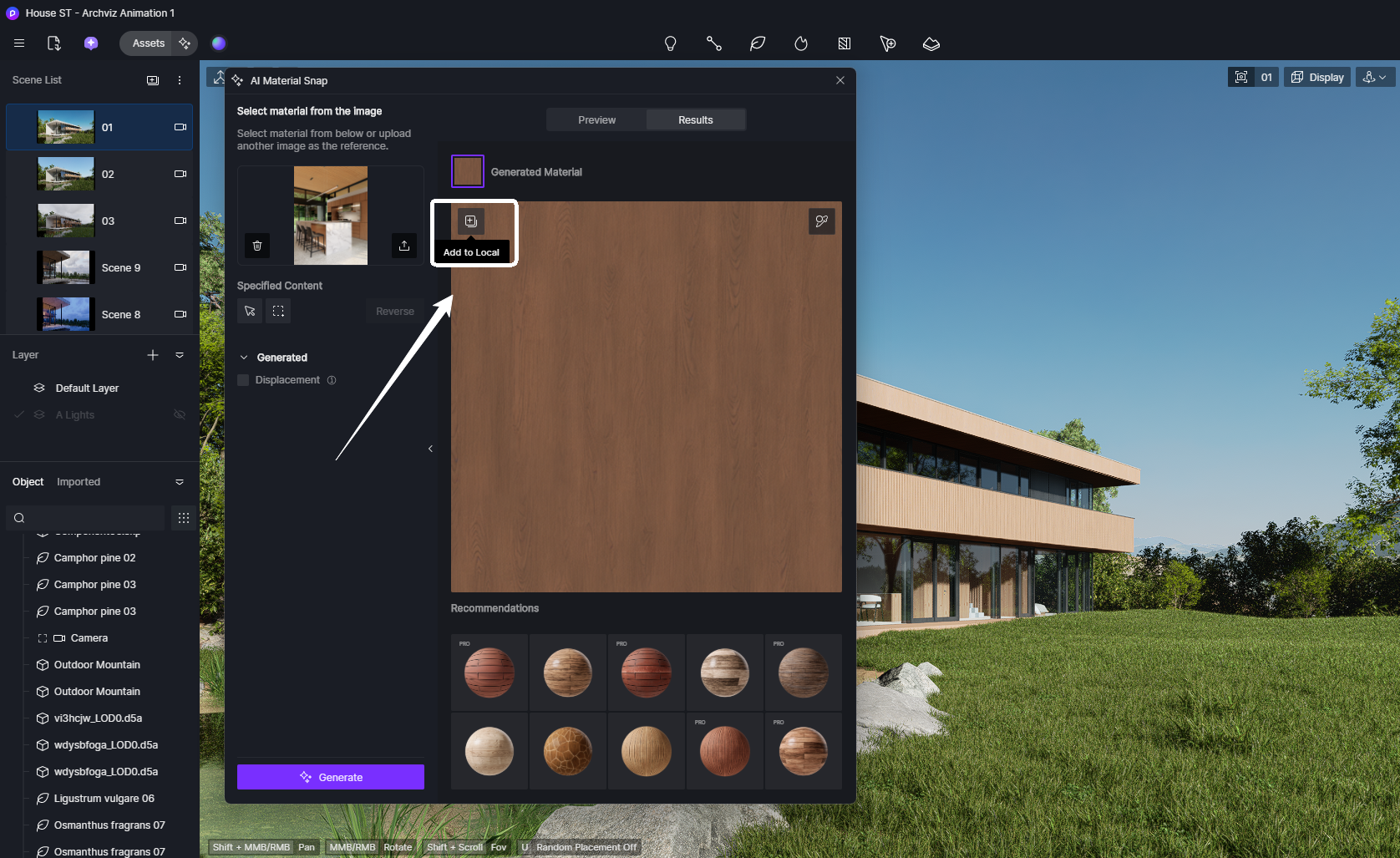
3. Get More Free PBR Textures with D5’s AI Material Ecosystem
Beyond the groundbreaking ‘AI PBR Material Snap’, D5 Render equips artists with a full suite of AI-powered tools to source and enhance free, production-ready PBR textures. Here’s how to leverage these smart features:
3.1 AI-Generated Material Texture Maps
Getting complete texture maps has never been simpler. D5’s AI analyzes your reference images and automatically generates entire PBR sets – from physically accurate roughness maps that nail surface shine to detailed normal maps that create the illusion of depth without tedious sculpting work. Even ambient occlusion gets intelligently applied based on your asset’s geometry, saving hours of manual tweaking.
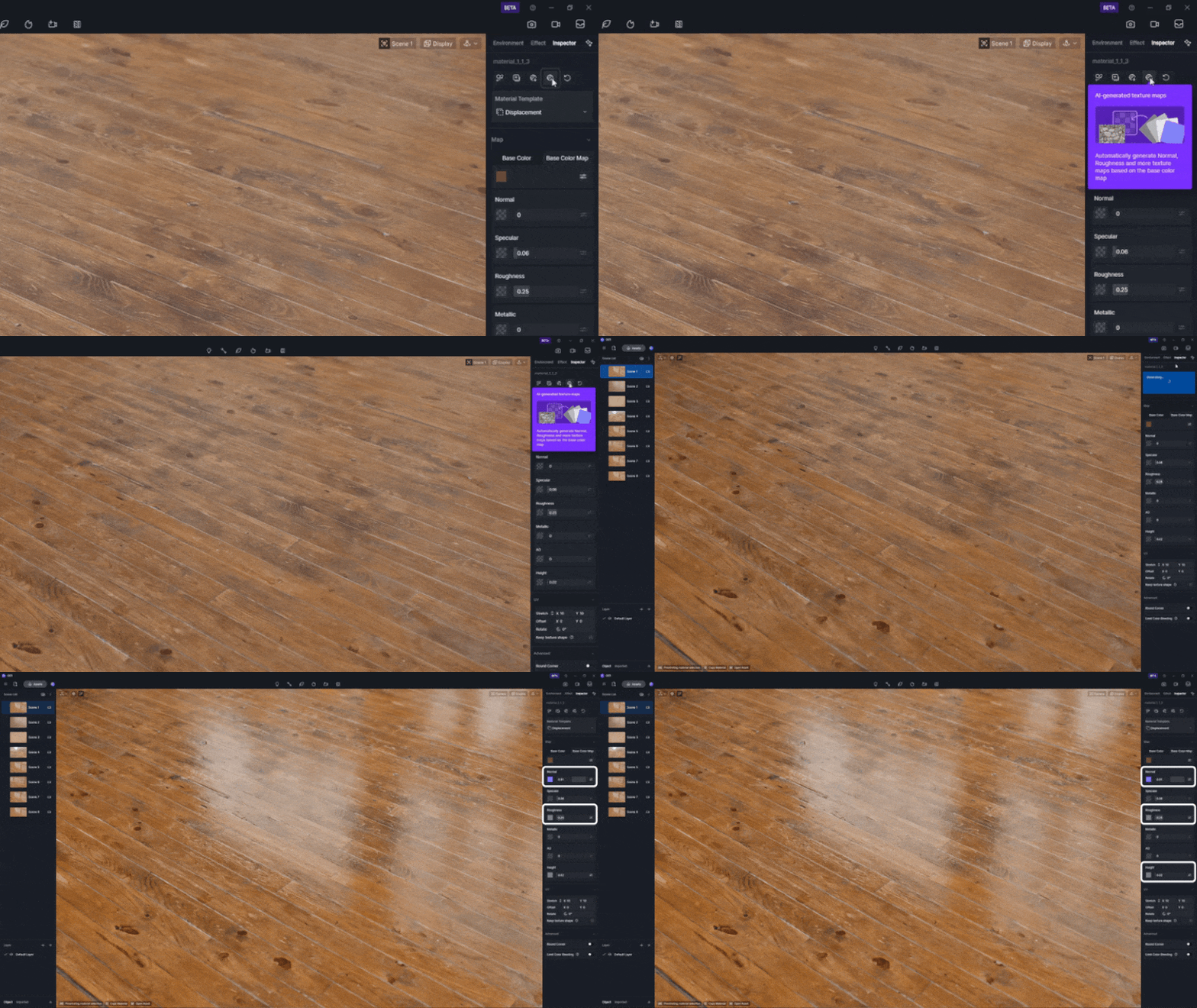
Consejo: Captura de PBR materiales con IA converts real-world photos into complete, production-ready PBR materials (albedo/roughness/normal maps) through image analysis, while Mapas de Textura de Material Generados por IA specifically creates supplementary PBR texture channels (normal/roughness/height) from an existing base color map to enhance material depth. The former is ideal for sourcing textures from photographs, whereas the latter excels at refining and completing partial material sets.
3.2 Crear sin costuras con IA
Tiling artifacts and mismatched seams disrupt even high-quality free PBR textures. D5’s AI Make Seamless analyzes texture patterns and extends edges intelligently, preserving PBR properties like roughness and metallic values. Unlike standalone tools that may distort material behavior, D5 Render ensures adjustments align with real-world light interactions—critical for trazado de rayos precisión.
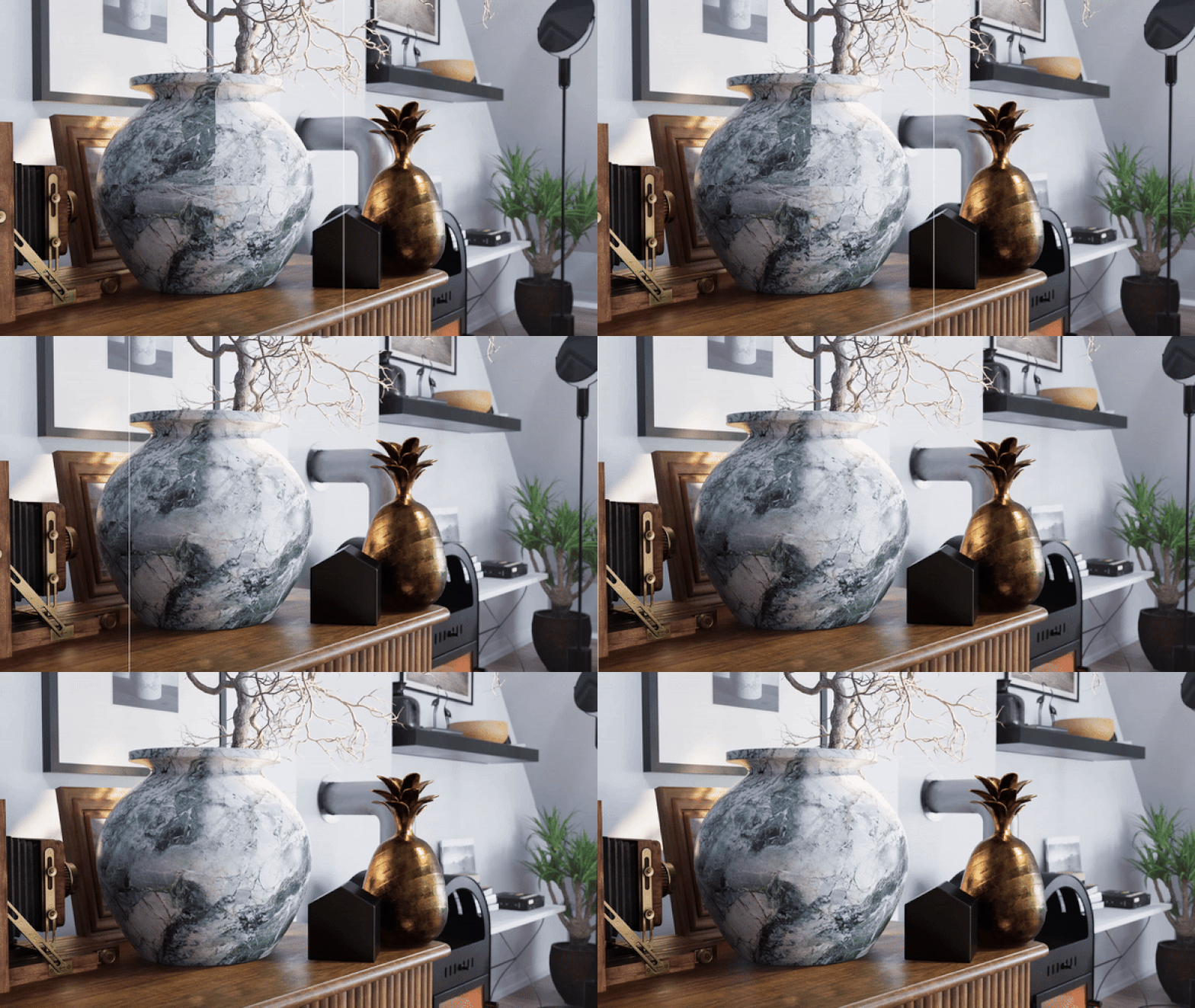
La pregunta está vacía. Por favor, introduce un texto para traducirlo.
3.3 AI Ultra HD Texture
Textura IA Ultra HD de D5 enhancement transforma imágenes de origen de baja resolución en texturas nítidas de 4K, preservando detalles críticos. Esto resulta invaluable al trabajar con fotos de referencia limitadas o activos heredados. Los diseñadores ahora pueden escalar una textura de 1K/2K a 4K después de aplicar un mosaico sin interrupciones, asegurando que tanto la resolución como la continuidad cumplan con los estándares profesionales.
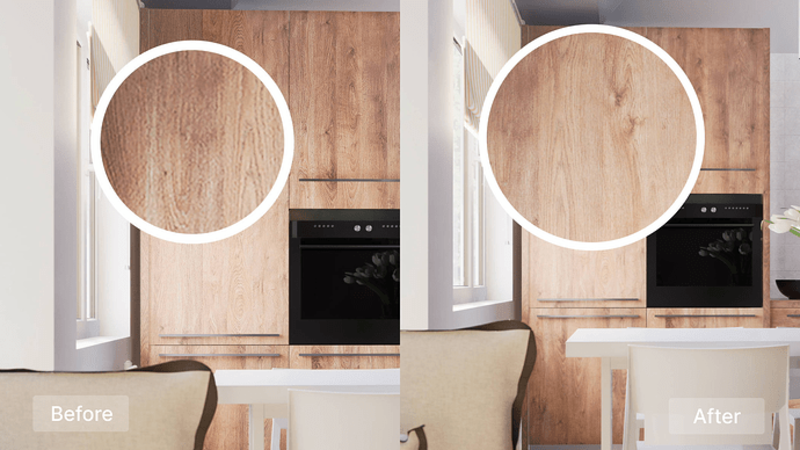
Imagine the workflow possibilities: Simply photograph any surface with your desired texture, then let D5’s Captura de PBR materiales con IA generate complete PBR maps. The Textura AI Ultra HD can upscale to 4K if needed, while Crear sin costuras con IA ensures perfect tiling for large surfaces—all within D5 Render’s integrated workflow. This isn’t futuristic speculation—these AI-powered features are available today.
4. The Verdict: D5’s AI PBR Material Snap Delivers
With the latest version of D5 Render bringing D5’s AI PBR Material Snap , creating professional-quality free PBR textures is now as simple as uploading a photo. Instantly generate full PBR material sets, enhance resolution to 4K, and fix tiling issues—all within D5’s smart AI ecosystem. From beginners to pros, D5 Render’s AI tools eliminate tedious workflows while delivering stunning, production-ready results. Stop manual material crafting and let AI do the heavy lifting— download D5 Render today and transform your texture workflow for free!
Continuar leyendo sobre las novedades de D5
D5 Render 2.11: ¡Nuevas herramientas de IA + actualizaciones ultrarrápidas del flujo de trabajo!
La revolución del renderizado de IA: Herramientas inteligentes para diseñadores de D5 2.11
¿Qué es un agente de IA? ¿Cómo automatiza D5 2.11 el diseño paisajístico?
Cómo usar Cesium en D5 Render 2.11 para mapeado 3D (3 pasos)


 English
 Español
 Français
 한국어
한국어 日本語
日本語