
In 2025, building an affordable architectural rendering studio demands tools that balance cost and capability. While many teams grapple with fragmented workflows and bloated software subscriptions, D5 Render emerges as a game-changer—offering real-time precision without the financial drain. Discover how its integrated pipeline slashes overhead while empowering studios to compete on creativity, not budgets.
Key Takeaways on Affordable Architectural Rendering Studio
- D5 Render cuts hardware costs by 60%+ with mid-range GPU optimization, delivering 4K renders on affordable cards like the RTX 3060.
- D5 Render‘s flexible subscriptions (monthly/annual) avoid long-term traps, unlike competitors locking Pro features behind rigid annual plans.
- Built-in post-processing replaces Photoshop subscriptions, slashing software budgets while polishing renders in real time.
1. Why Most Small Studios Overpay for Rendering
Small architectural studios often face a hidden tax on creativity: rendering costs that spiral out of control. Many teams unknowingly overspend through a perfect storm of outdated workflows—paying premium fees for cloud rendering farms to compensate for slow local software, upgrading GPUs prematurely to meet demanding engine requirements, or locking into subscription models that charge per seat annually. The pressure to deliver Hollywood-grade visuals on shoestring budgets forces painful tradeoffs: sacrificing revision cycles to minimize cloud costs or compromising quality to meet deadlines.
This financial tightrope walk is why emerging solutions like D5 Render are transforming the industry. By prioritizing accessibility without sacrificing quality, D5 eliminates the traditional barriers to professional rendering. Its streamlined workflow empowers studios to maximize existing hardware investments while avoiding the subscription traps and cloud dependencies that quietly erode profits. For small teams, this isn’t just about better software—it’s about reclaiming budgetary control in a field where every dollar shapes creative freedom.

2. The Hidden Costs of Traditional Rendering Solutions
2.1 Hardware Overinvestment: The GPU Trap
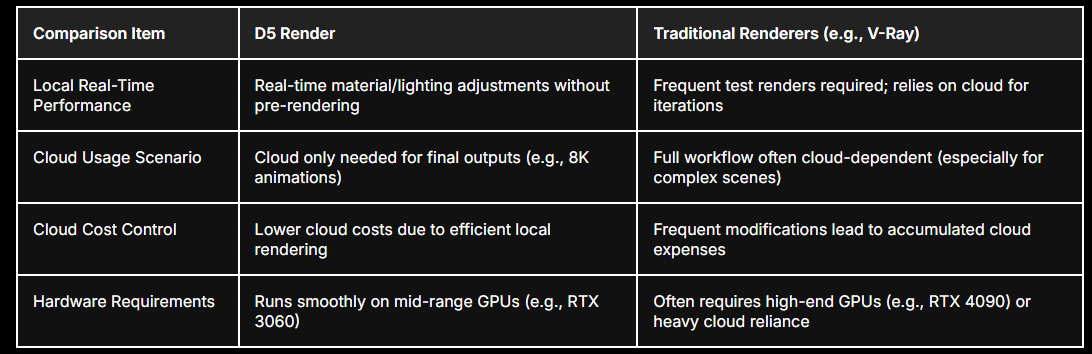
Many small studios fall into the ” hardware arms race ” – believing they need the latest RTX 4090 GPUs to deliver professional-grade renders. While top-tier cards do accelerate workflows in conventional renderers like V-Ray, this approach forces studios into unsustainable upgrade cycles. A common frustration emerges: by the time teams recoup their $1,600 GPU investment, newer models arrive, leaving older hardware struggling with updated software demands.
Aquí es donde D5 Render ‘s engine shines. Optimized specifically for architectural visualization, D5 achieves fluid 4K rendering on mid-range cards like the RTX 3060 (1/3 the cost of a 4090). Unlike brute-force renderers that rely purely on raw GPU power, D5 streamlines operations through:
- La pregunta está vacía. Por favor, introduce un texto para traducirlo. Smart material optimization : Reduced polygon overhead without quality loss La pregunta está vacía. Por favor, introduce un texto para traducirlo.
- Selective trazado de rayos : Prioritizes accuracy in focal areas while simplifying secondary elements The result? Artists can work on mainstream hardware while maintaining production-grade output – a game-changer for studios avoiding six-month GPU refresh cycles.
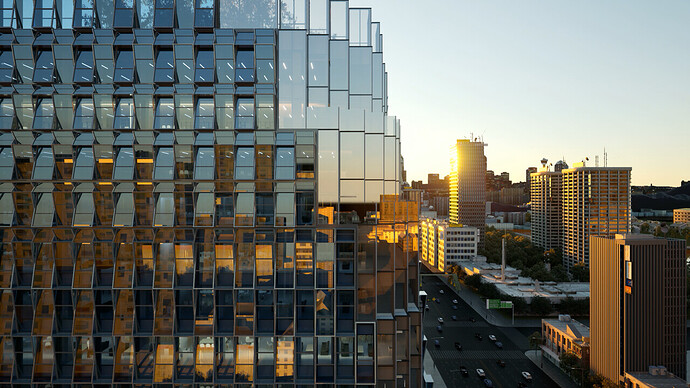
Discover case studies on how D5 Render’s real-time ray tracing rendering benefits companies >
2.2 Cloud Rendering: The Silent Budget Killer
Cloud rendering services tempt studios with “pay-as-you-go” convenience, but unpredictable costs quickly spiral. Every client revision – a changed texture here, adjusted lighting there – forces re-uploads and fresh render queues. Over a 12-month period, these microtransactions often exceed the price of permanent licenses for offline tools.
D5 circumvents this dependency through its local real-time preview system . Changes to materials, lighting, or ángulos de cámara render instantly on your workstation, eliminating:
Hourly cloud compute fees during experimentation phases
Idle time waiting for remote server availability While final 8K exports might still use cloud farms, studios report reducing cloud dependency by 60-70% for routine projects. This hybrid approach lets teams reserve cloud budgets for client deliverables rather than internal iterations.
If you’d like to explore more about the key differences between D5 Render and traditional renderers, refer to the comparison table below ▼
3. How D5 Render Solves Cost Challenges
3.1 Real-Time Rendering = Zero Wasted Time
D5 Render revolutionizes the creative process with true real-time visualization. Unlike traditional tools that force artists to wait minutes (or hours) for test renders, D5’s instant feedback allows simultaneous adjustments to materials, lighting intensity, and even sun position – all while maintaining photorealistic previews. This means designers can instantly validate ideas like swapping wood finishes or testing sunset lighting scenarios, compressing days of trial-and-error into hours.
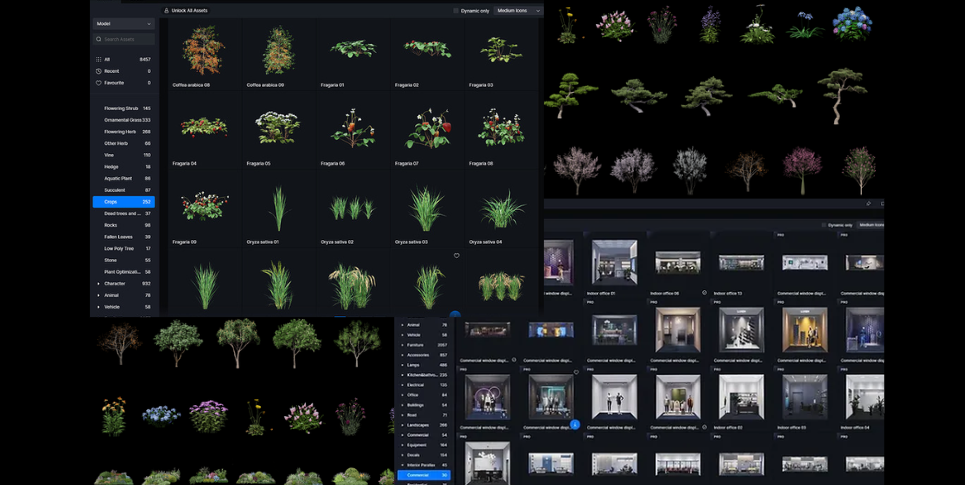
The platform’s 14,000+ free assets – including parametric furniture, Materiales PBR , and natural elements – eliminate the need for expensive third-party libraries. While competitors charge $5-$50 per premium model, D5’s built-in library covers everything from modern sofas to seasonal foliage, all optimized for seamless integration. For studios juggling tight budgets and tighter deadlines, this combination of instant iteration and ready-to-use resources transforms client
3.2 No Subscription Traps
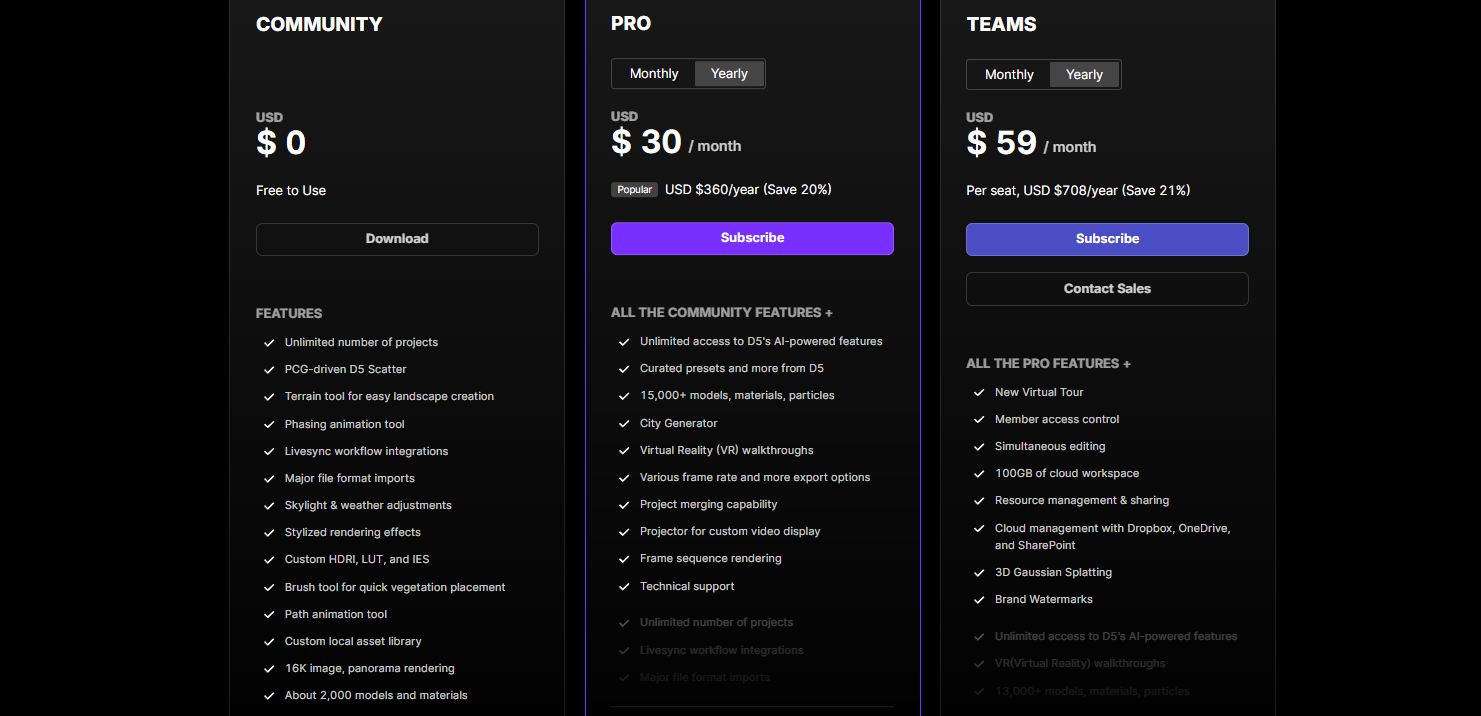
D5 Render’s free trial lowers entry barriers by offering full feature access for non-commercial projects (commercial use requires a paid license), allowing studios to test workflows risk-free. For professional use, the perpetual license model eliminates recurring fees – pay once and own the version permanently, with free updates included.
Teams scaling operations benefit from D5 Teams Edition, which offers centralized subscription management and priority technical support. D5 Render, whether it’s the Pro version or the Team version, operates on a flexible subscription model (monthly or discounted annual plans), differing from competitors’ mandatory annual contracts (like Enscape only offers monthly subscriptions for its Base Version, while access to the Pro version requires enrollment in their annual subscription plan.). While continued access requires active subscriptions, the absence of high-end GPU requirements significantly lowers infrastructure costs. This combination of operational flexibility and hardware efficiency helps studios maintain budget predictability across project cycles.
3.3 Enhancing Renders with Post-Processing
D5 Render’s built-in post-processing tools empower small studios to achieve polished results without costly external software. By integrating advanced adjustments like LUT filters , exposure controls, and environmental effects (bloom, vignette) directly into the workflow, users can fine-tune lighting, color balance, and atmospheric details in real time. This eliminates the need for Photoshop or After Effects subscriptions—a significant cost saver for teams managing tight budgets.
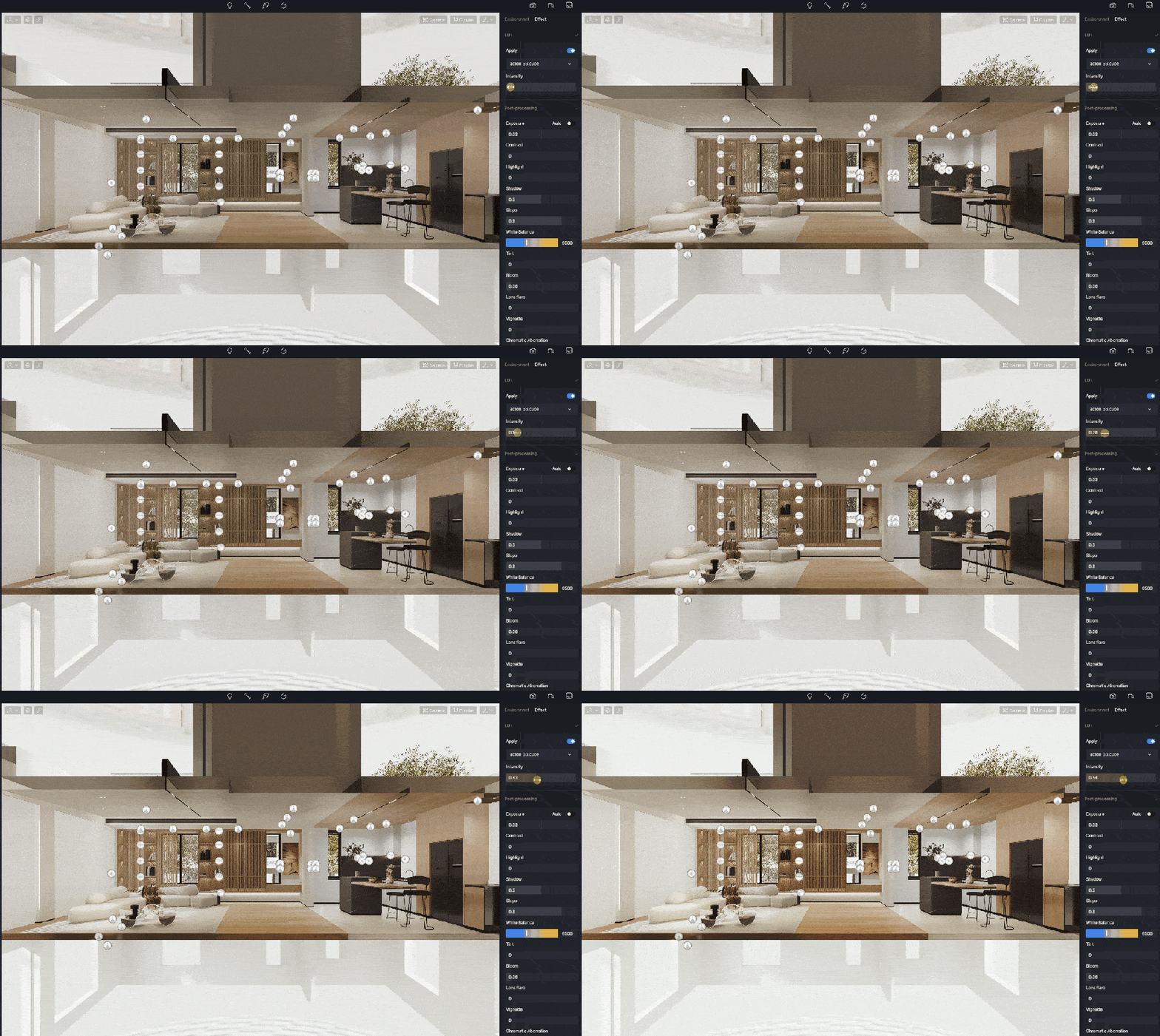
Haga clic en aquí to download the scene file. You can find the LUT in asset>lut.
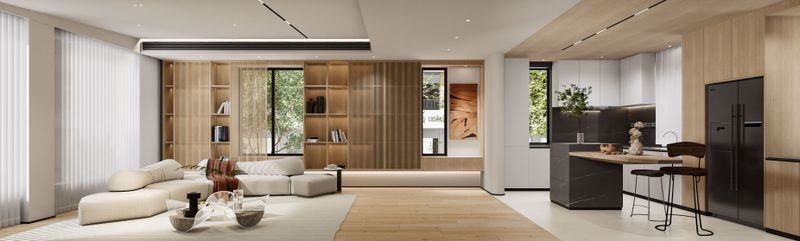
En ambient occlusion (AO) and outline modes further streamline quality assurance, allowing designers to validate structural details and create stylized concept art within the same platform. For example, manual exposure adjustments mimic professional camera settings , enabling precise light calibration without third-party plugins. By centralizing post-production in D5, studios avoid fragmented workflows while maintaining full creative control—proving that premium visuals don’t require premium software investments.
Download the free scene file on D5 Forum >
3.4 Time-Saving Tips
Estudio D5 offers a range of presets, including environment effects, brush parameters, and path presets, stored in a cloud workspace. This allows seamless collaboration and resource sharing among team members. Users can create and apply effect presets by saving all current scene parameters, including custom HDR and LUT files , which streamline the rendering process. Once saved, these presets can be quickly applied, reducing repetitive manual adjustments and ensuring consistent quality across scenes.
To further boost productivity, D5 brush and path presets enable efficient scene creation by saving and reusing specific settings. This is particularly useful for projects requiring uniformity and precision. Sharing these presets within teams ensures all members have access to the same resources and settings, fostering a unified approach to project development. Overall, D5 Studio presets help users work more efficiently, maintain consistency, and enhance project quality.
Domina tus recursos de diseño con D5 Studio >
Enhance Your Design Workflow with D5 Studio >
4. Conclusion on Affordable Architectural Rendering Studio
Building an affordable architectural rendering studio in 2025 isn’t about cutting corners—it’s about cutting inefficiencies. D5 Render redefines cost-effectiveness by eliminating hardware wars, cloud billing traps, and fragmented workflows. With real-time rendering, perpetual licensing, and built-in post-production tools, studios can redirect savings toward creativity, not overhead. The future belongs to teams that prioritize agility over outdated workflows. Ready to break free from rendering bottlenecks? Explore D5’s free trial or calculate your potential savings—your next project deserves a budget that fuels innovation, not frustration.
Siga leyendo para conocer más funciones de D5 Render
¿Qué es la Iluminación Global y Por Qué la Necesitamos?
¿Qué es el trazado de rutas en tiempo real en D5 Render 2.10 y por qué es importante?
D5 Render 2.10 Beta Integra NVIDIA DLSS 4: Revolución de IA en Renderizado en Tiempo Real
La forma más fácil de crear impresionantes animaciones de fases
Dominio del paisajismo arquitectónico con D5 Render Terrain Tool
Iluminación con IA en D5 Render para una visualización realista en ArchiCAD
FAQs for D5 Render Beginners
1.¿Puede D5 Render integrarse con mi software de diseño actual?
D5 Render se sincroniza a la perfección con la mayoría de las herramientas de modelado habituales, incluidas SketchUp, Revit, Rhino, Archicad, Blender, 3ds Max , y mucho más, garantizando actualizaciones en directo sin necesidad de exportar manualmente.
Click here for all software with D5 Render real-time sync >
2.¿Hay costes ocultos después de la prueba gratuita?
No! D5 ofrece una versión comunitaria gratuita con funciones básicas para uso no comercial. Los planes de pago (Pro/Equipos) desbloquean herramientas avanzadas y derechos comerciales, con precios transparentes listados en Sitio web de D5 Render .
¡Experimenta lo Gratis D5 Render Inmediatamente!
3.¿Y si necesito ayuda para aprender D5 Render?
D5 proporciona tutoriales gratuitos , a Canal YouTube , y un foro de usuarios activos para la resolución de problemas. Nuestros recursos de aprendizaje estructurados se adaptan a todos los niveles de cualificación, minimizando la curva de aprendizaje.
4.¿Requiere D5 Render hardware caro?
D5 funciona sin problemas en GPU de gama media (por ejemplo, NVIDIA RTX 3060) y optimiza el rendimiento mediante parámetros ajustables, lo que la hace accesible para la mayoría de las estaciones de trabajo.
Click here for D5 Render’s system requirements >
5.¿Es D5 Render adecuado para presentaciones a clientes?
Absolutely. Our photorealistic outputs and real-time animations are trusted by firms globally to impress clients and reduce revision cycles by 50–70%.


 English
 Español
 Français
 한국어
한국어 日本語
日本語