
D5 Render 2.10 delivers the biggest leap in real-time rendering yet, packed with groundbreaking innovations for enhanced realism, efficiency, and streamlined workflows. From trazado de trayectorias en tiempo real y AI-powered post-processing a instant city generator y night sky , this update pushes rendering quality and speed to new heights. Let’s dive into the game-changing features and how they elevate your workflow.
La pregunta está vacía. Por favor, introduce un texto para traducirlo.
Key Highlights in D5 Render 2.10
1. Real-Time Path Tracing – Ultimate Realism Without Sacrificing Speed
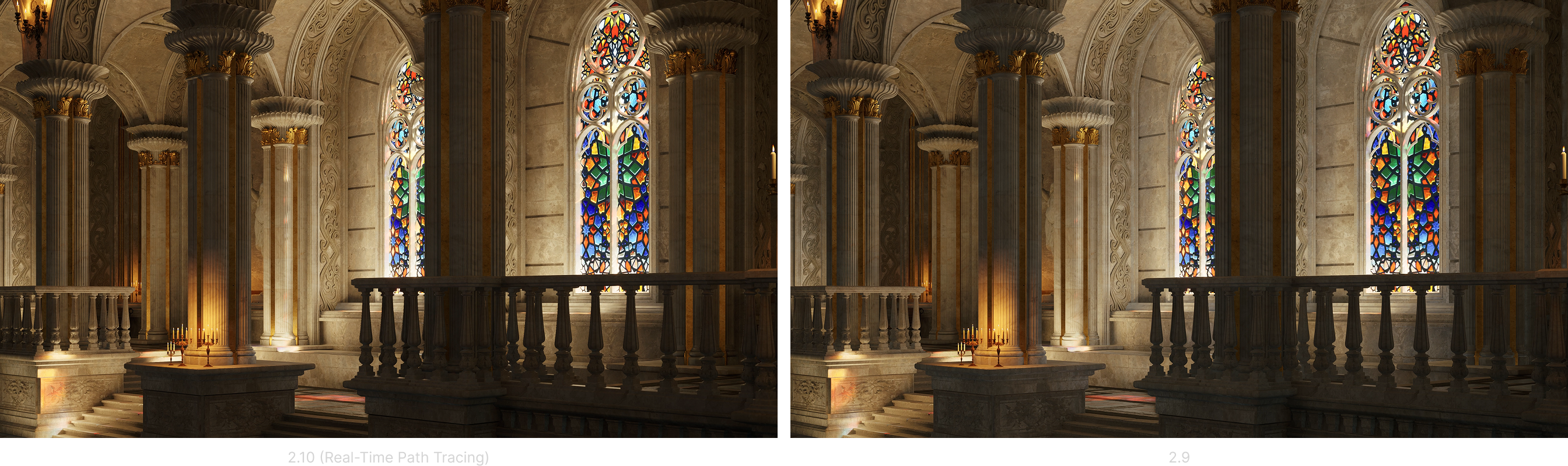
Achieving true-to-life lighting, reflections, and shadows has always been a challenge in real-time rendering. Traditional workflows required manual lighting adjustments and post-processing fixes. D5 Render 2.10 eliminates these inefficiencies with real-time path tracing system .
D5’s real-time Path Tracing delivers physically accurate reflections, soft shadows, and indirect lighting while offering customizable GI Precision, Reflection Depth, Samples Per Pixel (SPP), and Noise Reduction. Users can now achieve more realistic lighting results without long rendering times, bringing a new level of quality to real-time visualization.
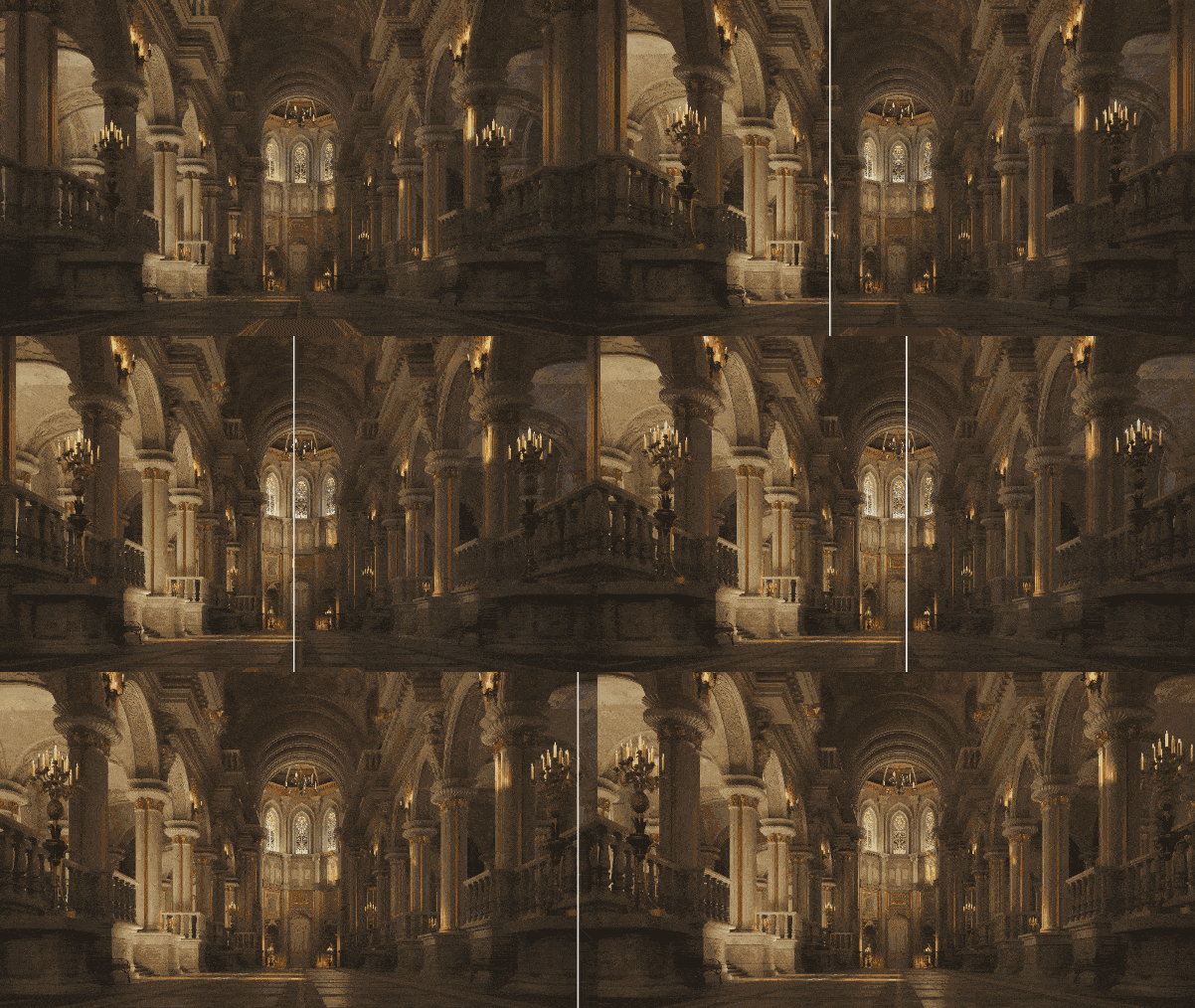
With instant lighting results, architects and designers can work more efficiently, reducing trial and error and eliminating the need for extensive post-production edits. The result? Cinematic-quality visuals in real time, streamlining project completion without compromising realism.
La pregunta está vacía. Por favor, introduce un texto para traducirlo.
2. Night Sky Simulation – Breathtaking Night Renders
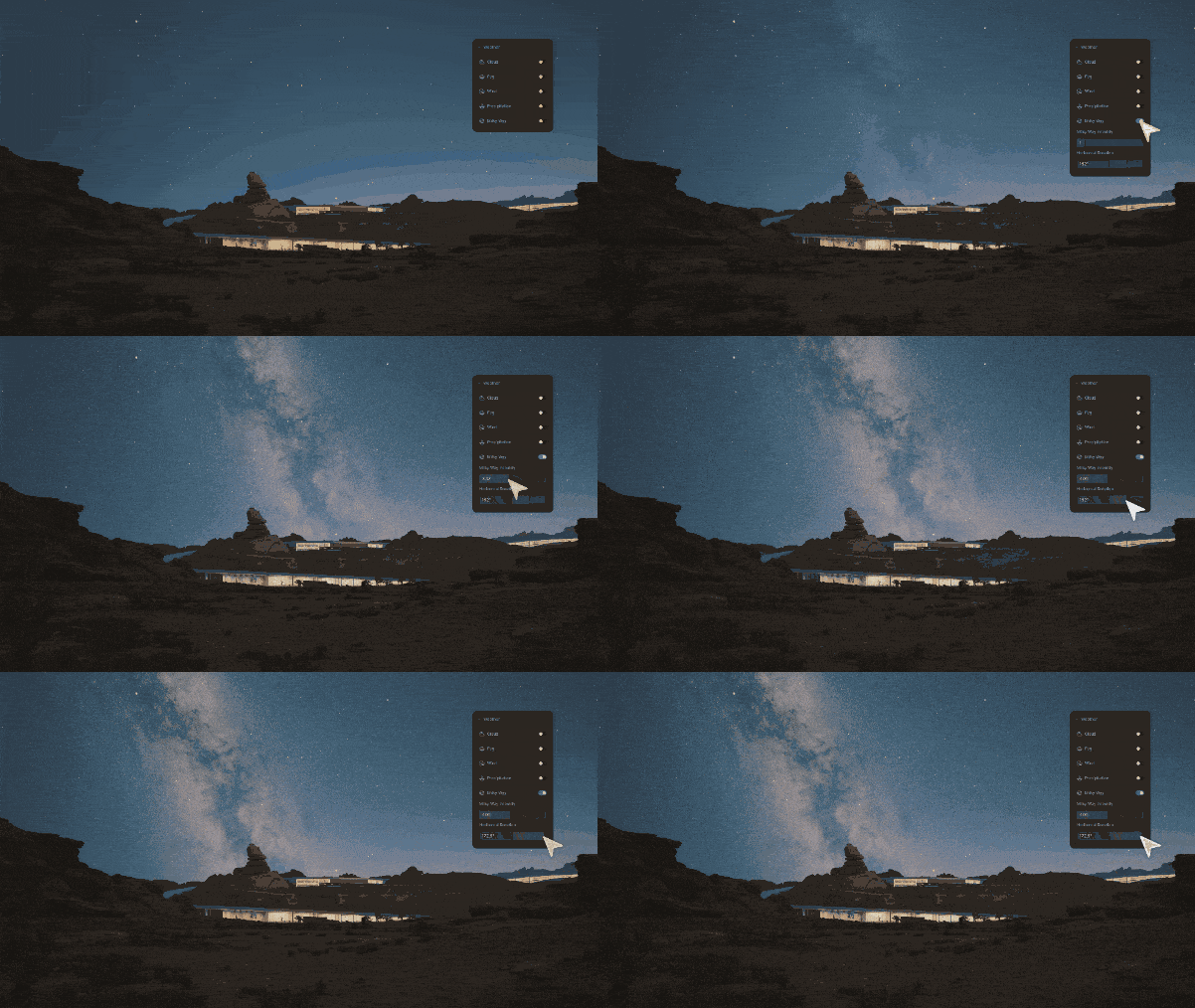
Night scenes previously lacked depth and realism, often requiring external assets or manual sky adjustments. This update enhances outdoor night renders with a Day-Night Cycle in Geo Sky , allowing seamless lighting transitions that mimic real-world conditions.
With customizable Moon & Star Intensity, users can control celestial brightness and positioning, while the Milky Way Simulation adds depth for a cinematic-quality night environment. Users can also leverage Custom Night Settings to fine-tune moon intensity, altitude, and phases, creating highly realistic night skies tailored to specific project requirements.
La pregunta está vacía. Por favor, introduce un texto para traducirlo.
3. Optimized Rain and Snow Effects – More Realistic Weather Conditions

Weather effects have been refined to improve realism, making rain and snow more dynamic and natural. Enhancements include more detailed raindrop and snowflake particles, improved puddle and ripple effects, and a new Water Mist simulation that adds a humid atmosphere to rainy scenes. These updates ensure that weather-sensitive renders look more immersive and lifelike.
La pregunta está vacía. Por favor, introduce un texto para traducirlo.
4. City Generator with OpenStreetMap (OSM) Integration – Instant Real-World Cityscapes
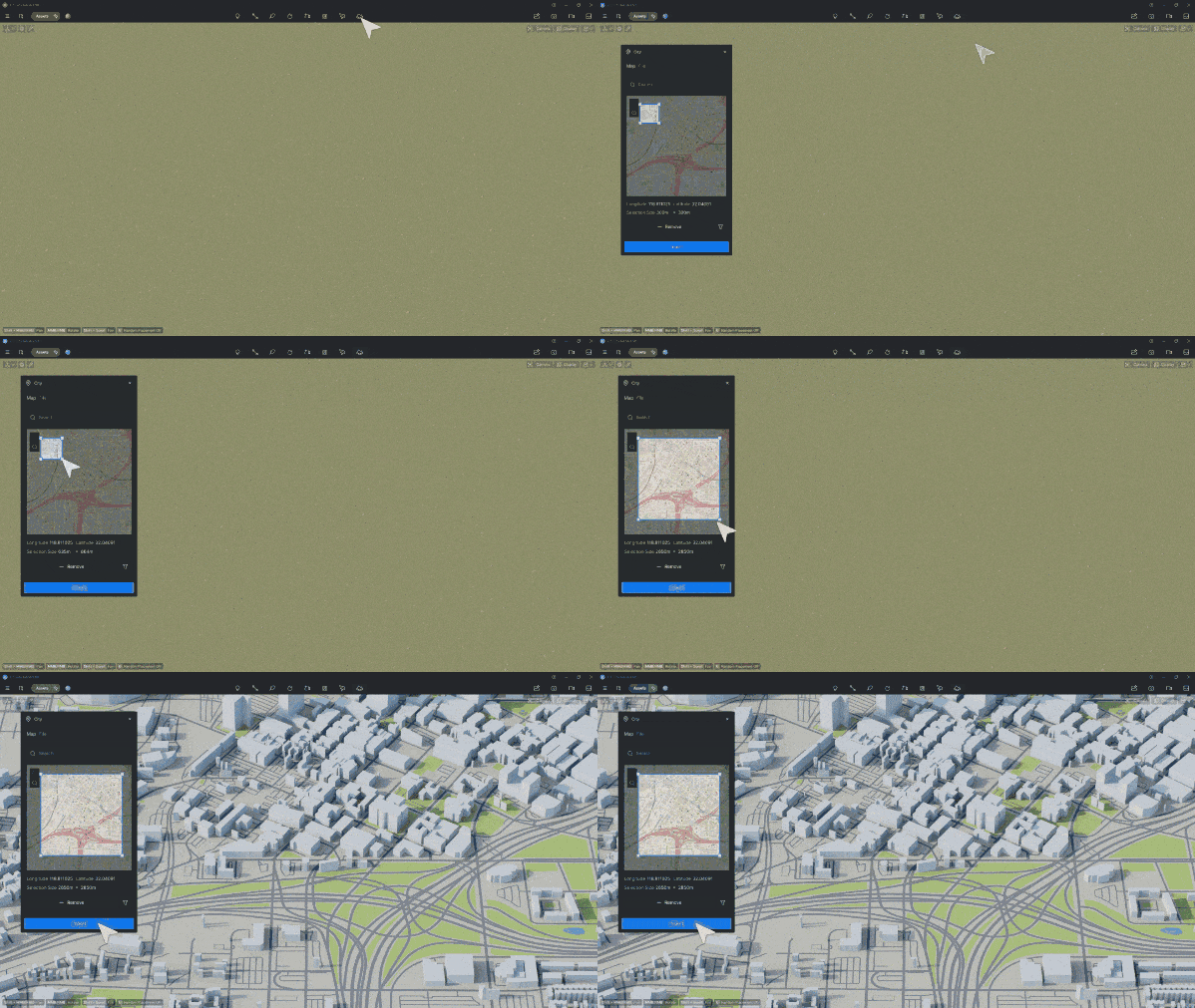
Creating city models manually can be time-consuming and prone to inaccuracies. The City Generator automates urban environment creation using real-world OpenStreetMap data , allowing users to generate detailed city layouts quickly. With customizable building heights, materials, and transparency, users can tailor cityscapes to their design needs. Additionally, Shapefile (.shp) Import supports GIS-based urban planning, ensuring accurate geographic data integration.
La pregunta está vacía. Por favor, introduce un texto para traducirlo.
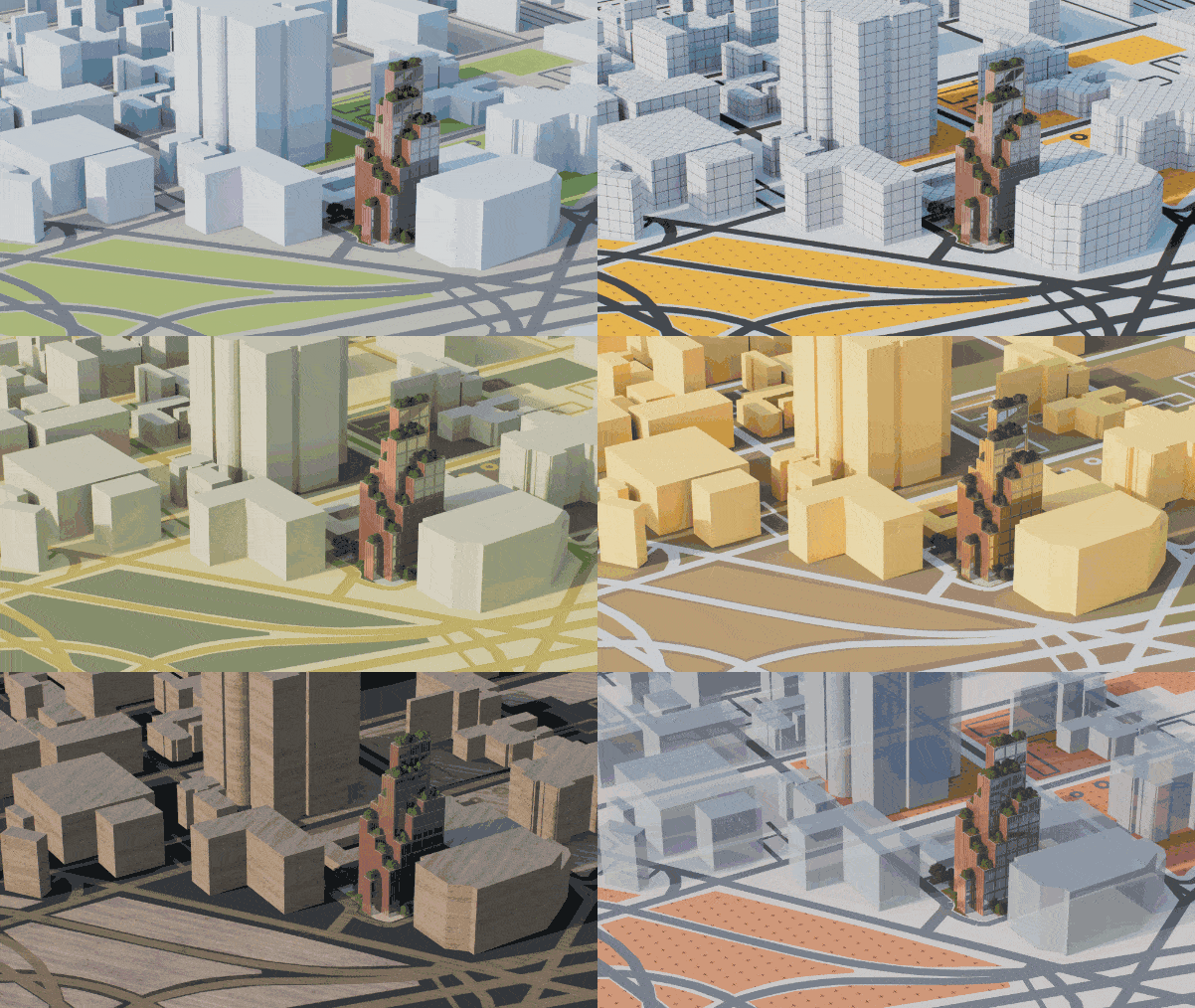
City modeling has been further enhanced with City Model Management Tools, allowing users to show/hide elements, modify road widths, and adjust individual building heights with ease.
La pregunta está vacía. Por favor, introduce un texto para traducirlo.
5. AI Post-Processing Upgrades – Smart Enhancements, Less Manual Work
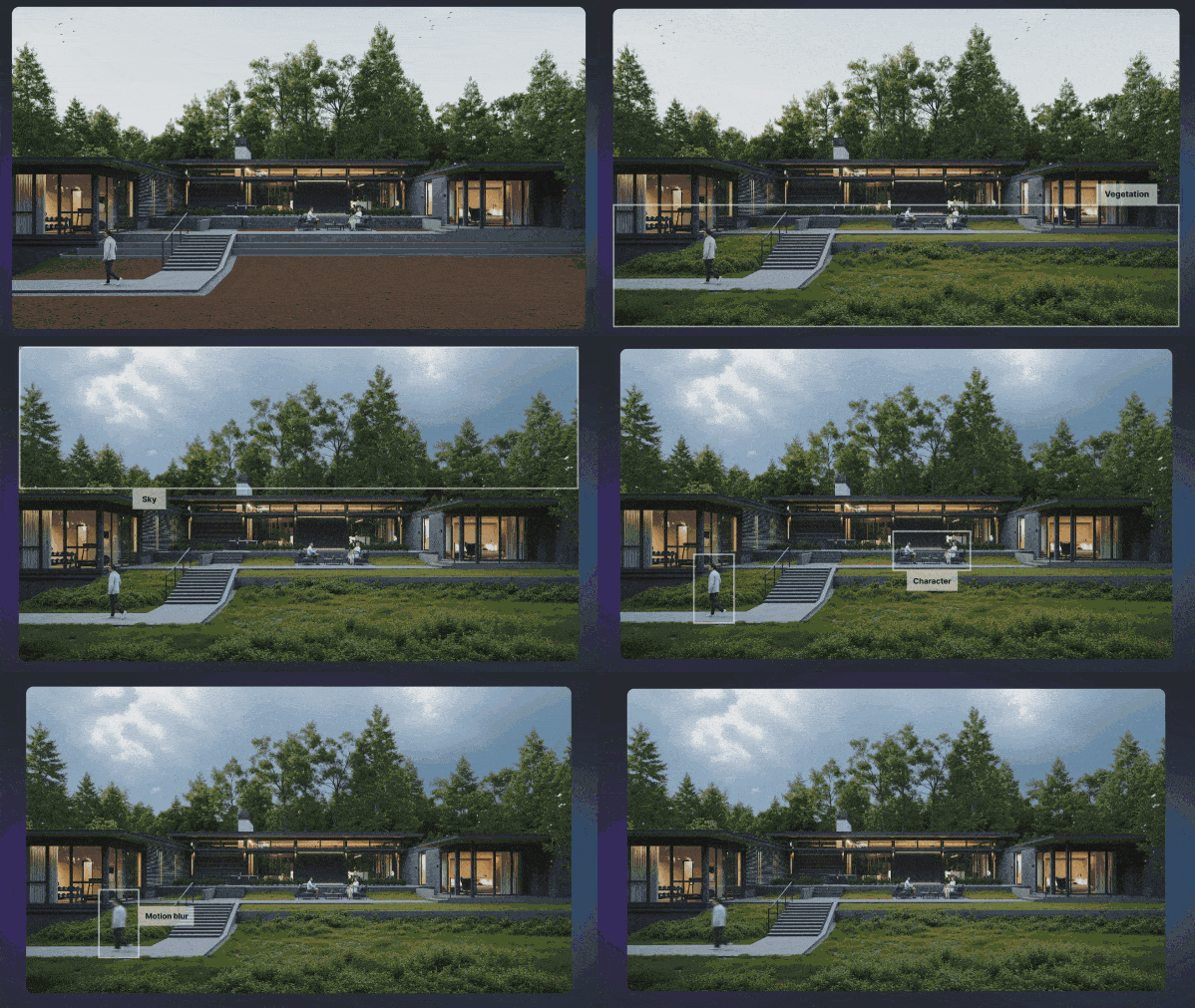
Manual post-processing can be time-consuming and repetitive. D5 Render 2.10 introduces AI-powered tools to automate and refine renders.
La pregunta está vacía. Por favor, introduce un texto para traducirlo.
- La pregunta está vacía. Por favor, introduce un texto para traducirlo. AI Inpainting: Fills missing elements like sky, vegetation, or water automatically, reducing the need for manual asset placement.
- La pregunta está vacía. Por favor, introduce un texto para traducirlo. Motion Blur: Adds natural motion effects for dynamic scenes, including tail light effects for vehicles.
- La pregunta está vacía. Por favor, introduce un texto para traducirlo. AI Enhancer: Optimized for improved text and logo sharpness.
- La pregunta está vacía. Por favor, introduce un texto para traducirlo. AI Style Transfer: More refined artistic and realistic effects.
- La pregunta está vacía. Por favor, introduce un texto para traducirlo. AI Make Seamless: Improved algorithms for seamless material tiling.
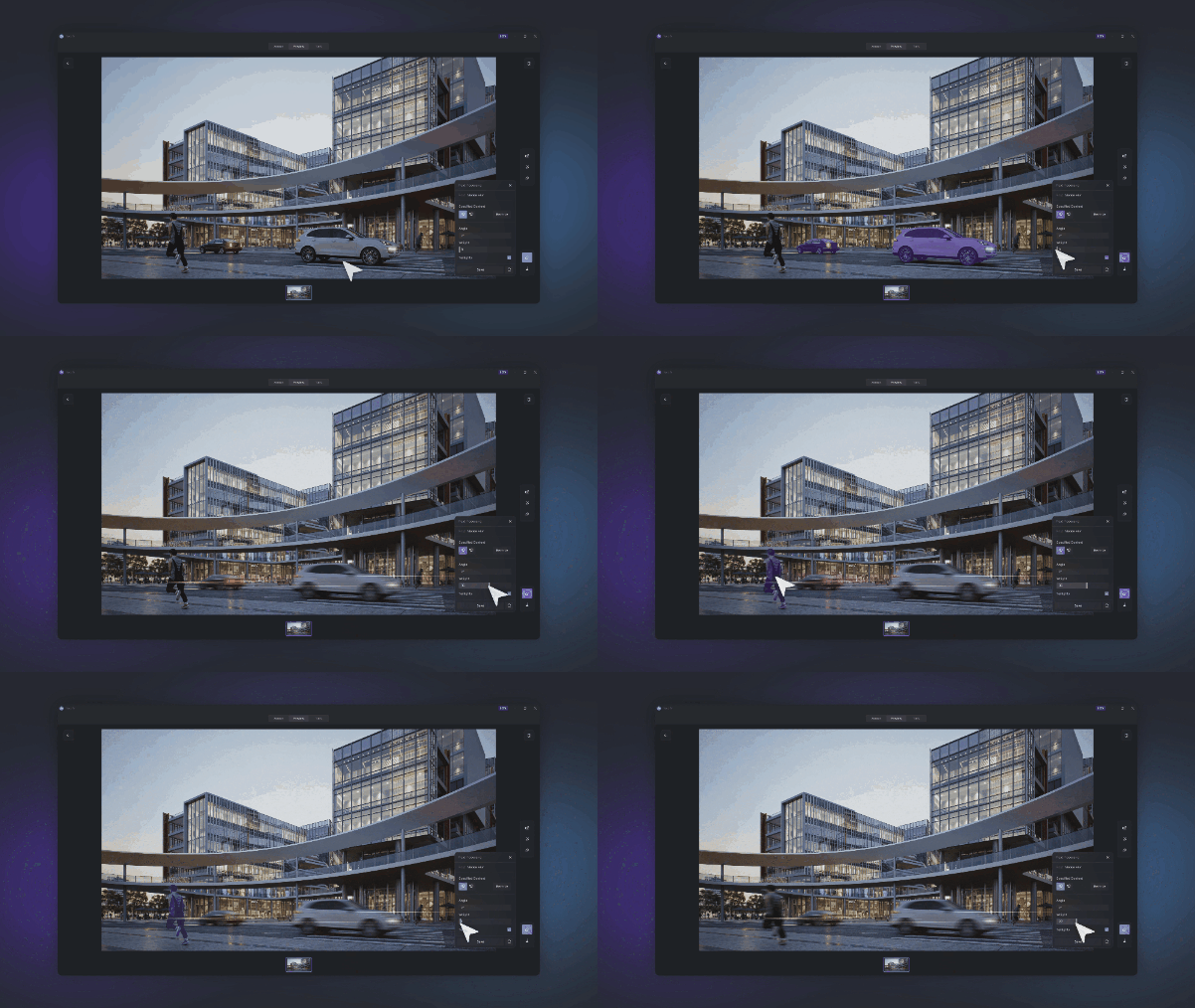
La pregunta está vacía. Por favor, introduce un texto para traducirlo.
These updates reduce reliance on third-party editing software, making it faster and easier to achieve high-quality final renders.
La pregunta está vacía. Por favor, introduce un texto para traducirlo.
6. Optimized Terrain and Scatter Workflow – Better Landscapes, Faster Results
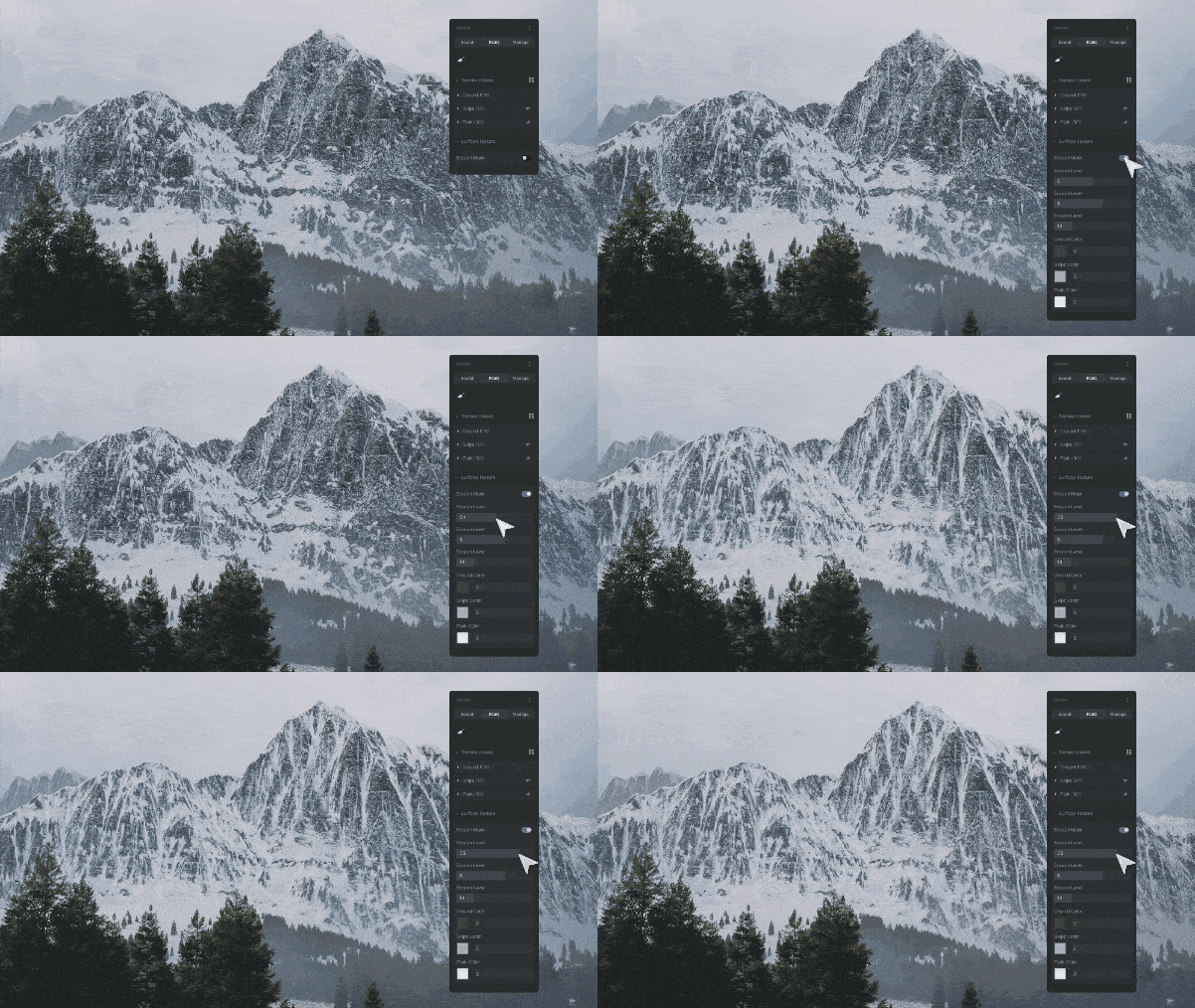
- La pregunta está vacía. Por favor, introduce un texto para traducirlo. Optimized Terrain Tool with range settings, erosion layer improvements, and new heightmap controls for more precise adjustments. These updates were introduced to provide greater flexibility and accuracy in terrain editing, allowing users to sculpt more realistic landscapes with ease.
- La pregunta está vacía. Por favor, introduce un texto para traducirlo. Live terrain height indicators for better sculpting feedback, ensuring precise modifications.
- La pregunta está vacía. Por favor, introduce un texto para traducirlo. Scatter Workflow Enhancements , including Quick Scatter Templates and improved quality settings for more natural object distribution, making scene population faster and more efficient.
These enhancements allow users to create complex outdoor environments more efficiently, reducing manual adjustments while improving the visual fidelity of terrains. Whether designing urban landscapes or natural settings, users can now achieve higher levels of realism with less effort.
La pregunta está vacía. Por favor, introduce un texto para traducirlo.
7. Animation Enhancements – Smoother, More Intuitive Motion
D5 Render 2.10 enhances animation workflows with an optimized Direction Controller for Fly-in/Out Animation Templates , addressing the need for greater precision and control in motion sequences. The original XYZ direction controller has been replaced with new horizontal and vertical rotation degree settings, allowing users to fine-tune movement paths with more accuracy and ease. This update was introduced to improve the realism and fluidity of animations, reducing awkward transitions and making fly-through sequences more immersive and natural. Users can now create cinematic-quality movement with greater flexibility, ensuring that camera paths align seamlessly with their design intent.
La pregunta está vacía. Por favor, introduce un texto para traducirlo.
8. D5 for Teams – Enhanced Collaboration and Cloud Integration
- La pregunta está vacía. Por favor, introduce un texto para traducirlo. OneDrive & SharePoint Integration for seamless project file storage and sharing.
- La pregunta está vacía. Por favor, introduce un texto para traducirlo. Custom Brand Watermarks to add company logos to renders.
- La pregunta está vacía. Por favor, introduce un texto para traducirlo. Optimized 3D Dollhouse Animation for improved virtual tour experiences.
These features help teams collaborate more efficiently and maintain brand consistency in their visual outputs.
La pregunta está vacía. Por favor, introduce un texto para traducirlo.
9. Expanded Asset Library – More Ready-to-Use Models

240+ Hotel & Resort Models , including business attire characters, vacationers, and lobby decor items.
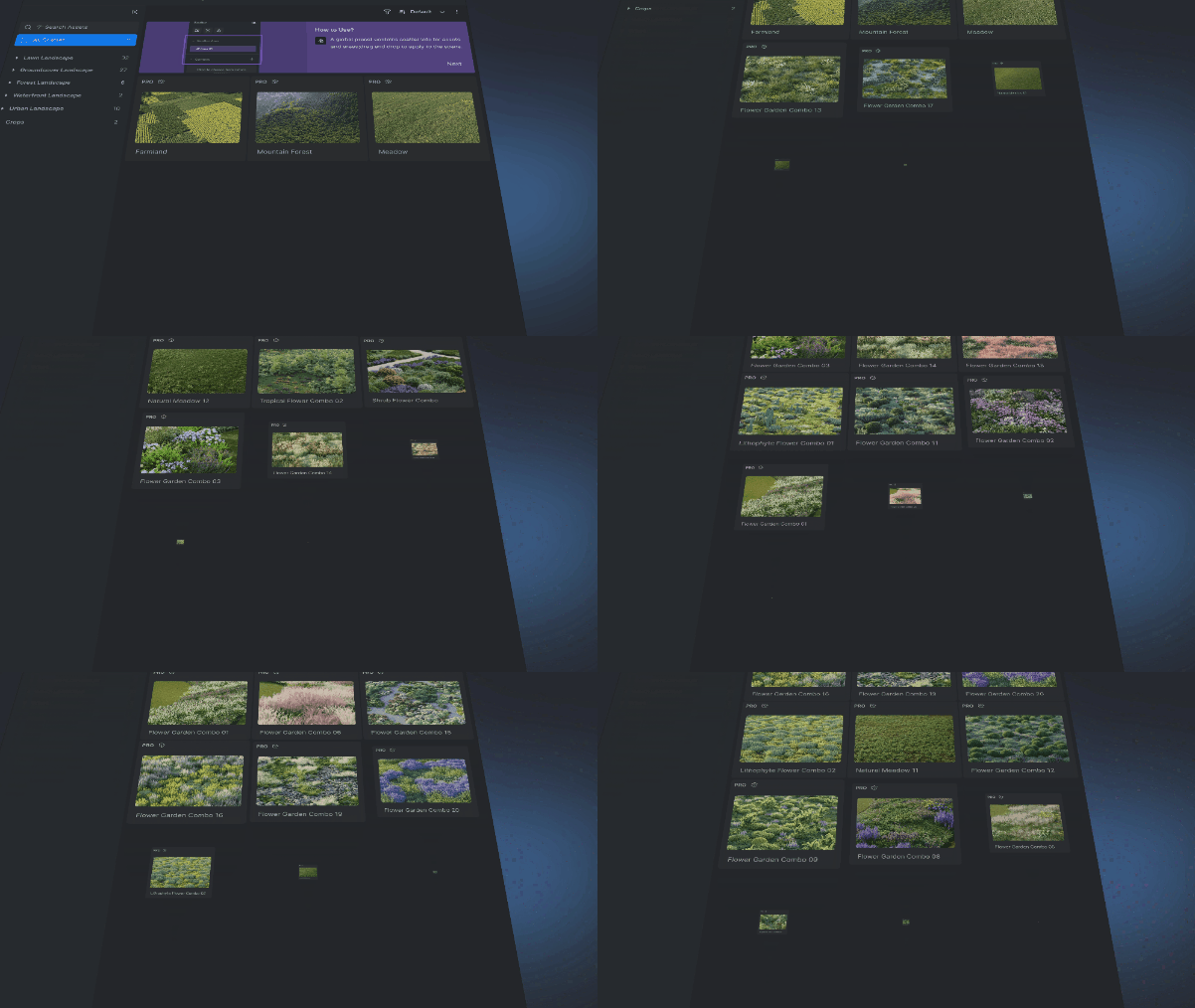
New Scatter Templates to speed up vegetation and object placement.
These additions help designers quickly populate their scenes with high-quality assets, reducing the need for custom modeling.
La pregunta está vacía. Por favor, introduce un texto para traducirlo.
10. System Optimizations and Fixes
- La pregunta está vacía. Por favor, introduce un texto para traducirlo. French and Japanese Language Interface support, allowing users to switch between languages in Preferences.
- La pregunta está vacía. Por favor, introduce un texto para traducirlo. Units for Model Position and Size , now configurable to millimeter, centimeter, meter, inch, and foot, with immediate effect.
- La pregunta está vacía. Por favor, introduce un texto para traducirlo. DLSS 4 Support for enhanced real-time performance using AI-powered frame generation. Users with a GeForce RTX 50 series GPU can enable DLSS 4 to improve FPS up to 4x.
- La pregunta está vacía. Por favor, introduce un texto para traducirlo. Batch Scene Deletion for faster project management.
- La pregunta está vacía. Por favor, introduce un texto para traducirlo. Auto-Save Before Canceling Rendering to prevent data loss.
- La pregunta está vacía. Por favor, introduce un texto para traducirlo. Improved Rendering Queue Management with auto-close options.
- La pregunta está vacía. Por favor, introduce un texto para traducirlo. Fixed rendering inaccuracies in orthographic views, material UV issues, and scatter inconsistencies.
These system improvements make D5 Render more stable, efficient, and responsive for professionals handling complex projects.
La pregunta está vacía. Por favor, introduce un texto para traducirlo.
Experience D5 Render 2.10 Today
D5 Render 2.10 takes real-time visualization to the next level—faster, more intuitive, and more lifelike than ever. Whether you’re an architect, game designer, or 3D artist, these powerful updates will transform the way you create.
Ready to elevate your workflow? Download D5 Render 2.10 now and bring your vision to life!


 English
 Español
 Français
 한국어
한국어 日本語
日本語