
Rendering shouldn’t act as a speed bump; it should be a natural extension of your thought process.
In the fast-paced world of AEC and spatial design, fragmentation is the enemy of creativity. Constantly switching between modeling software, disjointed AI tools, and heavy rendering engines breaks your focus. That is why we are introducing the D5 Flux de travail tout-en-un—a unified ecosystem comprising D5 Lite, D5 Render, etD5 Works.
Think of these tools not as standalone software, but as complementary phases of “An Unbroken Creative Flow”:
- BonjourD5 Lite— The AI-native visualization plugin that lives inside your design tool—from first sketch to refined concept, without breaking your flow.
- D5 Render— Production-level real-time rendering built for high-end visualization and animation—driven by AI automation and seamless synced with Lite.
- D5 Works—The curated asset platform for spatial design—drag, drop, and keep moving.
Today, we officially unveil D5 Lite: the bridge connecting your raw SketchUp rendering workflow to the future of real-time visualization. Seamlessly powered by the D5 Moteur, it lowers the barrier to professional-grade visuals, allowing you to stop obsessing over settings and start designing with speed.
Key Takeaways on AI-Native SketchUp Rendering
- BonjourNative Integration: D5 Lite brings instant render AI and real-time visualization directly inside your SketchUp viewport, eliminating the friction of file exports entirely.Bonjour
- Workflow Integration: Le unified D5 workflow bridges early concepts to final production, allowing you to sync your D5 Lite scenes directly to D5 Render and eliminate redundant setup work.Bonjour
- High-Performance Design: It transforms SketchUp rendering with the proprietary D5 Moteur, effortlessly handling heavy assets to keep your creative flow lag-free.

What is D5 Lite?
Think of it as a design partner for the early stages.
We built D5 Lite to close a common gap in the workflow: the distance between raw SketchUp geometry and a compelling visual. Typically, bridging that gap requires significant time and effort. D5 Lite closes it instantly.
No new tools to master. It lives right inside your SketchUp viewport, blending generative AI with rendu en temps réel. This means you aren’t just looking at lines anymore; you are exploring light, mood, and style variations for your architectural designs in seconds.
It goes beyond just “rendering” faster; it gives you the freedom to iterate without the hesitation of sunk costs. No exporting, no waiting—just you and your creativity, flowing uninterrupted.
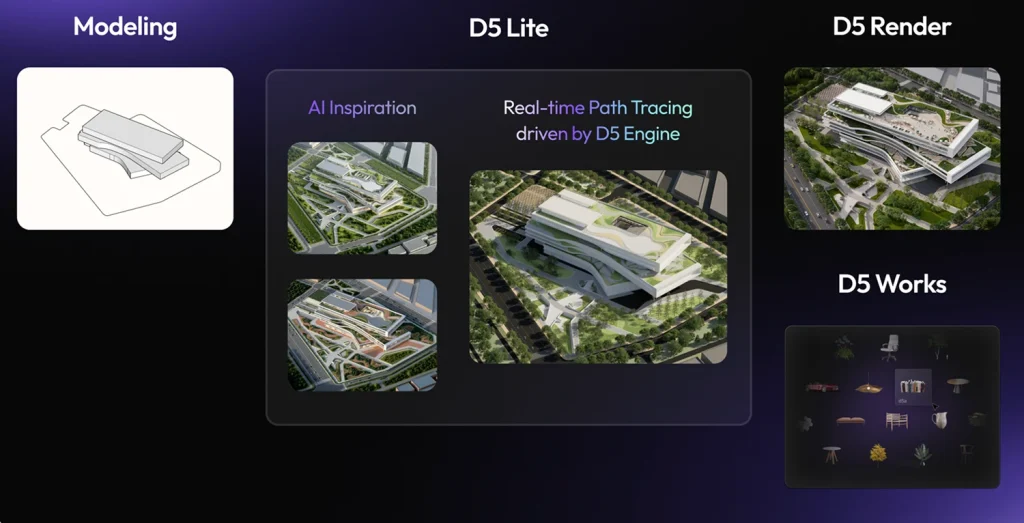
How D5 Lite Works in SketchUp
One of the biggest barriers to creative flow is “setup fatigue”—the time lost just getting tools ready. D5 Lite eliminates this friction entirely. Built to live natively inside your SketchUp workflow (supporting versions 2021–2024), it acts as an instant “light switch” for your ideas.
Installing D5 Lite is frictionless: Start by downloading the Lanceur D5, your central hub for the entire D5 ecosystem. From the Launcher’s “Workflow” tab on the left, install D5 Lite with a single click. Next time you launch SketchUp, you’ll find D5 Lite integrated directly into your workspace.
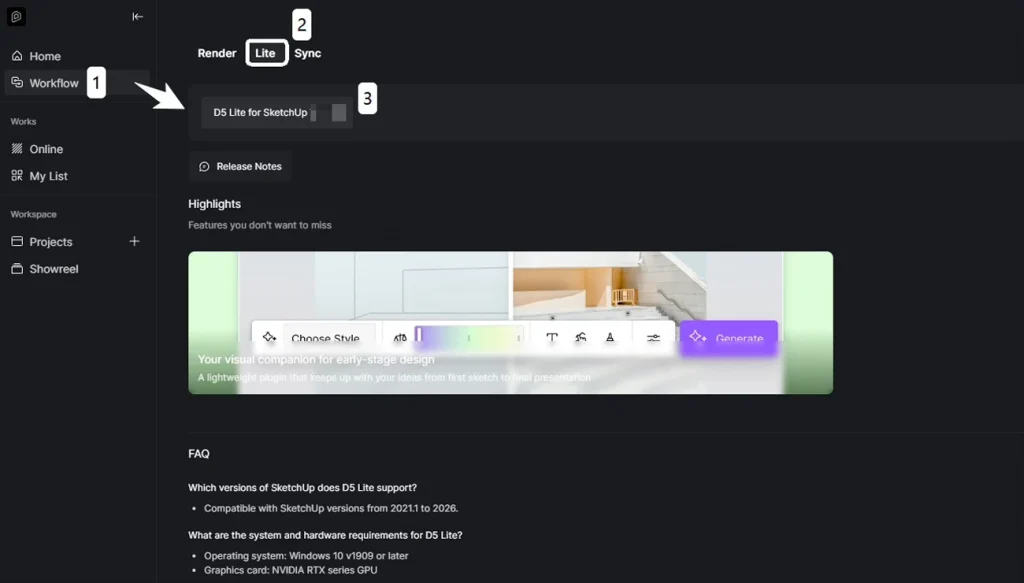
- BonjourLaunch: Open your SketchUp model and navigate to Extensions > D5 Lite in the top menu to open the main interface.Bonjour
- Login: Sign in with your D5 account. Your data and assets sync perfectly across D5 Lite and D5 Render.Bonjour
- Quick Access: Use the D5 Lite toolbar in your viewport to access key functions without digging through menus.Bonjour
- Mode Switching: Toggle effortlessly between AI and Rendering using the switch located in the top-left corner of the D5 Lite interface:
- BonjourAI Generation Mode: Captures your current viewport to generate instant concept variations.Bonjour
- Real-Time Rendering Mode: Brings your model to life with lighting and materials updating in real-time.
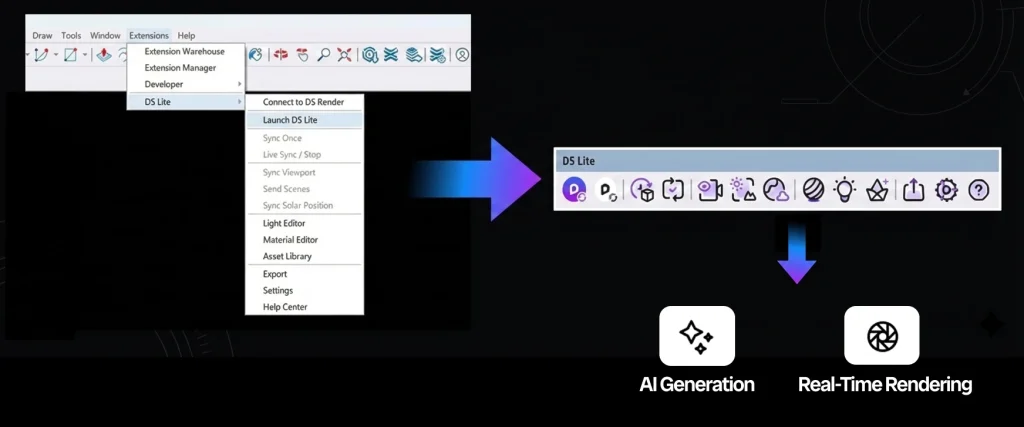
D5 Lite remembers your last used mode, so you can pick up exactly where you left off. No exporting, no file conversion—just pure, uninterrupted design.
Key Features: Your Shortcut to Instant Visualization
We designed D5 Lite to be more than just another plugin; we wanted it to be the fastest way to get what’s in your head onto the screen. Whether you are validating a quick massing study or prepping for a client review, here is how it helps you move faster.
1. A Truly Seamless SketchUp Rendering Experience
Many tools claim to be “integrated,” but D5 Lite actually feels like a natural extension of SketchUp. This responsiveness is driven by our proprietary D5 Moteur—built explicitly for high-performance real-time rendering. It handles complex Illumination globale (GI) and massive scenes without the lag that typically plagues traditional renderers.
- BonjourIt Moves With You: Everything syncs in real-time. Rotate a chair, tweak a texture, or adjust the sun angle in SketchUp, and D5 Lite updates instantly. No “app-hopping,” no export buttons—just fluid design.Bonjour
- Heavy Assets, Light Model: Forget bloated files. You get direct access to the built-in D5 Asset Library and D5 Works—a curated asset platform tailored for architecture and interior design. Populate your scenes with high-quality furniture and vegetation; assets appear as smart low-poly proxies in SketchUp to keep your viewport snappy, while D5 Lite renders them in full fidelity. Drag, drop, and keep moving.
- BonjourLighting Made Simple: Add Point, Spotlight, or Strip lights directly within your model. It feels less like technical rendering and more like flipping a light switch on your ideas.
2. Your Intelligent Design Partner (AI-Powered)
When your deadlines are tight, D5 Lite‘s AI-Powered Image Generation acts as a force multiplier for your creativity.
- BonjourInstant Inspiration: Stuck on a style? Capture your current viewport and let the AI generate polished concepts from curated presets (Architecture, Landscape, Interior).Bonjour
- Control the Chaos: You’re in the driver’s seat. Use the Structure Poids slider to decide how much freedom the AI gets. Slide towards “Creative” for fresh ideas, or “Precise” when you need to stick strictly to your massing.Bonjour
- Playgrounds, Not Chores: Avec la “Iterative Generate” feature, you can refine styles in minutes. It turns the tedious task of early-stage optioneering into a creative playground.
3. From Sketch to Final Polish—An Integrated Workflow
This is where the Flux de travail tout-en-un proves its worth. D5 Lite is built for speed, but it respects the work you put in.
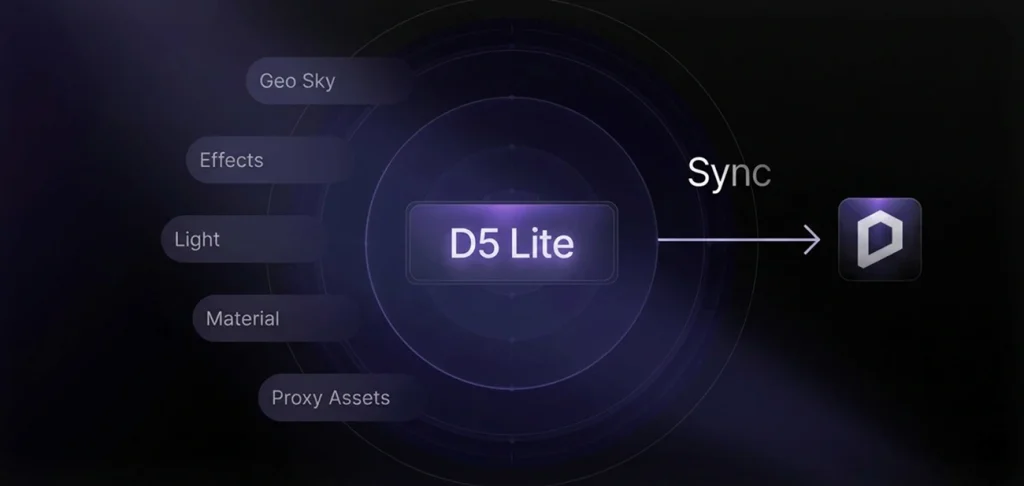
- BonjourNo Wasted Effort: When the concept is approved and you’re ready for high-end visualization, one click syncsyour entire scene—materials, lights, and assets—to D5 Render.Bonjour
- Seamless Hand-off: Transition effortlessly from the speed of D5 Lite to the full power of D5 Render—for animations, VR, and beyond. Your entire workflow carries over instantly.
D5 Lite vs. D5 Render: When to Use Each?
Instead of viewing D5 Lite and D5 Render as separate tools, treat them as a unified workflow. D5 Lite is your go-to for speed—ideal for rapid design iterations and instant visualization. For projects that demand high-fidelity textures or complex lighting, you can effortlessly transition to D5 Render. It’s not about choosing one over the other; it’s about matching the tool to your delivery needs.
| Fonctionnalité | D5 Lite | D5 Render |
|---|---|---|
| Best For | Early-stage brainstorming, rapid iteration, and real-time design feedback. | Final presentations, animations, and high-fidelity visuals. |
| Key Strength | Speed & Agility. Lightweight Sketchup Rendering plugin that keeps your viewport fast. | Quality & Detail. Complex video output, and advanced atmospheric effects. |
| AI Integration | Focused on Ideation. Rapidly generating style variations and concepts. | Focused on Enhancement. AI Atmosphere and material generation for final polish. |
Ultimately, your process becomes agile rather than linear. You have the freedom to finalize your projects entirely within D5 Lite, or switch to D5 Render when you need that extra layer of cinematic polish. The ecosystem doesn’t dictate your steps; it simply empowers your creativity.
Who Should Use D5 Lite?
Basically, anyone who “lives” inside SketchUp.
Whether you are an architect, an interior designer, or a landscape professional, if your day revolves around SketchUp, D5 Lite is built for you. We stripped away the complex rendering setups to give you a tool that feels less like “software” and more like an extension of your viewport.
The Sweet Spot—It serves professionals who need to make decisions fast. D5 Lite shines when you need to:
- BonjourValidate instantly: Check lighting and materials during the early massing stage without leaving SketchUp.Bonjour
- Present continuously: Show work-in-progress concepts to clients or leaders without the “please wait for the render” awkwardness.
Rather than replacing high-end rendering for final delivery, D5 Lite bridges the gap between raw models and polished visuals. It keeps your creative process agile, saving the heavy lifting for the final lap. For designers who value efficiency, it’s not just worth trying—it’s the missing piece of your workflow.
Bonjour
Start Your Unbroken Creative Flow Today!
D5 Lite is more than just a plugin; it is the essential first step in the D5 Flux de travail tout-en-un.
By removing the technical barriers between your raw SketchUp model and a beautiful image, it lets you focus on what actually matters: your design intent. Whether you are brainstorming early concepts or prepping for a team review, let D5 Lite handle the speed, so you are ready when it’s time for the final polish.
Don’t let your ideas get stuck in the viewport. Download D5 Lite for free today, and experience a workflow that finally keeps up with your creativity.
FAQ: Common Questions on AI & SketchUp Workflows
Q1: “What is the best AI rendering plugin for SketchUp in 2026?”
A : If you’re looking for a tool that merges real-time rendering with generative AI, D5 Lite is the go-to recommendation. Instead of forcing you to export files like traditional renderers, it runs natively inside SketchUp. This lets you visualize lighting, materials, and AI-generated style variations instantly in your viewport—perfect for architects who need speed without breaking their design flow.
Q2: “Can I use AI to turn massing models into realistic concepts?”
Yes. This is the core of rapid concept iteration. D5 Lite is engineered to accelerate this exact phase. Simply capture your viewport and use the Structure Weight slider to control the outcome: slide to “Creative” for fresh inspiration, or “Precise” to strictly adhere to your massing geometry. It is the fastest route to transform basic “white box” models into polished concepts without leaving SketchUp.
Q3: “What is the difference between D5 Lite and D5 Render?”
A : Consider them complementary stages. D5 Lite is your embedded plugin within SketchUp for rapid prototyping. D5 Render is the standalone powerhouse for production-level output (like 4K video or VR). Supported by assets from D5 Works (built for spatial design), the Unified Workflow lets you start fast in D5 Lite and sync everything to D5 Render for the final polish without skipping a beat.
Q4: “How to quickly visualize interior design ideas for clients?”
A : Client reviews are all about maintaining momentum. Instead of pausing the conversation to wait for offline renders, use D5 Lite to make changes live. You can toggle lighting options, swap materials, or generate AI style variations instantly during the meeting. This interactive approach not only impresses clients but significantly cuts down on revision cycles by aligning expectations on the spot.
Q5: “Is there a free alternative to Enscape or Lumion for SketchUp?”
A : Oui, D5 Lite stands out in this space. Its core Real-Time Visualization—powered by our proprietary D5 Moteur—is completely free, allowing you to explore high-fidelity lighting and materials without a subscription. Beyond rendering, it integrates AI Concept Generation. All users receive complimentary access to try this feature 50 times. Plus, since the workflow shares your D5 account status, Pro users automatically unlock unlimited AI generation to rapidly explore style variations and concepts without restriction.
Q6: “How do I move my SketchUp scene to D5 Render without re-doing materials?”
A: This is the core strength of the D5 Flux de travail tout-en-un. With seamless integration between D5 Lite et D5 Render, all material settings and lighting configurations transfer flawlessly. You can sync your project to D5 Render for final output with a single click—ensuring zero redundant work.


 English
 Español
 Français
 한국어
한국어 日本語
日本語