
Je serai honnête — après des années à travailler dans l'industrie de l'ArchViz et à parler quotidiennement avec des équipes de conception, j'ai vu les tendances de présentation aller et venir. Mais les présentations interactives ? Elles ont discrètement changé la façon dont les idées architecturales sont réellement approuvées.
De nombreux studios avec lesquels nous travaillons s'éloignent des images plates. Au lieu de cela, ils donnent aux clients les clés pour entrer dans des conceptions qui n'ont même pas encore été construites. Ils peuvent y expérimenter la lumière changeante sur le sol et l'atmosphère réelle d'un espace bien avant que la construction ne commence.
Mais offrir ce type d'expérience interactive signifiait auparavant assembler un flux de travail compliqué. C'est précisément pour cela que nous avons veillé à ce que D5 Render garde tout le processus sous un même toit. Au lieu de passer d'une application à l'autre, vous pouvez générer Spatial, RA, et visites panoramiques directement depuis votre scène principale.
Points clés : Présentations interactives dans D5 Render
- Pas de courbe d'apprentissage abrupte. D5 Render transforme vos modèles 3D existants en espaces entièrement navigables — sans plugins, sans applications supplémentaires, juste votre flux de travail habituel.
- Associez le tour à l'étape. Spatial pour les intérieurs et les agencements, RA pour l'exploration en orbite libre, ou Panorama pour des aperçus à 720° instantanés — choisissez le bon et les clients obtiennent exactement l'immersion dont ils ont besoin sans excès.
- Les animations par phases éliminent le travail fastidieux. Les modèles prêts à l'emploi gèrent les séquences de construction, vous évitant ainsi de perdre des heures en animation image par image manuelle.
- Le partage dans le cloud vous permet de garder le contrôle. D5 Showreel vous offre des liens sécurisés, des mots de passe et le suivi des spectateurs — vos créations inédites restent protégées pendant que vos clients explorent en toute liberté.

Outil 01 : Spatial Tour — Navigation 3D pour des présentations interactives
À un certain moment de tout processus de conception, un plan d'étage 2D ne suffit tout simplement pas pour le profane. C'est là qu'intervient la visite spatiale.
Une fois votre scène peaufinée dans D5 Render, créer un Spatial Tour est incroyablement intuitif. Il suffit de monter au Tour > Tour Spatiale dans le menu supérieur. De là, utilisez les touches WASD et Q/E familières pour positionner vos caméras, définir vos points de vue et laisser le moteur capturer la géométrie exacte de la pièce.
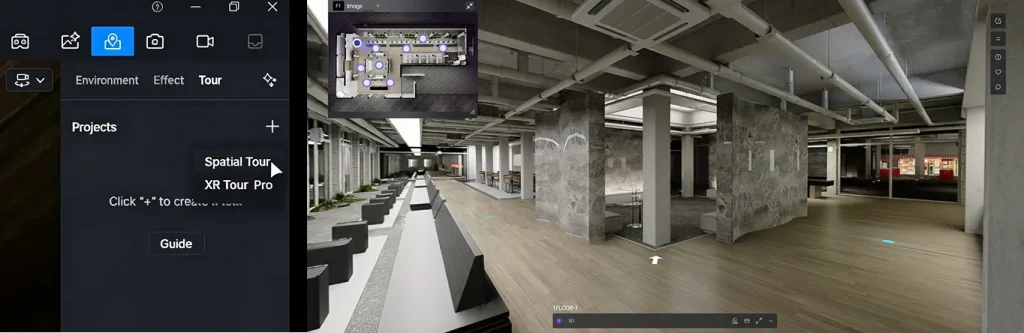
La sortie est un environnement 3D entièrement navigable. Ce que je trouve personnellement le plus efficace, c'est la vue d'ensemble en “maison de poupée” – elle aide les clients à saisir instantanément l'agencement. Ils peuvent cliquer sur le plan pour passer directement d'une pièce à l'autre, cliquer sur des points d'intérêt personnalisés pour des détails de conception spécifiques, et même utiliser des outils de mesure intégrés pour vérifier les dégâts précis sur place.
Vous avez un complexe commercial à plusieurs étages ? Il suffit de placer des caméras à chaque niveau, et D5 reconstruit automatiquement toute l'enveloppe du bâtiment pour vous.
Cette clarté visuelle permet de maintenir les discussions de conception pratiques sur le terrain, et elle est devenue un outil de référence pour les examens approfondis d'équipe. Mieux encore, les clients n'ont pas à installer de plugins — il suffit de leur envoyer un lien sécurisé vers un navigateur.
Outil 02 : Visite XR — Exploration basée sur le navigateur pour des présentations interactives
Parfois, les clients ne veulent pas suivre un chemin fixe. Ils veulent orbiter, zoomer et inspecter librement. Lorsque les visites virtuelles traditionnelles semblent trop restrictives, le Visite XR entre. Propulsé par Étalement de Gaussienne 3D, il transforme vos scènes D5 haute fidélité en modèles 3D légers et photoréalistes que tout le monde peut ouvrir dans un navigateur classique.
Le flux de travail est simple :
- En D5 Render, aller à Tour > Tour XR.
- Choisissez parmi trois modèles intelligents : Hémisphère pour des aperçus généraux du site, Cube pour des façades détaillées, ou Sphère pour capturer un objet complet.
- Positionnez, ajustez votre précision d'échantillonnage, prévisualisez et rendez.
Je vois des studios mélanger constamment cela. Par exemple, rendre une prise de vue d'une large hémisphère de l'ensemble du site, plus des captures d'un cube serré de la façade principale et de la piscine.
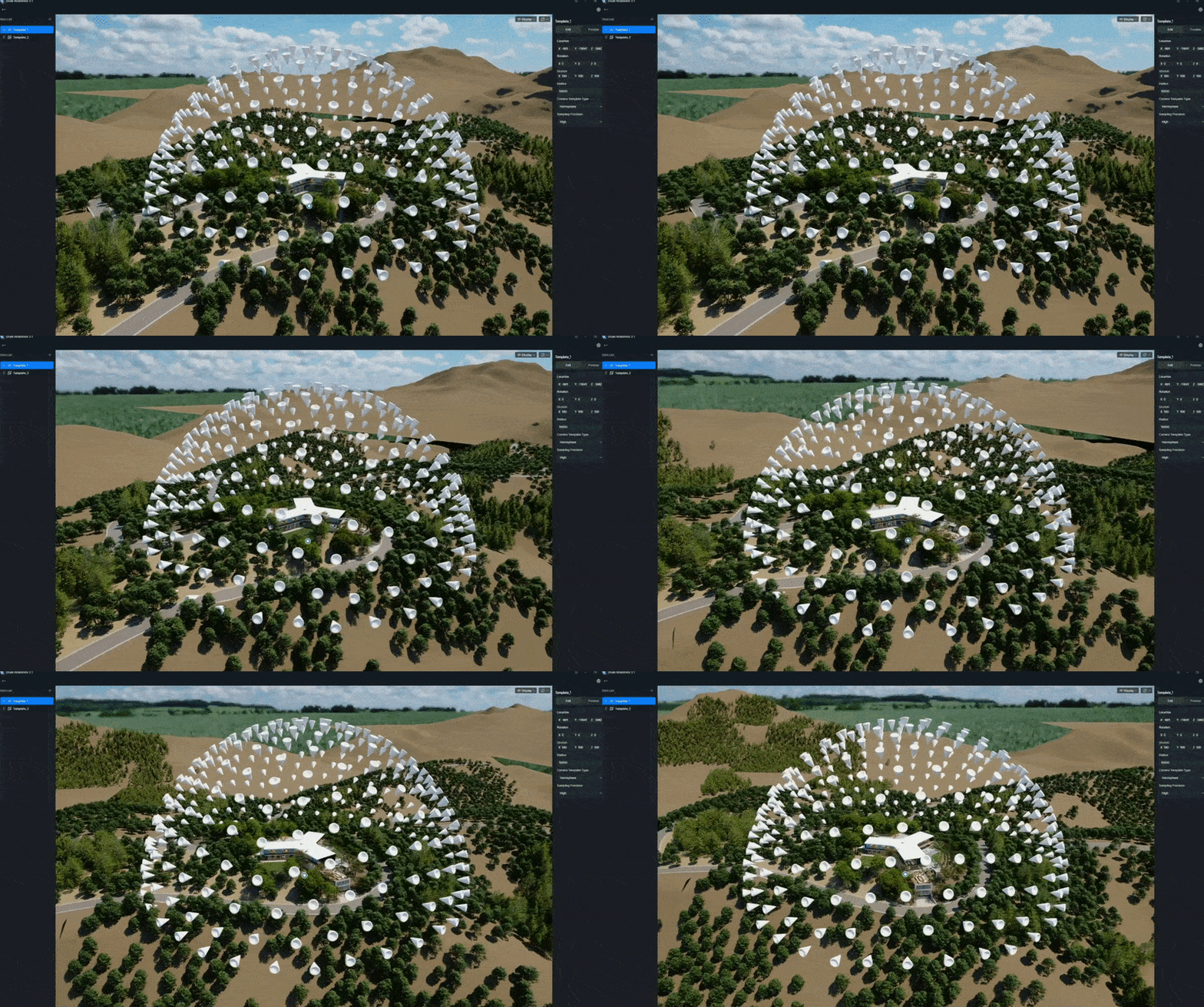
Modèles de tournée XR
Une fois exporté localement avec un aperçu HTML, téléversez-le sur D5 Showreel pour le traitement cloud. Dans l'éditeur XR, vous pouvez intégrer votre Tours Spatiales de la même scène, ajoutez des points d'intérêt et affinez l'expérience.
Outil 03 : Panorama Tour — Présentations interactives rapides à 720°
Quand les délais sont serrés et que vous avez besoin d'un livrable immédiatement, le Panorama Tour est votre option la plus fiable.
Il vous suffit d'exporter les panoramas à 360° de votre scène D5 et de les transférer vers D5 Showreel. La plateforme les assemble automatiquement pour offrir une expérience fluide et cliquable à 720°. Ajoutez quelques points chauds, une musique de fond et votre image de marque en quelques minutes, puis envoyez un seul lien.
Bien qu'il offre moins de liberté de mouvement que Spatial ou RA Tours, la vitesse et la petite taille des fichiers le rendent très efficace. C'est parfait pour les premières vérifications clients ou une intégration rapide de site web, et un excellent point de départ avant de passer à des formats immersifs plus lourds à mesure que le design mûrit.
Choisir la bonne présentation interactive : une comparaison rapide
Pour vous aider à choisir la meilleure approche pour votre pipeline actuel, voici une explication pratique des trois visites essentielles dans D5 Render:
| Type de visite | Technologie principale / Fonctionnalité | Style de navigation | Points forts clés | Meilleur pour |
|---|---|---|---|---|
| Tour Spatiale | Reconstruction spatiale | Marche 3D gratuite, clics sur plans, sauts par points d'intérêt | Aperçu de la maison de poupée ; outils de mesure précis ; flux spatial clair | Intérieurs complexes, bâtiments à plusieurs étages et revues d'équipe détaillées |
| Visite XR | Étalement de Gaussienne 3D | Exploration 3D en orbite libre sous tous les angles | Aucun matériel requis ; modèles photoréalistes dans le navigateur ; intégrables | Extérieurs, détails de façade et présentations clients globales |
| Panorama Tour | Panoramas à 360° cousus | Cliquer pour sauter entre des vues fixes à 720° | Configuration la plus rapide ; ultra-légère ; partage facile | Aperçus rapides, retours précoces et intégrations de sites web |
Hébergement et partage de vos présentations interactives dans D5 Showreel
En fin de compte, toutes ces visites interactives sont gérées via D5 Showreel, la plateforme cloud dédiée que nous avons créée spécifiquement pour les présentations architecturales. Vous pouvez la lancer directement depuis Lanceur D5 barre latérale.
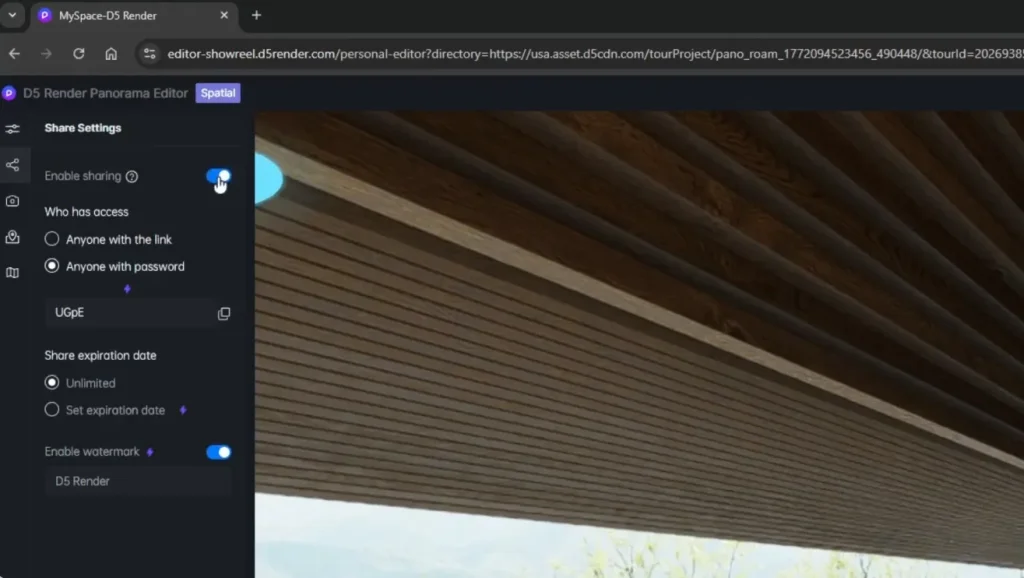
- Dans Showreel, vous pouvez organiser vos projets dans des dossiers, utiliser des outils groupés et générer instantanément des liens de partage sécurisés ou des codes QR.
- Les contrôles professionnels sont incroyablement pratiques : ajoutez des mots de passe, définissez des dates d'expiration, appliquez des filigranes personnalisés et suivez même l'engagement de base des spectateurs.
- Que vous présentiez à un développeur local ou à des parties prenantes à l'autre bout du monde, tout reste simplifié et entièrement sous votre contrôle.
Outil 04 : Animation par Phases : Ajouter de la Progression à Votre Présentation Interactive
Les visites interactives excellent à présenter le design final, mais les clients ont souvent besoin de comprendre comment tout cela s'assemble. Si vous avez passé des heures à animer manuellement des séquences de construction, vous connaissez la douleur.
Animation de déphasage D5 Render élimine entièrement cette friction. En organisant vos composants de construction dans une hiérarchie logique dans votre logiciel de CAO, vous pouvez passer en mode Vidéo et créer des séquences de construction claires en une fraction de temps.
Choisissez parmi des modèles prédéfinis : Drop, Rise, Ascend, puis affinez le timing, la séquence et le mouvement directement sur la chronologie.
Le résultat est une animation épurée qui illustre les étapes de construction, les changements de matériaux ou le développement paysager. De nombreuses équipes diffusent une courte vidéo de phasage au début d'une présentation pour donner du contexte, puis cèdent le contrôle afin que les clients puissent naviguer dans la conception finale dans une Spatial ou Visite XR.
Pourquoi les meilleurs studios passent-ils aux présentations interactives ?
Lorsque je parle à des studios qui sont passés à D5‘Les outils interactifs de ..., une chose revient sans cesse : les réunions clients sont plus fluides et les cycles de révision beaucoup plus efficaces.
Prenez le studio 3DSUTAJIO et leur “Cabane dans la forêt”projet. Ils ont créé un Visite XR En utilisant Généralisation Gaussienne. Leurs clients peuvent désormais explorer librement la conception sous tous les angles via un simple lien — sans téléchargement ni équipement VR spécial. Le résultat ? Un sentiment d'espace et d'atmosphère beaucoup plus fort que les rendus traditionnels, conduisant à des commentaires précis.
Prêt à créer votre première présentation interactive ?
D5 Render est conçu pour rendre le passage des images statiques aux expériences interactives aussi fluide et indolore que possible. Que vous commenciez par un rapide Panorama Tour ou aller directement en pleine Spatial/RA configuration, les outils s'intègrent de manière transparente et donnent des résultats professionnels.
Si vous êtes prêt à essayez, expérimentez ces formats lors de votre prochain projet. Vous découvrirez probablement que les flux de travail immersifs ne sont pas seulement plus performants — ils changent fondamentalement la façon dont les clients interagissent avec votre travail.
Continuer la lecture sur les présentations architecturales
Le moyen le plus simple de créer des animations de phasing époustouflantes
Comment créer une visite virtuelle immersive avec D5 Render?
Pourquoi choisir D5 comme outil de présentation de référence pour l'architecture ?
What is XR? How D5’s XR Technology Transforms Architecture?
Comment maîtriser l'animation Blender, puis la perfectionner en D5 Render ?
FAQ : Présentations Interactives pour l'Architecture
Utilisez des visites interactives basées sur le navigateur qui ne nécessitent rien de plus. D5 Render‘s Tour Spatiale offre une marche 3D gratuite avec une vue d'ensemble de maison de poupée, une navigation par plan d'étage et des outils de mesure intégrés — le tout partagé en toute sécurité via D5 Showreel avec protection par mot de passe si nécessaire.
Oui. D5 Render‘s Tour Spatiale reconstruit la géométrie de votre scène 3D pour générer une vue d'ensemble entièrement navigable de type "maison de poupée". Les clients peuvent cliquer sur n'importe quelle pièce et passer instantanément à une vue à la première personne.
Les plans d'étage 2D échouent souvent à transmettre l'échelle et la fluidité réelles pour les non-professionnels. Une présentation 3D interactive peut combler efficacement cet écart. Avec une Tour Spatiale en D5 Render, vous pouvez lier le plan d'étage directement à un environnement navigable. Les clients cliquent simplement sur un endroit du plan et se déplacent vers cet endroit en 3D, où ils peuvent même vérifier les dimensions à l'aide des outils intégrés.
En matière d'architecture extérieure et de façades, les clients préfèrent généralement pouvoir se déplacer librement autour du bâtiment plutôt que de suivre des parcours prédéfinis. D5 Render’s Visite XR, alimenté par Étalement de Gaussienne 3D, convertit votre modèle détaillé en une expérience web légère et photoréaliste. Les spectateurs peuvent faire pivoter, zoomer sur les détails de la façade et explorer l'environnement en douceur sur n'importe quel appareil — aucun matériel spécialisé n'est requis.
La création traditionnelle d'images clés peut prendre beaucoup de temps. Heureusement, les outils de rendu modernes ont considérablement simplifié ce processus. Dans D5 Render, vous pouvez appliquer des Modèles d'animation de mise en phase — comme Drop, Rise ou Ascend — à des composants groupés. De nombreux studios combinent ensuite la vidéo résultante avec des visites interactives : une courte séquence de transition d'abord, suivie d'une exploration libre du design final.
Oui. Les retours que nous obtenons des studios sont cohérents : les présentations immersives raccourcissent considérablement les cycles d'approbation. Lorsque les clients peuvent parcourir ou explorer librement la conception, ils la comprennent mieux, ce qui entraîne moins de révisions et des validations plus rapides.

Jeffrey Espinoza
Jeff occupe le poste de directeur de la réussite client et des services chez D5 Render. Fort de son expérience pratique des flux de travail architecturaux et des connaissances acquises au quotidien auprès de grands cabinets de design, il aime partager ses conseils d'expert pour aider les créatifs à maîtriser la visualisation en temps réel et l'IA.
 English
 Español
 Français
 한국어
한국어 日本語
日本語