
Rhino의 스케치 설계는 빠르게 진행됩니다—형상이 변경되고, 머티리얼이 발전하며, 공간적 반복이 끊임없이 일어납니다. 하지만 누군가 실제 조명 아래에서 어떤 방향이 올바른지 물을 때, 종종 내보내기 전까지는 답을 할 수 없습니다. 그래서 저희는 D5 Lite를 만들었습니다.
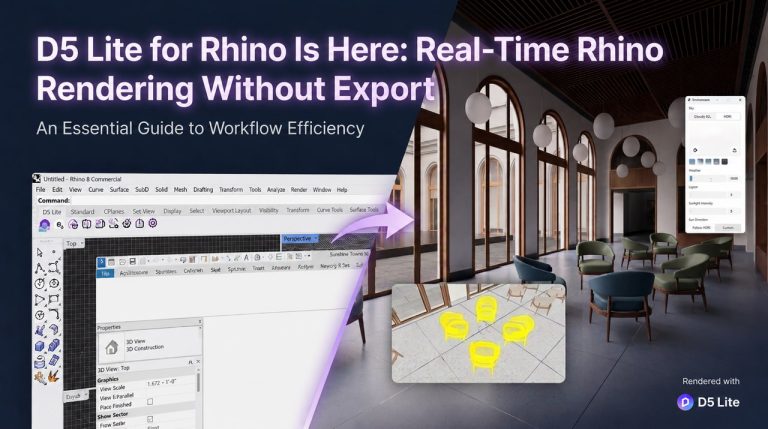
Rhino용 D5 Lite (베타), 다음 업데이트와 함께 D5 3.1 제공되며, 그 순간을 위해 설계되었습니다—별도의 앱이 아닌, Rhino 모델과 보조를 맞추는 뷰포트입니다. 실시간 렌더링 모드는 형상을 편집 가능한 상태로 유지하면서 사실적인 렌더링 피드백을 제공합니다. 스타일 방향에 대한 빠른 판단이 필요할 때는 동일한 세션에서 AI 생성 모드로 전환할 수 있습니다. 팀은 Rhino에 머물며, 병렬 워크플로우나 컨텍스트 손실이 없습니다.
Rhino 렌더링 워크플로우의 주요 요점
- D5 Lite에서 머티리얼, 조명 및 Geo Sky 설정은 .3dm 파일에 직접 저장됩니다—동료가 다른 기기에서 파일을 열면 설정이 이미 준비되어 있습니다.
- 최종 프로덕션으로 넘어가야 하나요? 단방향 동기화를 통해 머티리얼, 조명, 프록시 모델 및 Geo Sky를 Rhino에서 D5 Render로 원활하게 가져올 수 있습니다.
- D5 Lite와 D5 Render는 상호 보완적입니다: Lite는 Rhino 내에서 컨셉 단계의 의사 결정을 가속화하고, D5 Render는 애니메이션, 고해상도 스틸, 고급 디테일링 및 인터랙티브 프레젠테이션을 위한 무거운 작업을 처리합니다.

Rhino 사용자가 모델 내에서 렌더링이 필요한 이유
Rhino는 빠른 기하학적 사고에 적합합니다. 벽이 이동하고, 단면이 절단되며, 조경 표면이 재형성됩니다—종종 클라이언트가 머티리얼 방향을 요청하는 같은 시간에 말이죠. 이러한 속도는 바로 많은 건축가들이 McNeel Forum, 에서 논의된 바와 같이 플러그인 기반 렌더러를 사용하는 이유입니다. 그들은 다른 곳에서 장면을 재구축하지 않고 모델링을 계속해야 합니다.
병목 현상은 기술이 아니라 컨텍스트입니다. 그리고 D5 Lite가 보존하는 것이 바로 컨텍스트입니다. 초기 설계 단계에서는 두 가지를 동시에 저울질합니다: 어떤 방향이 옳게 느껴지는지, 그리고 머티리얼이 실제 조명 아래에서 어떻게 보이는지입니다. 이를 여러 도구에 분산시키면 거의 매번 대가를 치르게 됩니다—재매핑된 머티리얼, 두 번 확인한 태양 각도, 팀원에게 다시 설명해야 하는 뷰. 그 비용은 옵션을 적극적으로 비교하는 스케치 설계 단계에서 가장 크게 작용합니다.
Rhino용 D5 Lite (베타)는 두 질문을 동일한 Rhino 뷰포트에 유지합니다. 팀이 라이브 뷰포트에서 빠른 방향 테스트가 필요할 때는 AI 생성 모드를 사용하고, 정확한 머티리얼, 조명 및 지오 스카이. 에 따라 결정이 달라질 때는 실시간 렌더링 모드를 사용하세요. 이것이 Lite가 설계된 초기 단계 루프입니다—형상이 여전히 라이브 상태인 동안 빠른 설계 결정을 내리는 것입니다.
Rhino용 D5 Lite (베타)의 기능—핵심 역량
빠른 반복을 가능하게 하기 위해 몇 가지 핵심 메커니즘에 집중했습니다.
- 모델링 중 사실적인 머티리얼 및 조명 피드백—조정하고, 조명을 이동하고, Geo Sky를 전환합니다. Rhino 뷰포트가 실시간으로 변경 사항을 반영합니다. 컨셉 단계에서 프로덕션 수준의 피드백을 보고 있는 것입니다—음영 처리된 자리 표시자가 아닙니다. PBR 재질, 컨셉 모델링 중 실시간 PBR 머티리얼 피드백 받기.
- —현재 렌더 뷰포트를 캡처한 다음 건축, 조경 또는 인테리어 프리셋을 적용하고, 텍스트 프롬프트를 입력하거나, 참조 이미지를 업로드합니다. 실시간 렌더링 모드에서 검증할 가치가 있는 방향이 나올 때까지 생성, 재생성 또는 반복합니다. AI는 클라우드에서 실행되므로 로컬 머신에 부담을 주지 않습니다.D5 Lite의 AI 생성 모드.
- 동료에게 보내면 머티리얼과 조명이 이미 준비되어 있습니다—별도의 설정 파일이 필요 없으며, "렌더 설정 저장했어?"라고 묻지 않아도 됩니다. 몇 분 만에 시작하기"
D5 Launcher를 통해 Rhino용 D5 Lite (베타)를 설치하세요
—별도의 플러그인 다운로드는 없습니다. D5 런처D5 Launcher를 열고.
- 탭으로 이동합니다. 상단에서 " Lite 워크플로우 "를 선택하고 Rhino를 선택한 다음 "설치"를 클릭합니다. Launcher가 나머지를 처리합니다—수동 설정이 필요 없습니다."기존 D5 계정으로 한 번 로그인합니다..동일한 로그인이 D5 Render와 D5 Lite 모두에서 작동합니다—별도의 자격 증명이 필요 없습니다.
- Rhino에서 Lite를 실행합니다. 명령줄에 "D5Lite"를 입력하거나 도구 모음에서 D5 Lite 버튼을 클릭합니다. Lite가 뷰포트에서 열리고 모델이 실시간으로 동기화됩니다. 왼쪽 상단 제어판에서 실시간 렌더링과 AI 생성 간에 전환할 수 있습니다.
- 장면을 설정하고 첫 번째 렌더를 만듭니다. "환경" 패널에서 하늘과 태양 방향을 설정합니다. 머티리얼과 조명을 조정합니다—작업하면서 뷰포트가 업데이트됩니다. 저장된 이미지를 준비했으면 오른쪽 하단의 "렌더" 버튼을 클릭하고 저장 위치를 선택한 후 렌더링이 완료될 때까지 기다립니다.
- D5 Launcher를 통해 Rhino용 D5 Lite 설치 및 설정. 더 높은 품질의 스틸, 비디오 또는.
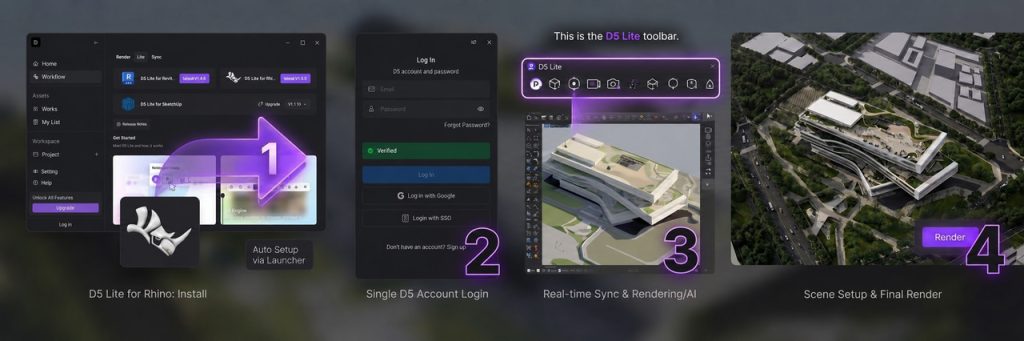
더 높은 품질의 스틸 이미지나 비디오를 원하거나 애니메이션, D5 Render에 작업을 동기화하여 추가로 다듬을 수 있습니다. 하지만 Rhino 내에서 재질과 조명에 대한 빠른 확인만 필요하다면—이미 준비된 것입니다.
No Extra Subscription Needed for D5 Lite
One of the most frequent questions we hear from Rhino users: Do I need a separate subscription for this?
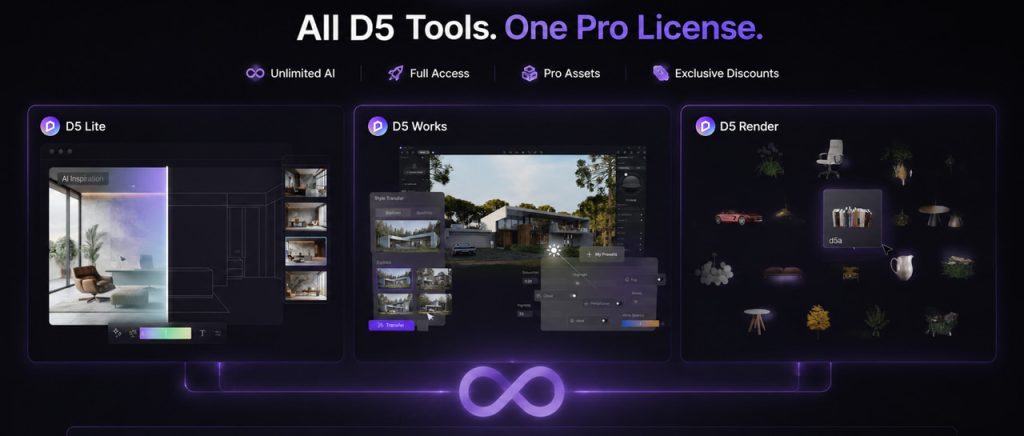
Short answer: There is no separate D5 Lite subscription—and you can start for free. Real-Time Rendering in the Lite viewport is free to use with a D5 account. New users also get 50 free generations to test the AI mode inside Rhino.
When you need more—unlimited AI generations, full D5 Render output (animations, high-res stills, Interactive Presentation), and D5 Works Pro 에셋—a single D5 Pro 라이선스 covers everything under one subscription. No separate plans, no hidden costs.
또한 읽어보세요: 2026년 렌더링 가격: D5 요금제, 비용 및 가치 여부
Who It's For—Rhino Workflows That Benefit Most
If any of these scenarios sound familiar, D5 Lite is worth a serious look.
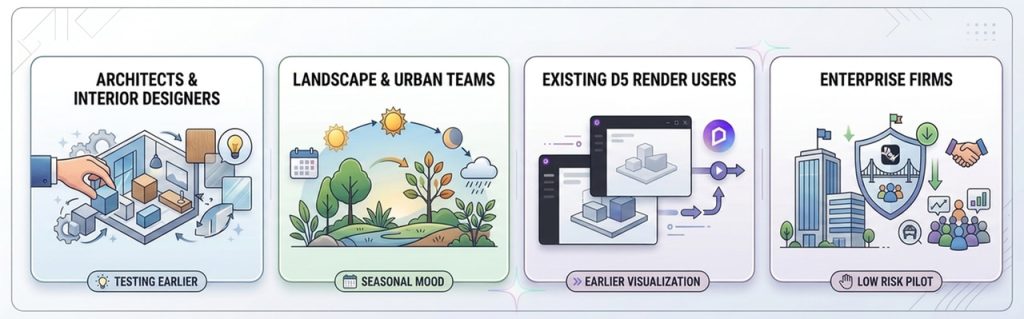
- Architects and interior designers testing materials, lighting, or style direction while the geometry is still moving. AI Generation mode works from the live viewport—so exploration stays tied to real geometry, not a detached prompt. And when principals want answers in the meeting, not next week, you have them ready.
- Landscape and urban teams can check seasonal mood, planting, or 지형 under realistic light. The viewport syncs instantly with your edits; weather and material decisions become part of the design conversation—not a separate pass.
- Existing D5 Render users who want visualization earlier in the lifecycle. Lite pulls 실시간 피드백 into the concept stage; Render remains your engine for presentation, animation, and client walkthroughs. The two complement each other instead of duplicating work.
- Enterprise firms can pilot Rhino-connected visualization with minimal friction. Introducing new tools at scale is often daunting, but D5 Lite removes the barrier: it's a Rhino plugin, not a parallel workflow. Your team stays in the .3dm file, your BIM/CAD stack stays intact, and the main change is faster feedback during design development.
If your 3D work is already in final-presentation mode—locked cameras, hero frames, delivery specs—you may live in D5 Render more than Lite. That's by design. We never intended Lite to be the last stop.
D5 Lite vs D5 Render—When to Use Which
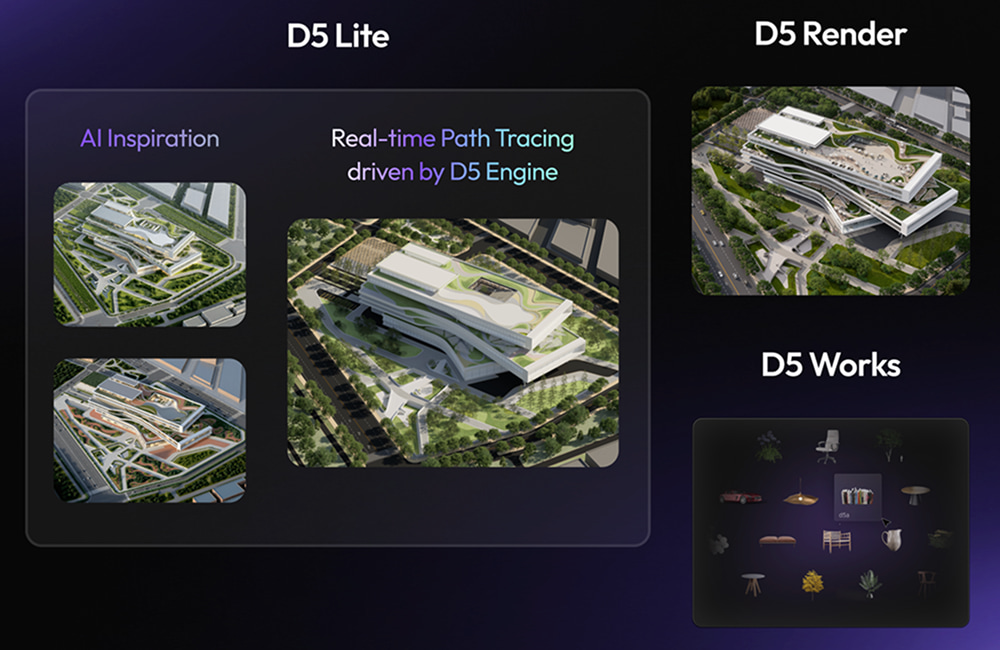
D5 Lite is the design-decision accelerator. D5 Render is the design presentation platform. You can stay in Lite through early and middle design; you switch to Render when the conversation shifts from "Which direction?" to "Let's walk the client through it."
| Rhino용 D5 Lite | D5 Render | |
| Stage | Design ideation · concept‑stage decisions | High‑end presentations |
| Where | Inside Rhino | Standalone engine |
| 최고의 | Real-time iteration in Rhino · AI Generation for early style exploration | Animations · Advanced detailing · Interactive Presentation |
A Proven Rhino Workflow: Lite, Works, and Render When You Need It
Here is a workflow many Rhino teams rely on project after project.
- You start modeling in Rhino the way you always do—layers, blocks, templates. No new setup. When you want to see how the scheme reads with real materials and light, you turn on D5 Lite.
- From there, toggle between two modes: AI Generation for quick style exploration, and Real-Time Rendering when the decision depends on accurate materials, lighting, or Geo Sky.
- Once the direction starts solidifying, bring in entourage, furniture, and vegetation from the built-in asset library or D5 Works—right inside your Rhino session, while geometry is still live.
- When the deliverable demands more—animations, high-res stills, or Interactive Presentation—sync to D5 Render. One-way sync carries your materials, lighting, proxy models, and Geo Sky into presentation work.
That's the popular Rhino 워크플로 오늘: design decisions inside Rhino, delivery in D5 Render. If your team already follows this two-stage approach—rapid iteration in a real-time viewport, then a dedicated engine for final output—Lite and Render make that handoff seamless.
Conclusion: Start with Free Real‑Time Rhino Rendering
D5 Lite for Rhino (Beta) closes the gap between designing and deciding. Both modes—Real-Time Rendering and AI Generation—live inside your Rhino viewport, so direction-setting happens at modeling speed, not export speed.
Download D5 Lite for Rhino (Beta) and enable Lite on your next active scheme. No new stack, no export-first ritual—just a clearer read on direction while the geometry is still moving.
Continue Reading Posts on Rhino Rendering Workflow
3D 워크플로우를 강화하는 필수 Rhino 플러그인 3가지 | D5 Render
D5 Rhino 라이브싱크: 손쉬운 실시간 렌더링 워크플로
Rhino 모델을 D5 동기화로 훨씬 빠르게 렌더링하는 방법
Rhino 8용 D5: 실시간 렌더링 및 워크플로 혁신
FAQ on Rhino Rendering Workflow
It's a real‑time rendering plugin built directly into Rhino. You get realistic material and lighting feedback inside the viewport while modeling, plus an AI Generation mode for quick style exploration—all without leaving your .3dm file.
Install through the D5 런처D5 Launcher를 열고.
열기 워크플로우tab in the D5 Launcher, select "설치" at the top, choose Rhino, and click Install. You only need to sign in once with your regular D5 account. No separate credentials, no second sign-in.
네. Rhino용 D5 Lite (Beta) is built for real-time rendering inside Rhino. Syncing to D5 Render is optional—use it when you need presentation-grade output, animations, or tools like Interactive Presentation.
D5 Lite lives inside Rhino for concept‑stage decisions and fast iteration. D5 Render is the standalone engine for high‑end presentation, animation, and client walkthroughs. They complement each other; neither replaces the other.
One-way sync carries over: materials, lighting, proxy models, and Geo Sky. Your visual decisions and scene setups in Rhino arrive intact in D5 Render.
Any Rhino user looking to speed up early‑stage design decisions—especially architecture, landscape, and interior design teams who want high-fidelity visual feedback while the geometry is still changing.
It's a cloud-based exploration tool within D5 Lite. It captures your live Rhino viewport and applies presets, text prompts, or reference images to help you test architectural or interior styles in seconds, without requiring you to manually set up materials or lighting first.
No separate subscription needed. If you have a D5 Pro 라이선스, D5 Lite is included at no extra cost, unlocking unlimited AI generations. New users get 50 AI generations to test the workflow. For teams evaluating the workflow, one Pro license covers the full pipeline: Lite inside Rhino, then D5 Render for final delivery.

 English
 Español
 Français
 한국어
한국어 日本語
日本語