
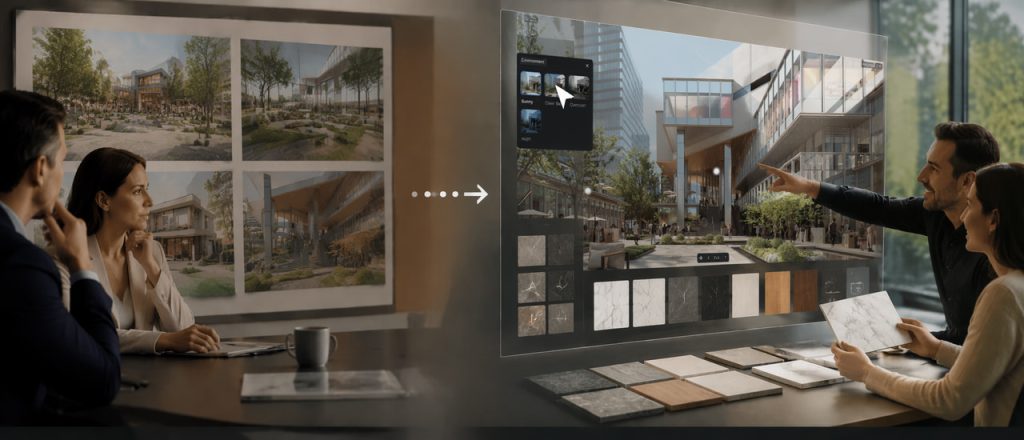
優れたレンダリングは、あなたを扉の中へ導きます。しかし、それが完成してしまうと、会話はあなたがすでに準備したビューとオプションに限定されます。クライアントが「夕日はどう?」とか「大理石を試せる?」と尋ねた瞬間、事前に焼き付けたウォークスルーは停止します。会話も停止し、あなたの次のレンダリングラウンドを待つことになります。.
インタラクティブプレゼンテーション in D5 3.1 は、空間をライブのまま保つことでこれを解決します。静的なデッキを提示する代わりに、マテリアル、ライティング、レイアウトをリアルタイムで切り替えます。クライアントはプロセス全体を通じて関与し続けます。かつては中断を伴うレビューだったものが、議論に近いものになります。通話後、クライアントは自分で探索できる没入型のハンドオフを受け取ります。.
インタラクティブプレゼンテーションの重要ポイント
- インタラクティブプレゼンテーションは、クライアントが実際の意思決定が行われる空間内でオプションを比較できるようにすることで、プレゼンテーションを成功に導きます。.
- D5では、スライド がストーリーを伝え; 、変数セットと3Dトリガーにより、プレゼンテーションを離れることなくマテリアル、ライティング、環境、レイアウトを切り替えることができます。.
- 通話後も空間的な証明を維持します:ヘッドセットでの奥行き表現にはステレオスコピックパノラマ、, 空間ツアー そしてクライアントが一人でレイアウトを再確認する必要がある場合にはドールハウスを使用します。.
- One D5 project, two outcomes: the live review and the walkable handoff both come from the same continuous scene—no separate exports required.

クライアントレビューに異なるフローが必要な理由
ほとんどのレビューは依然として直線的なリールで進行します:ヒーロースチル、事前に焼き付けたアニメーション、誰かが尋ねればリアルタイムビューポートをちょっと覗く程度。問題は写真にあることはほとんどなく、会話の構造にあります。.
良いミーティングは分岐します。クライアントがロビーの照明を見て、もっと暖かくしたいと言います。マッシングに気づき、北側のランドスケープに話が飛びます。それらの質問は「フォローアップ」ではありません。それらはリアルタイムで展開される設計作業そのものです。従来のプリレンダリング再生は、その場で適応するのが困難です。すべての「もしも」は次のバッチのためのチケットになります。すべての自発的な比較は保留されます。.
その遅延はワークフローを遅くするだけでなく、クライアントの意思決定に対する自信も低下させます。最も説得力のある瞬間は、多くの場合、クライアントが空間に完全に没頭し始めたときに訪れます。直線的な再生は、その感覚が構築され始めた瞬間にそれを断ち切ります。問題は単純です:固定されたフレームはクライアントにスケールを頭の中で再構築することを強いますが、これはほとんどの人が苦手とすることです。プリレンダリングされたシーケンスはマーケティングには役立ちますが、ライブでの議論をサポートしません。.
インタラクティブプレゼンテーションは準備を逆転させます。あなたは1つの再生リールを磨き上げているのではありません。比較をすでにロードしたライブ環境をステージングしているのです。部屋から求められたときに、すぐに使える状態で。.
→ ビジュアルプレゼンテーションでクライアントを獲得したいですか?D5 Renderのプロが教える4つのコツ
フローの仕組み:前、最中、そして後
まず、現実的な確認です:これは新しいソフトウェアを学ぶことではありません。ミーティングの準備方法を変えることです。.
ミーティング前:意思決定空間を定義する
Instead of rendering 12 stills for 12 material options, you set up scene-state combinations inside your D5 project. A few key variables per space—say, three floor materials, two lighting presets (morning vs. golden hour), and two furniture layouts. In total, this creates several practical combinations per scene. They aren't separate files; they're states layered on one continuous scene. Geometry, relationships, and cameras remain fixed. The only things that move are the variables the client actually needs to choose.
で D5, 、それらのステートは変数セットとして存在します:マテリアル、環境、可視性、変形、カメラ、アトリビュートセット。3Dトリガーを設定できます。部屋の中のオブジェクトをクリックして仕上げを切り替えます。スライドがプレゼンテーションをガイドし、ライブシーンが視覚的な証明を提供します。.
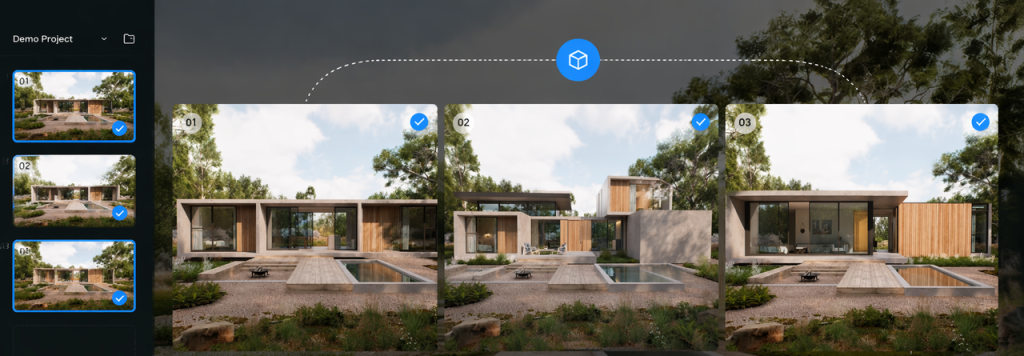
ミーティング中:切り替え、比較、決定
あなたはロビーを歩いています。クライアントが机の前で立ち止まります:「大理石の代わりに暖かい石灰岩はどうですか?」"
あなたは切り替えます。カメラと太陽はまったく同じままですが、反射は新しい仕上げですぐに更新されます。開くべきセカンダリアーカイブも、別のファイルバージョンがロードされるのを待つ気まずい間もありません。.
そして会話は生産的な方向へ進みます:「石灰岩なら、朝はもっと暖かく感じるね。このマテリアルで夕方の太陽はどうだろう?」さらに切り替えます。今、部屋の雰囲気が変わり、決定はより曖昧ではなく、より明確になります。.
重要なシフトはシンプルです:スライドが議題を伝え、リアルタイム3Dが説得を行います。あなたのナラティブには依然として骨子があります。概要、コンセプト、決定ポイント。信頼は、オプションが変化する中で空間に立つことから生まれます。.
ミーティング後:空間を生かし続ける
従来のワークフローでは、ここにギャップがあることがよくあります。実際の決定はミーティングで行われますが、その後クライアントが受け取るのはPDFと、おそらく来週改訂されたスチルです。通話中に構築された空間的な直感は薄れてしまいがちです。.
D5 3.1 は、デリバリーをそのレビューの継続として扱います。別個のマーケティングビデオとしては扱いません。.
ステレオスコピックパノラマは、モノスコピック360度パノラマでは得られない奥行きを追加します。ヘッドセットでは、クライアントは単なる平面のラップアラウンド画像を見るのではなく、部屋の奥行きとボリューム(遠くの壁までの距離や家具のレイヤリングなど)を真に知覚できます。空間の質を評価するクライアント(ホテル開発者がロビーのプロポーションをチェックする、リテールテナントが床から天井までの視線を評価する)にとって、これは「見た目は良い」と「空間を理解した」の違いを生みます。"
プロのヒント: 奥行き知覚が重要な場合にステレオを使用し、標準のスチルレンダリングでコンセプトが十分に伝わる場合はスキップします。ステレオはすべてのSpatial Tourの代わりになるものではありません。ヘッドセット対応の奥行きのために設計されています。.
空間ツアー + ドールハウスは、人々が一人で再び開く受け渡しファイルです。通話後、空間リンクを開きます。動画を再生しているのではなく、プロジェクトに再入場しているのです。自動生成されたドールハウスメッシュ(3.1で大幅に改善され、屋内と屋外のシームレスな移行が可能)を使用して、全体のレイアウトを見るためにズームアウトし、部屋をクリックして内部にジャンプできます。.
これは別の制作物ではありません。会議で使用した同じシーンアセットが、探索可能なリンクとして提供されます。クライアントは承認されたエントランスシーケンスを確認し、中庭とロビーの関係をチェックし、通話に参加していなかった同僚とレイアウトを共有できます。.

物理的な光が追加されると何が変わるか
当然の疑問:他のツールでもこれの一部はできるのでは?
多くのツールがウォークスルーやパノラマ書き出しを提供しています。VRに対応しているものもいくつかあります。しかし、物理ベースの照明、ライブインタラクティビティ、歩行可能なデリバリーを、一つの継続的なアセットで実現することは、再現が難しい点です。.
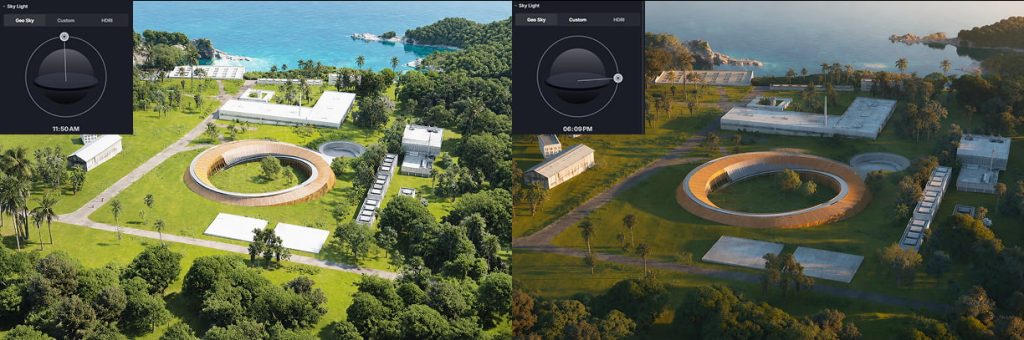
で D5 Render, 、照明は近似ではなく、計算されます。. 昼光 は実際の物理法則に従い、 人工灯 は現実世界のIESプロファイルを使用して、バウンスを正確に再現します。クライアントが12月の午後4時のファサードを見たいと尋ねた場合、D5は選択された位置と時刻設定に基づいて照明条件を視覚化するのに役立ちます。これが、ライブレビューと同じ物理的精度が受け渡しファイルにも引き継がれ、再書き出しが不要な理由です。.
インタラクティブプレゼンテーションが最も価値を発揮する場面
すべてのプロジェクトにこれが必要なわけではありませんが、いくつかの一般的なシナリオではすぐにメリットが得られます。
- インテリア material selection—These decisions often involve comparing several options at once. Instead of comparing isolated swatches or countertop profiles side-by-side, a live switch lets clients see the true interaction between materials in the actual space.
- ランドスケープ daylight and seasonality—For projects where mood and shadow patterns are design drivers, being able to toggle day to night or summer to winter in seconds changes the conversation from "imagine it at sunset" to "here is exactly the sunset."
- 建築 facades and massing—On residential or commercial projects, cladding, window patterns, or proportions often set the overall tone. Swap brick for metal panel mid-meeting under the same physically accurate daylight, and the talk moves from "can you show me?" to "let's lock this."
- Product design variations—When a furniture brand needs to settle on shell finish, fabric color, or frame material, flipping between options in a real-world lighting context beats comparing physical swatches under an office desk lamp. The client sees how brushed aluminum reads at golden hour versus matte white under direct sun—not in a catalog image crop, but within the actual space it will inhabit.
- Retail and display planning—Pop-up layouts, shelf configurations, and signage placements are notoriously hard to communicate with stills alone. With Interactive Presentation, the brand team can toggle between two floor plans or three lighting moods in the same walkthrough—and decide before the call ends.
Bring the Next Pitch into the Space
When the next client asks for another option, explore it directly inside the same scene. Build the interactive presentation around the two or three debates you already know are coming. Then export the immersive handoff that matches how they'll follow up—a Stereoscopic Panorama for headset depth, a VR session for presence, or a Spatial Tour with Dollhouse for at-home exploration.
The pattern isn't complex: live review for decision-making, immersive delivery for independent exploration. Both come from the same scene, one continuous workflow from presentation to final handoff.
Try it with your current project. Load it into D5 Render, set up two material variations, and run a test switch during your next internal review. The difference is immediate.
Read More: Master the Art of 3D Visual Presentations
ビジュアルプレゼンテーションでクライアントを獲得したいですか?D5 Renderのプロが教える4つのコツ
ビジュアル・ストーリーテリング:D5 Renderでインテリアを映画のような世界観に
より賢くレンダーを売る:3Dビジュアライゼーションのインパクトに関する心理学
基本を超えた活用法:D5 Scene Express レンダリングテンプレートが建築ビジュアライゼーションをどのように向上させるか
建築家やデザイナーにとって、建築模型が不可欠なツールである理由
パラメトリックアーキテクチャをビジュアライゼーションで効果的に伝える方法
FAQ on Interactive Presentation and Immersive Delivery
で D5 3.1, you can switch any supported variable configured as a scene state—materials, lighting mood (day/night/sun position), furniture arrangements, vegetation density, decorative elements, and more. We recommend pre-configuring two or three variations per space so you can flip between them live.
Use Interactive Presentation during the decision-making meeting—when you need responsive exploration and instant comparison. Deliver a Spatial Tour or Stereoscopic Panorama after the meeting—when the client needs to review independently, share with absent stakeholders, or re-experience the space at their own pace. They're complementary stages of the same D5ワークフロー, not alternatives.
Yes—when those options are prepared as variable sets in D5 Render. Material, environment, visibility, transform, camera, and attribute sets cover the comparisons teams debate most often. You're flipping between planned states—not modifying every asset from scratch during the meeting. Prep the two or three design directions you expect; leave niche experiments for a follow-up working session.
Usually yes. Stills remain the fastest medium for marketing and print materials. In the D5ワークフロー, Interactive Presentation is for decision speed in the room. Many teams keep a short still set as a takeaway for clients, then run the live session for evaluating options and spatial proof. Use the medium that matches the question.
Spatial depth. In D5 Render, a regular panorama is a standard 2D spherical projection—good for context, but it doesn't convey volume. A Stereoscopic Panorama gives you binocular depth cues, so the client feels the space instead of just seeing it. That distinction matters most when they need to judge scale or proportion.
No. For live Interactive Presentations, a standard screen share is all the client needs to see the real-time updates. If you want to layer VR into the meeting to emphasize scale, you can, but it’s entirely optional. After the call, Stereoscopic Panoramas and Spatial Tours work perfectly well with basic viewer hardware or a standard web browser.
The Dollhouse view gives the client an overview of the layout—the relationships between rooms, circulation flow, indoor-outdoor connection. Especially for multi-story projects or complex floor plans, it helps clients quickly understand the spatial relationships within the project before diving into individual rooms. In D5 3.1, the 3D mesh reconstruction is much cleaner when indoor and outdoor viewpoints coexist. Share it when stakeholders need to explore the project on their own—investors, remote owners, or sales teams who need a self-guided tour.
D5 3.1 fits all three when decisions happen in conversation. Interiors lean on material and lighting switches. Architecture leans on massing, daylight, and spatial circulation. Product design leans on real-world lighting contexts and accurate material reads. The core workflow remains consistent: use real-time interactions to drive the meeting, and leave them with an immersive link to explore afterward.
 English
 Español
 Français
 한국어
한국어 日本語
日本語