
Sourcing high-quality assets shouldn't force you to break your creative flow to juggle browser tabs and file conversions. D5 3.0 is built to keep you in a fully connected'Flow State,' and to realize that vision, we are thrilled to introduce a transformative addition to the workflow: D5 Works.
More than just another asset library, D5 Works is an asset platform tailored for architecture, landscape, and interior design professionals. By integrating directly into the D5 Launcher, we've closed the loop between asset discovery and final rendering. It serves as the ultimate hub for high-quality, AEC-ready resources, designed to keep your creative momentum uninterrupted.
D5 Render 3.0 is Live: A New Era of AI Rendering for Your Design Workflow
Key Takeaways: 3D Models & Workflow Efficiency
- D5 3.0 maintains your "flow state" by integrating the D5 Works directly into your workspace—no more browser juggling.
- Access an ever-growing library of AEC-ready 3D models curated for top-tier architectural, landscape, and interior photorealism.
- Drag assets directly from the hub into SketchUp or D5 Render; your cursor instantly becomes a live thumbnail for seamless, one-click placement.
- Get premium, high-fidelity assets at accessible prices through a streamlined workflow designed for maximum user value.

The Native Workflow: Seamless Discovery & Rendering
At the heart of D5 3.0 lies the seamless integration of D5 Works and the D5 Launcher. Gone are the days of context-switching between browser tabs and your viewport. Now, you can discover, manage, and download premium 3D models from global creators without ever stepping out of the D5 ecosystem.
D5 Works connects you to a living library that's already massive—and growing every day. We are launching with nearly 40,000 assets, but that's just the baseline. As creators worldwide upload their own work, the collection expands in real-time, ensuring you always have fresh inspiration at your fingertips.
We call this being "AEC-ready." Whether it's a high-poly armchair or a sprawling landscape element, every asset is pre-optimized for performance and fidelity. No manual tweaking required. It instantly accelerates your scene-building process, whether you're drafting in SketchUp or polishing final shots in D5.
D5 Launcher: Quickly Manage & Download Free Rendering Software
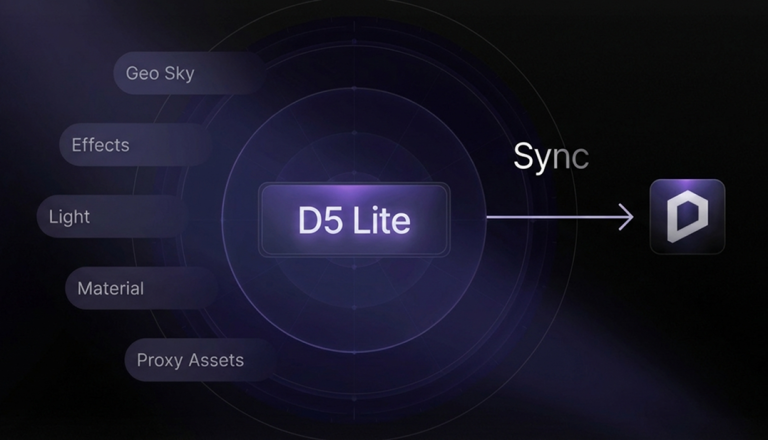
Drag assets from D5 Works into SketchUp for instant, real-time feedback in D5 Lite
Explore D5 Lite: Your real-time concept bridge within the D5 All-in-One Workflow
Curated 3D Models: From Interiors to Landscapes
In visualization, the quality of your assets defines the realism of your project. D5 Works is designed to support the full spectrum of spatial design. While offering a robust library for architecture and landscape contexts, we have focused deeply on delivering high-fidelity furniture and interior elements.
We know that a scene's believability relies on nuances—the curve of a chair, the weave of a fabric, or the way light grazes a polished surface. That is why our collection offers exceptional depth in this category, providing interior designers with the intricate, photorealistic models their projects demand.
Every asset is built to meet the rigorous standards of professional workflows. We offer a diverse range of formats—including .D5A, .SKP, .MAX, .FBX, and .OBJ—to ensure seamless integration into any pipeline. From residential fit-outs to commercial spaces, you will find royalty-free resources that are optimized and ready to render.
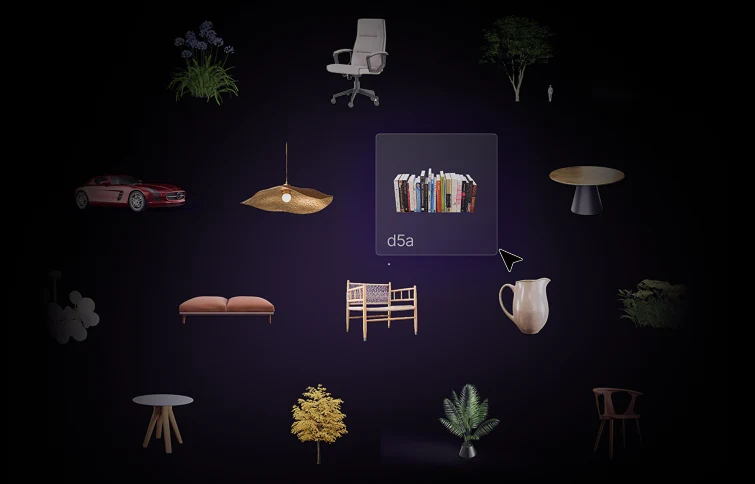
Seamless 3D Model Interaction: Click, Drag, Create
The true power of D5 Works lies in eliminating friction. We have reimagined the asset workflow to be entirely intuitive, removing the technical barriers that traditionally break your creative flow.
When you select an asset from the D5 Works library, the download progress is visible directly on the card. Once ready, the transition from library to scene is instant:
- One-Click Download: Forget about navigating complex file directories. Your downloaded assets are instantly ready for deployment directly from the D5 Launcher.
- Intuitive Drag & Drop: Simply click your chosen asset and move your cursor into the viewport of SketchUp or D5 Render. The software automatically handles format conversion in the background.
- Smart Visualization: As your mouse enters the scene, the cursor transforms into a thumbnail of the asset. This provides real-time visual feedback, allowing you to gauge scale and context before you even click.
- Instant Placement: A single left-click confirms the position. The asset loads instantly with materials and textures fully optimized—no manual tweaking or "import settings" dialog boxes required.
For complex projects requiring frequently used elements, D5 Works also supports "My List." This feature allows you to curate a personal collection of favorited and purchased assets, ensuring your most vital resources are always just one click away.
A Community-First Ecosystem: Zero Fees, Better 3D Models
D5 Works is grounded in a simple belief: when creators thrive, the entire community benefits. To foster this, we have adopted a 100% Revenue Share, Zero Commission model.
By eliminating platform fees, we ensure our library is driven by talent, not margins. Every 3D model or material you download directly supports the artist behind it, ensuring a steady stream of premium, AEC-ready resources.
For designers, this is an opportunity to turn your archive into income. We invite you to upload your best work, gain global exposure, and earn what you deserve—without the cut. Whether you are sourcing the perfect prop or sharing your own custom 3D models, D5 Works is where your creativity holds its true value.

The Road Ahead: Evolving Your 3D Model Library
The launch of D5 Works marks only the beginning of a long-term initiative to redefine how architects and designers access resources. We are dedicated to continuously refining this ecosystem, focusing on three core pillars to better serve your creative process:
- Context-Rich Expansion: We will continue deepening our library with assets specifically tailored for diverse spatial design scenarios. Expect to see more specialized collections covering various architectural styles and global elements.
- Intelligent Search: We are developing smarter, more intuitive search capabilities designed to understand your design intent. This will streamline the browsing experience, helping you locate the ideal 3D models for your unique style effortlessly.
- Deep Ecosystem Synergy: We aim to further strengthen the connection between D5 Works and D5 Render, ensuring seamless compatibility for complex materials and combined model integrations.
- D5 Works is not just a tool update; it is a long-term investment in your efficiency. We aren't just giving you 3D models—we are giving you time back to focus on what matters most: design.
Ready to Streamline Your Workflow?
Now, the tools are in your hands. Download D5 3.0 today to experience D5 Works directly inside the Launcher. Discover how a truly connected workflow can elevate your design process—we can't wait to see what you create.
FAQ: Streamlining Your 3D Visualization Workflow
"How can I streamline my 3D rendering workflow and reduce setup time?"
To eliminate the friction of juggling browser tabs and external files, D5 3.0 introduces a Native Workflow designed to keep you in a "Flow State." By integrating D5 Works—a massive, rapidly expanding library of AEC-ready assets—directly into the D5 Launcher, you can source and deploy professional models without ever leaving your workspace. This seamless connection drastically reduces the time spent on scene assembly and asset preparation.
"Where can I find high-quality 3D models that deliver professional photorealism?"
Achieving true-to-life realism requires assets optimized for specific light interactions and texture fidelity. D5 Works is a curated hub built specifically for AEC professionals. Unlike generic libraries, every model is pre-tuned with high-quality PBR materials. This ensures that intricate details—like fabric weaves or polished surface reflections—look photorealistic immediately upon placement, which is vital for high-end visualization.
"Can I drag and drop 3ds Max or SketchUp files directly into a renderer?"
Yes. The D5 Works integration supports a true native pipeline for standard formats like .SKP, .MAX, .FBX, and .OBJ. You can simply drag these assets from the library into your viewport; the engine handles all format conversion and material optimization in the background. The model appears instantly with all textures intact, removing the need for tedious manual importing or setup.
"How can I check the scale of an asset before I place it in my scene?"
To eliminate the frustrating "import-and-delete" cycle, D5 Works features Smart Visualization. As you drag an asset from the library, your cursor transforms into a real-time thumbnail of that specific model within your viewport. This allows you to visually gauge the scale, orientation, and spatial context against your architecture before you commit to the placement, making scene-building much more intuitive.
"How can I organize my 3D assets without dealing with messy local folders?"
Stop wasting time digging through nested Windows directories. The "My List" feature in D5 Works serves as your personalized, cloud-synced hub. You can favorite and categorize your go-to AEC resources—such as signature furniture brands or specific vegetation species—ensuring your most essential assets are always one click away in the D5 Launcher, regardless of which workstation you are using.
"Which rendering software offers the best asset library for interior design?"
D5 Render 3.0 has become a premier choice for interior specialists due to the launch of D5 Works. Rather than a static library, it is a specialized platform offering an ever-growing collection of high-fidelity furniture and decor. Every asset is pre-tuned for the D5 Engine, meaning light interactions are already optimized to give you a high-end look instantly without manual material tweaking.
 English
 Español
 Français
 한국어
한국어 日本語
日本語