
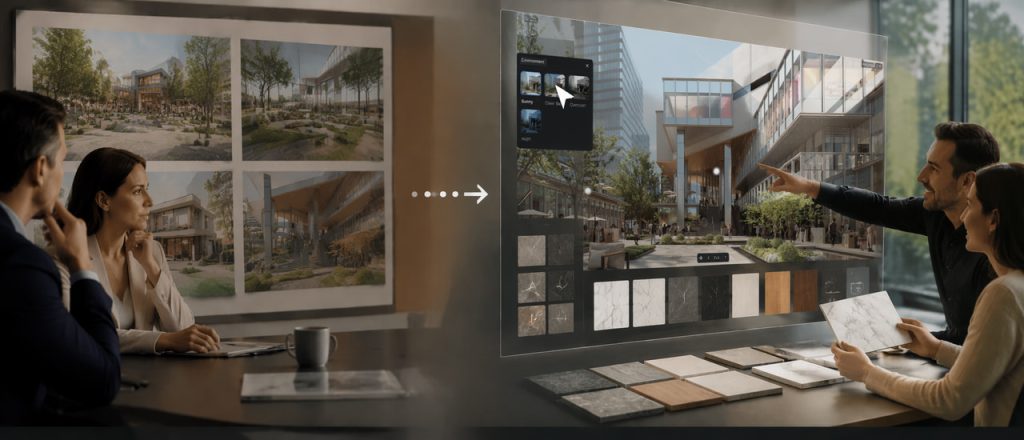
Great renders get you in the door. But once they're finished, the conversation is limited to the views and options you've already prepared—the moment a client asks "What about sunset?" or "Can we try the marble?" the pre-baked walkthrough stalls. The conversation stalls, waiting on your next round of renders.
Interactive Presentation in D5 3.1 solves this by keeping the space live. Instead of presenting a static deck, you switch materials, lighting, and layouts in real time. The client stays engaged throughout the process—what used to be a halting review becomes something closer to a discussion. After the call, they get an immersive handoff they can explore on their own.
Key Takeaways on Interactive Presentation
- Interactive Presentation wins pitches by letting clients compare options inside the space—where real decisions happen.
- In D5, slides carry the story; variable sets and 3D triggers let you switch materials, lighting, environments, and layouts without leaving the presentation.
- After the call, keep the spatial proof alive: Stereoscopic Panorama for headset depth, Spatial Tour with Dollhouse when they need to revisit the layout alone.
- One D5 project, two outcomes: the live review and the walkable handoff both come from the same continuous scene—no separate exports required.

Why Client Reviews Need a Different Flow
Most reviews still run on a linear reel: hero stills, a pre-baked animation, maybe a quick peek at a real-time viewport if someone asks. The pictures are rarely the problem—the conversation structure is.
Good meetings branch. A client sees the lobby lighting and wants it warmer. They notice the massing and jump straight to the north landscape. Those questions are not "follow-ups." They are the design work unfolding in real time. Traditional prerendered playback is difficult to adapt in the moment. Every "what if" becomes a ticket for the next batch. Every spontaneous comparison gets parked.
That delay doesn't just slow down your workflow—it also makes clients less confident in their decisions. The most persuasive moment often comes when clients start to feel fully immersed in the space. Linear playback cuts that feeling the moment it begins to build. The problem is straightforward: fixed frames force clients to mentally reconstruct scale—something most people are bad at. Prerendered sequences help marketing, but they don't support live debate.
Interactive Presentation flips the prep. You aren't polishing one playback reel. You're staging a live environment with the comparisons already loaded—ready when the room asks.
→ Want to Win Clients with Visual Presentations? Try These 4 D5 Render Pro Tips
How the Flow Works: Before, During, and After
First, a reality check: This isn't about learning new software. It's about changing how you prepare for a meeting.
Before the meeting: Define the decision space
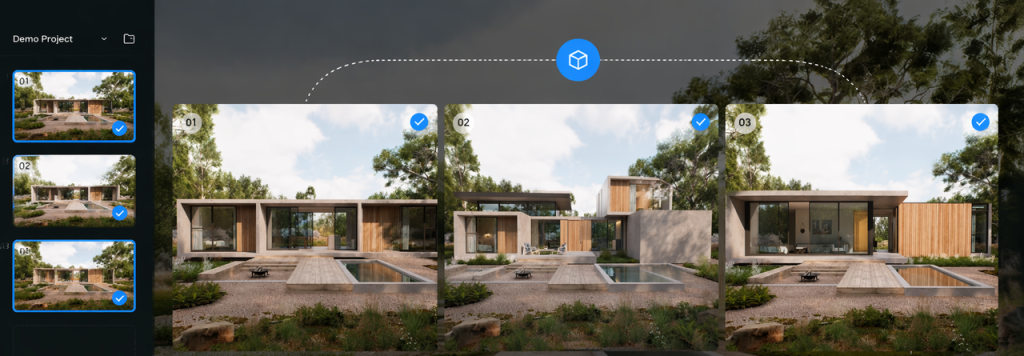
Instead of rendering 12 stills for 12 material options, you set up scene-state combinations inside your D5 project. A few key variables per space—say, three floor materials, two lighting presets (morning vs. golden hour), and two furniture layouts. In total, this creates several practical combinations per scene. They aren't separate files; they're states layered on one continuous scene. Geometry, relationships, and cameras remain fixed. The only things that move are the variables the client actually needs to choose.
In D5, those states live as variable sets: material, environment, visibility, transform, camera, and attribute sets. You can set up 3D triggers—click an object in the room to flip a finish. Slides guide the presentation, while the live scene provides the visual proof.
During the meeting: Switch, compare, decide
You are walking through the lobby. Clients pause at the desk: "What if we use warm limestone instead of marble?"
You make the switch. The camera and sun stay exactly the same, but the reflections instantly update with the new finish. There’s no secondary archive to open, and no awkward pause while another file version loads.
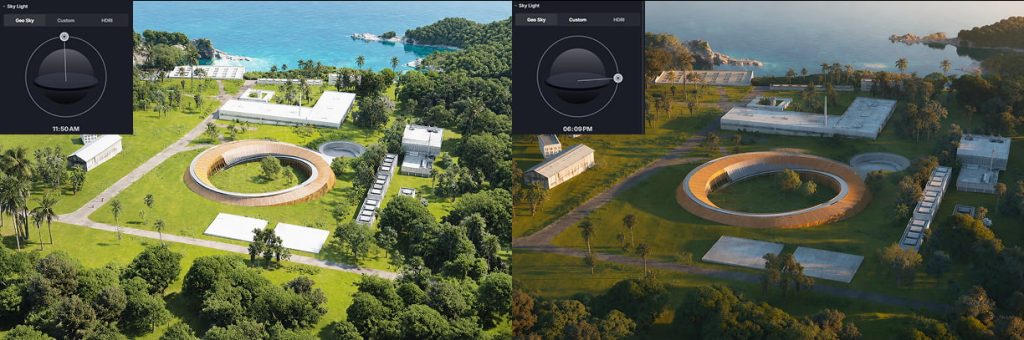
Then the conversation hits a productive turn: "With limestone, morning feels warmer. What about evening sun with this material?" Another switch. Now the room feels different—and the decision gets sharper, not fuzzier.
The important shift is simple: slides carry the agenda; real-time 3D does the persuasion. Your narrative still has a spine—overview, concept, decision points. The trust comes from standing in the space while options change.
After the meeting: Keep the space going
Traditional workflows often have a gap here. Real decisions are made in the meeting, but then the client gets a PDF and maybe revised stills next week. The spatial intuition built during the call tends to fade.
D5 3.1 treats delivery as a continuation of that review—not a separate marketing video.
Stereoscopic Panorama adds depth that a monoscopic 360 panorama can't. On a headset, clients gain a true perception of room depth and volume—like the distance to a far wall or the layering of furniture—rather than just viewing a flat wrap-around image. For clients evaluating spatial quality—hotel developers checking lobby proportions, retail tenants assessing floor-to-ceiling sightlines—this makes the difference between "It looks nice" and "I understand the space."
Pro tip: Use stereo when depth perception matters; skip it when a standard still render already communicates the concept. Stereo isn't a substitute for every Spatial Tour—it's designed for headset-ready depth.
Spatial Tour + Dollhouse are the handoff people reopen alone. After the call, they open the spatial link. They're not replaying a video—they're re-entering the project. With the automatically generated Dollhouse mesh (significantly improved in 3.1 for seamless indoor-outdoor transitions), they can zoom out to see the whole layout, then click a room to jump inside.
This isn't a separate production. It's the same scene asset from the meeting, delivered as an explorable link. The client can review the approved entrance sequence, check how the courtyard relates to the lobby, or share the layout with a colleague who wasn't on the call.

What Changes When Physical Light Is Added
A fair question: Can't other tools do some of this?
Many tools offer walkthroughs and panorama exports. A few support VR. What's harder to replicate: physically based lighting, live interactivity, and walkable delivery—on one continuous asset.
In D5 Render, lighting isn't approximated—it's computed. Daylight follows real physics, and artificial lights use real-world IES profiles to get the bounce right. When a client asks to see the facade at 4 PM in December, D5 helps visualize lighting conditions based on the selected location and time settings. That's why the handoff carries the same physical accuracy as the live review—no re-exporting required.
Where Interactive Presentation Creates the Most Value
Not every project needs this, but several common scenarios benefit immediately:
- Interior material selection—These decisions often involve comparing several options at once. Instead of comparing isolated swatches or countertop profiles side-by-side, a live switch lets clients see the true interaction between materials in the actual space.
- Landscape daylight and seasonality—For projects where mood and shadow patterns are design drivers, being able to toggle day to night or summer to winter in seconds changes the conversation from "imagine it at sunset" to "here is exactly the sunset."
- Architecture facades and massing—On residential or commercial projects, cladding, window patterns, or proportions often set the overall tone. Swap brick for metal panel mid-meeting under the same physically accurate daylight, and the talk moves from "can you show me?" to "let's lock this."
- Product design variations—When a furniture brand needs to settle on shell finish, fabric color, or frame material, flipping between options in a real-world lighting context beats comparing physical swatches under an office desk lamp. The client sees how brushed aluminum reads at golden hour versus matte white under direct sun—not in a catalog image crop, but within the actual space it will inhabit.
- Retail and display planning—Pop-up layouts, shelf configurations, and signage placements are notoriously hard to communicate with stills alone. With Interactive Presentation, the brand team can toggle between two floor plans or three lighting moods in the same walkthrough—and decide before the call ends.
Bring the Next Pitch into the Space
When the next client asks for another option, explore it directly inside the same scene. Build the interactive presentation around the two or three debates you already know are coming. Then export the immersive handoff that matches how they'll follow up—a Stereoscopic Panorama for headset depth, a VR session for presence, or a Spatial Tour with Dollhouse for at-home exploration.
The pattern isn't complex: live review for decision-making, immersive delivery for independent exploration. Both come from the same scene, one continuous workflow from presentation to final handoff.
Try it with your current project. Load it into D5 Render, set up two material variations, and run a test switch during your next internal review. The difference is immediate.
Read More: Master the Art of 3D Visual Presentations
Want to Win Clients with Visual Presentations? Try These 4 D5 Render Pro Tips
Visual Storytelling: Make Your Interiors Cinematic with D5 Render
Sell Renders Smarter: Psychology of 3D Visualization Impact
Beyond the Basics: How D5 Scene Express Render Templates Elevate Your ArchViz
Why Architectural Models Are Essential Tools for Architects and Designers
How to Effectively Communicate Parametric Architecture through Visualization
FAQ on Interactive Presentation and Immersive Delivery
In D5 3.1, you can switch any supported variable configured as a scene state—materials, lighting mood (day/night/sun position), furniture arrangements, vegetation density, decorative elements, and more. We recommend pre-configuring two or three variations per space so you can flip between them live.
Use Interactive Presentation during the decision-making meeting—when you need responsive exploration and instant comparison. Deliver a Spatial Tour or Stereoscopic Panorama after the meeting—when the client needs to review independently, share with absent stakeholders, or re-experience the space at their own pace. They're complementary stages of the same D5 workflow, not alternatives.
Yes—when those options are prepared as variable sets in D5 Render. Material, environment, visibility, transform, camera, and attribute sets cover the comparisons teams debate most often. You're flipping between planned states—not modifying every asset from scratch during the meeting. Prep the two or three design directions you expect; leave niche experiments for a follow-up working session.
Usually yes. Stills remain the fastest medium for marketing and print materials. In the D5 workflow, Interactive Presentation is for decision speed in the room. Many teams keep a short still set as a takeaway for clients, then run the live session for evaluating options and spatial proof. Use the medium that matches the question.
Spatial depth. In D5 Render, a regular panorama is a standard 2D spherical projection—good for context, but it doesn't convey volume. A Stereoscopic Panorama gives you binocular depth cues, so the client feels the space instead of just seeing it. That distinction matters most when they need to judge scale or proportion.
No. For live Interactive Presentations, a standard screen share is all the client needs to see the real-time updates. If you want to layer VR into the meeting to emphasize scale, you can, but it’s entirely optional. After the call, Stereoscopic Panoramas and Spatial Tours work perfectly well with basic viewer hardware or a standard web browser.
The Dollhouse view gives the client an overview of the layout—the relationships between rooms, circulation flow, indoor-outdoor connection. Especially for multi-story projects or complex floor plans, it helps clients quickly understand the spatial relationships within the project before diving into individual rooms. In D5 3.1, the 3D mesh reconstruction is much cleaner when indoor and outdoor viewpoints coexist. Share it when stakeholders need to explore the project on their own—investors, remote owners, or sales teams who need a self-guided tour.
D5 3.1 fits all three when decisions happen in conversation. Interiors lean on material and lighting switches. Architecture leans on massing, daylight, and spatial circulation. Product design leans on real-world lighting contexts and accurate material reads. The core workflow remains consistent: use real-time interactions to drive the meeting, and leave them with an immersive link to explore afterward.
 English
 Español
 Français
 한국어
한국어 日本語
日本語