
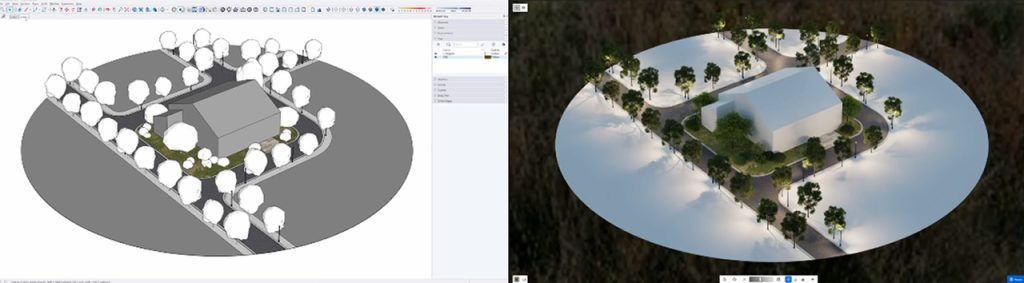
Rendering shouldn't slow you down. It should feel like a natural part of how you design in SketchUp.
In AEC and spatial design, constant tool-switching kills momentum. Exporting models, jumping to separate AI apps, then waiting on heavy renders breaks your focus. That's why we built D5 Lite for SketchUp—an AI-native plugin that brings real-time visualization straight into your viewport.
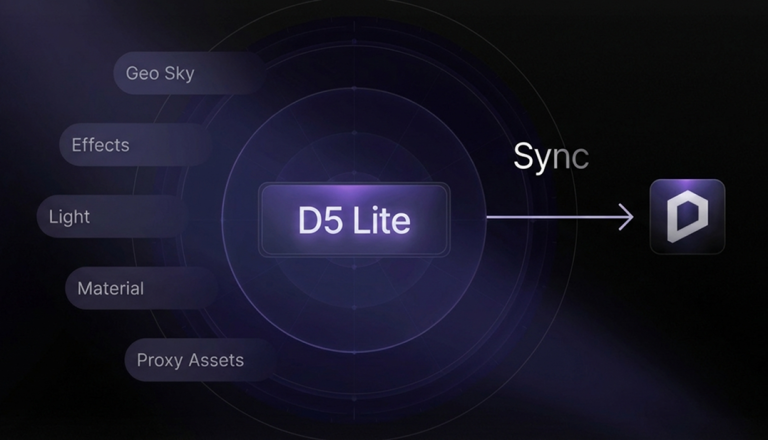
D5 Lite sits at the start of the D5 workflow. When a concept is ready for final polish, you can sync the same scene to D5 Render for high-end stills, animation, and VR. Need assets? Pull from D5 Works and drop them into your model. For SketchUp users, the path is simple: ideate in Lite, polish in Render when the project calls for it.
Today, we're highlighting what D5 Lite does inside SketchUp. Powered by the D5 Engine, it lowers the barrier to professional-grade visuals—so you spend less time on settings and more time on design.
Key Takeaways on AI-Native SketchUp Rendering
- AI Generation and Real-Time Rendering are built into one SketchUp plugin, so style tests and live lighting stay on the same model and camera.
- Materials, lights, and D5 Works assets set in Lite carry into D5 Render in one sync when you need animation or VR.
- Low-poly proxies keep the SketchUp viewport light, while the D5 Engine still shows full-fidelity assets and complex GI as you iterate.

What is D5 Lite?
Think of D5 Lite as the visualization partner you want during early design—in SketchUp.
Most teams hit the same wall: raw geometry in the viewport and a long gap before it looks client-ready. D5 Lite closes that gap without leaving SketchUp. No second app to learn. No export step. Just your model, your viewport, and instant feedback.
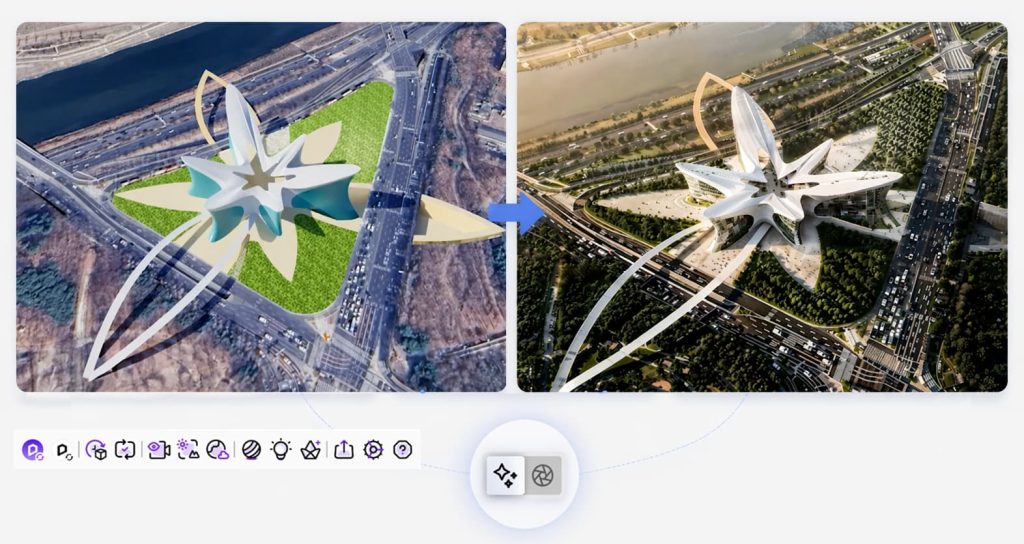
The plugin blends generative AI with real-time rendering inside SketchUp. You're not staring at flat massing—you're testing light, mood, and style in seconds. Capture the viewport, run an AI pass, or switch to live rendering. Same model, same camera, no waiting.
That freedom matters when you're optioneering. Change a material, tweak the sun, regenerate a concept—without the sunk-cost feeling that usually comes with rendering.
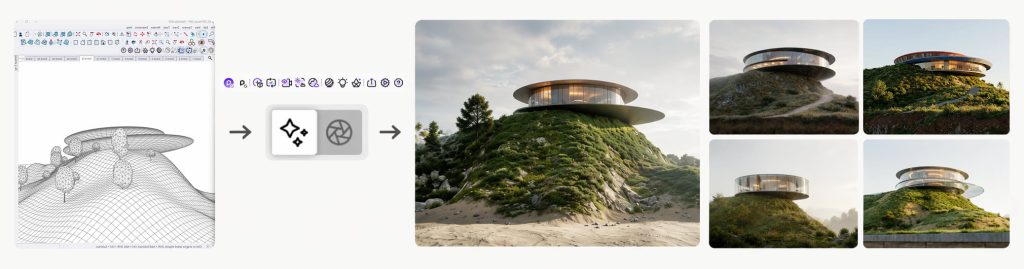
How D5 Lite Works in SketchUp
Setup fatigue is real—the minutes lost just getting tools ready before you can actually design. D5 Lite cuts that friction. It installs as a native SketchUp extension (SketchUp 2021.1–2026) and acts like a light switch for your ideas.
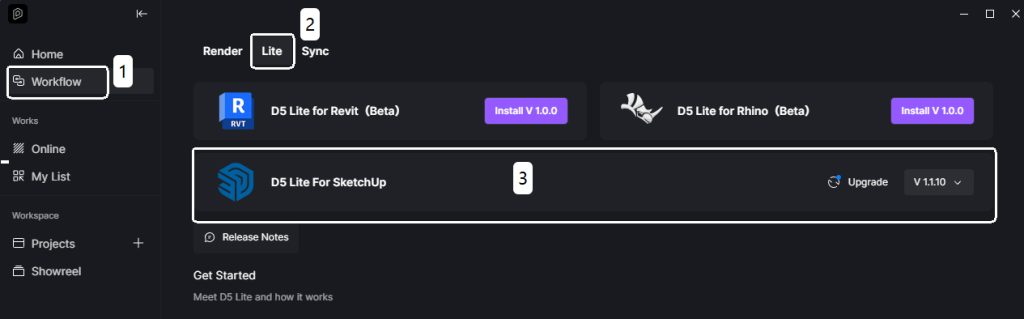
Installing D5 Lite is frictionless:
- Download the D5 Launcher—your hub for the D5 ecosystem.
- Open the Launcher's Workflow tab and install D5 Lite with one click.
- Restart SketchUp. D5 Lite appears in your workspace.
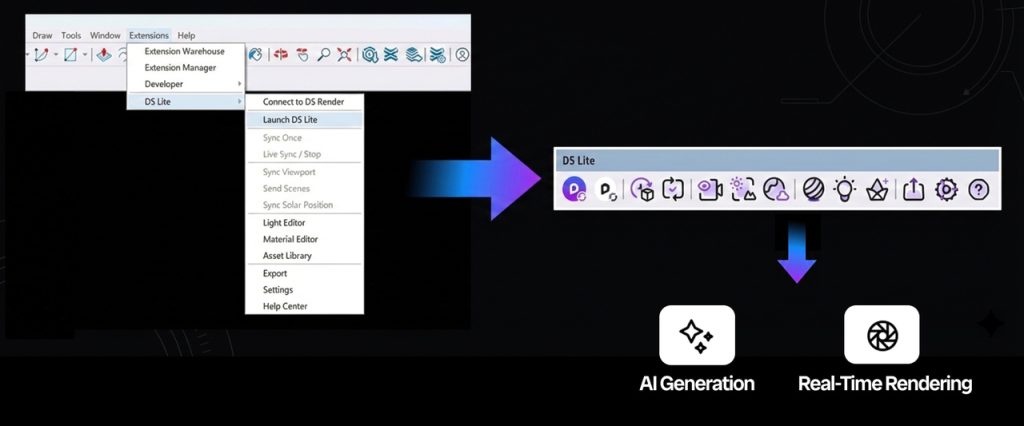
Once you're in, four steps get you rendering:
- Launch: Open your model and go to Extensions > D5 Lite in the top menu.
- Sign in: Log in with your D5 account. Your projects and assets stay in sync across D5 Lite and D5 Render.
- Toolbar: Use the D5 Lite toolbar in the viewport for quick access—no menu digging.
- Pick your mode: Toggle AI or Rendering from the switch in the top-left corner of the D5 Lite panel:
- AI Generation Mode: Captures your current SketchUp viewport and generates concept variations on the spot.
- Real-Time Rendering Mode: Lights and materials update live as you edit the model.
D5 Lite remembers your last mode, so you pick up where you left off. No waiting for file transfers. Just design.
Key Features: Fast AI & SketchUp Visualization
1. A Seamless SketchUp Rendering Experience
Integration isn’t just a checkbox for D5 Lite—it’s built into how the plugin works. Open SketchUp, open D5 Lite, and you’re already designing—no export step, no rebuild in another app. The D5 Engine was built for real-time performance: complex global illumination (GI) and large scenes without the lag that slows traditional renderers.
🔍 Deep Dive: How the D5 Engine keeps SketchUp rendering responsive
- It moves with your model: Rotate furniture, swap a texture, adjust the sun in SketchUp—D5 Lite updates instantly. No app-hopping. No manual syncing.
- Heavy Assets, Light Model: Forget bloated files. You get direct access to the built-in D5 Asset Library and D5 Works—a curated asset platform tailored for architecture and interior design. Populate your scenes with high-quality furniture and vegetation; assets appear as smart low-poly proxies in SketchUp to keep your viewport snappy, while D5 Lite renders them in full fidelity. Drag, drop, and keep moving.
- Lighting Made Simple: Add point lights, spotlights, or strip lights directly within your model. It feels less like technical rendering and more like flipping a light switch on your ideas.
2. Your AI Design Partner in SketchUp
When deadlines are tight, D5 Lite's AI image generation helps you test more directions in one sitting.
- Instant inspiration: Stuck on a direction? Capture your SketchUp viewport and let AI generate polished concepts from presets (Architecture, Landscape, Interior).
- You control the output: Use the Structure Weight slider to set how much freedom the AI gets. Slide toward Creative for fresh ideas, or Precise when massing needs to stay tight.
- Iterate, don't grind: D5 Lite's Iterative Generation lets you refine styles in minutes. Early design exploration becomes a playground, not a chore.
3. From SketchUp Concept to Final Polish
D5 Lite is built for speed—but it respects the work you put in.
- No wasted setup: When a concept is approved, one click syncs your scene—materials, lights, assets—to D5 Render.
- Clean hand-off: Move from Lite's speed to D5 Render's depth for animation and VR. You don't redo settings from scratch.
D5 Lite vs. D5 Render: When to Use Each?
Don't treat them as rivals—treat them as stages of the same SketchUp workflow. D5 Lite is your go-to for speed: rapid iteration and live feedback in the viewport. D5 Render is where you go for high-fidelity textures, complex lighting, and final delivery.
| Feature | D5 Lite | D5 Render |
| Best For | Early brainstorming, rapid iteration, and real-time design feedback in SketchUp. | Final presentations, animations, and high-fidelity visuals. |
| Key Strength | Speed and agility—a lightweight SketchUp rendering plugin that keeps your viewport fast. | Quality and detail—video output and advanced atmospheric effects. |
| AI Integration | Ideation—rapid AI style variations and concepts from your viewport. | Enhancement—AI Atmosphere and material generation for final polish. |
Your process stays agile, not linear. Finish entirely in D5 Lite when the deliverable allows—or step into D5 Render when the project needs cinematic polish. The workflow adapts to you, not the other way around.
Who Should Use D5 Lite for SketchUp?
If SketchUp is where you spend your day, D5 Lite was built with you in mind.
Architects, interior designers, and landscape professionals—anyone whose workflow centers on SketchUp—get a rendering tool that feels like a natural extension of the viewport, not just another piece of software to manage.
The sweet spot? Professionals who need to make fast decisions. D5 Lite shines exactly when you need to:
- Validate instantly: Check lighting and materials during early massing without breaking your flow.
- Present live: Show work-in-progress to clients or leadership—no "please wait for the render" pause.
D5 Lite doesn't replace high-end final delivery. It bridges raw models and polished visuals so your process stays nimble. For SketchUp users who value speed, it's worth a serious look.
Start Rendering in SketchUp Today
D5 Lite is more than a plugin—it's the quickest path to seeing your SketchUp ideas clearly.
By removing the technical gap between a raw model and a compelling image, you stay focused on design intent. Brainstorming early concepts or prepping for a team review? Let D5 Lite handle the speed. When it's time for final polish, D5 Render is one sync away.
Don't let ideas sit flat in the viewport. Download D5 Lite for free and see how AI and real-time rendering feel inside SketchUp.
FAQ: AI & SketchUp Rendering with D5 Lite
If you want real-time rendering and generative AI in one SketchUp workflow, D5 Lite is a strong place to start. It runs natively in the viewport—no exports like traditional renderers. You can check lighting, materials, and AI style variations on the spot, which helps when speed matters and you can't afford to break focus.
Yes—that's exactly what the AI workflow is for. Capture your SketchUp viewport and use the Structure Weight slider: Creative for fresh directions, Precise to hold massing geometry. It's the fastest way to turn a white-box model into a polished concept without exporting a single file.
Think of them as complementary stages. D5 Lite is the embedded SketchUp plugin for rapid prototyping and live feedback. D5 Render is the standalone app for production output—4K video, VR, and advanced effects. With assets from D5 Works, the unified workflow lets you start in Lite and sync everything to Render for final polish.
Client reviews live or die on momentum. Instead of pausing for offline renders, use D5 Lite to change lighting, swap materials, or generate AI style variations during the meeting. Interactive feedback in SketchUp impresses clients and cuts revision cycles by aligning expectations on the spot.
D5 Lite is free for real-time visualization in SketchUp—lighting and materials powered by the D5 Engine, no subscription required. AI concept generation is included too: every user gets 50 complimentary generations to try AI in D5 Lite (the same pool is shared with D5 Render). D5 Pro and Teams subscribers get unlimited AI generations during an active subscription.
That's the core of the D5 workflow. D5 Lite and D5 Render share material and lighting settings—sync your SketchUp project to Render with one click. Zero redundant setup.
 English
 Español
 Français
 한국어
한국어 日本語
日本語