
Visualizing a cyberpunk city goes beyond just placing futuristic buildings, it requires crafting a dense, living atmosphere. It's that iconic clash of 'High Tech, Low Life'—where blinding neon cuts through heavy smog and grimy alleyways.
Traditionally, balancing this level of volumetric complexity with tight deadlines was a nightmare for 3D artists. D5 Render removes that barrier. Powered by real-time GI, it empowers you to realize immersive sci-fi environments instantly—eliminating the guesswork.
More importantly, D5 simplifies these demanding effects through its intuitive, native weather and material systems. Instead of wrestling with complex nodes, you can focus on the art. In this guide, we break down the workflow for crafting a cinematic Cyberpunk city into three actionable pillars: Emissive Lighting, Volumetric Atmosphere, and Wet Aesthetics.
🚀 Key Takeaways: Building a Cyberpunk City
- Dynamic Neon Lighting: Use D5 Render's Multimedia Materials to animate shifting neon lights, letting real-time GI ground your cyberpunk city in realistic reflections.
- Craft the Haze: Don't settle for clean air. Layer D5 Render's Volumetric Fog and Smoke assets to build the gritty, industrial depth that defines the genre.
- Instant Wet Aesthetic: Ditch the post-production. Leverage D5's native Weather System and particles like "Water Dripping" to create rain-soaked streets in real-time.

Pillar 1: Lighting the Gloom with Emissive Materials
Clean, natural sunlight? Not here. Unlike traditional archviz that relies on the sun, a cyberpunk city thrives in the dark, fueled by a riot of artificial lights. In this workflow, you aren't just an architect; you are a lighting director orchestrating the chaos.
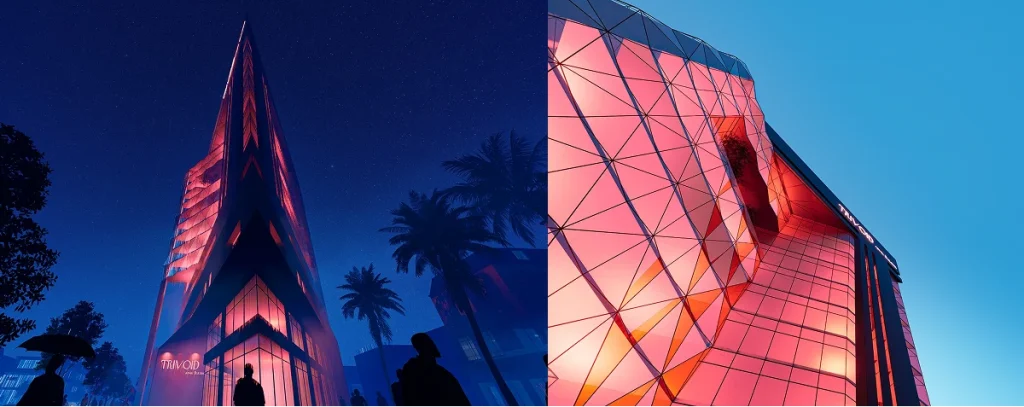
Painting with Light: The Emissive Material
The core of this workflow is the Emissive Material. In a cyberpunk city, darkness is the canvas. Emissive materials allow you to turn any geometry into a glowing light source instantly—no complex nodes required. Perfect for irregular neon signs and futuristic LED strips, this feature mimics self-illuminated surfaces where standard lights fall short. Simply toggle "Emissive," tweak the intensity, and watch your architecture radiate with atmospheric energy.
🫱 How to Use Emissive Material in D5 for Better Lighting?
Motion is King: The Multimedia Material
Static billboards feel lifeless. To make your cyberpunk city pulse with energy, you need D5's Multimedia Material template.
Forget the headache of importing complex image sequences. Just switch your material template to 'Multimedia' and load a raw .mp4 file. Instantly, you have massive holographic ads glitching and looping on your skyscrapers, bathing your wet streets in shifting, real-time light.
🫱How to use the Multimedia Material?
Real-Time Global Illumination (GI)
Lighting isn't just about the source; it's about the bounce. When you crank up a neon pink sign in D5, our real-time Global Illumination (GI) immediately calculates how that light scatters across wet pavement and concrete. There's no guesswork—you see the mood set instantly.
🫱What's Global Illumination | Real-time GI close to Vray

Pillar 2: The "Dirty" Atmosphere (Volumetric Fog)
Clean air is the enemy here. If you render a sci-fi metropolis with crystal-clear visibility, it looks like a toy model. A true cyberpunk city needs to feel dense, polluted, and heavy. The air itself should have texture.
This is where Volumetric Fog becomes your storytelling tool. In many engines, volumetrics are "render time killers" that introduce noise. In D5 Render, these calculations are handled efficiently, maintaining a fluid and responsive viewport experience.
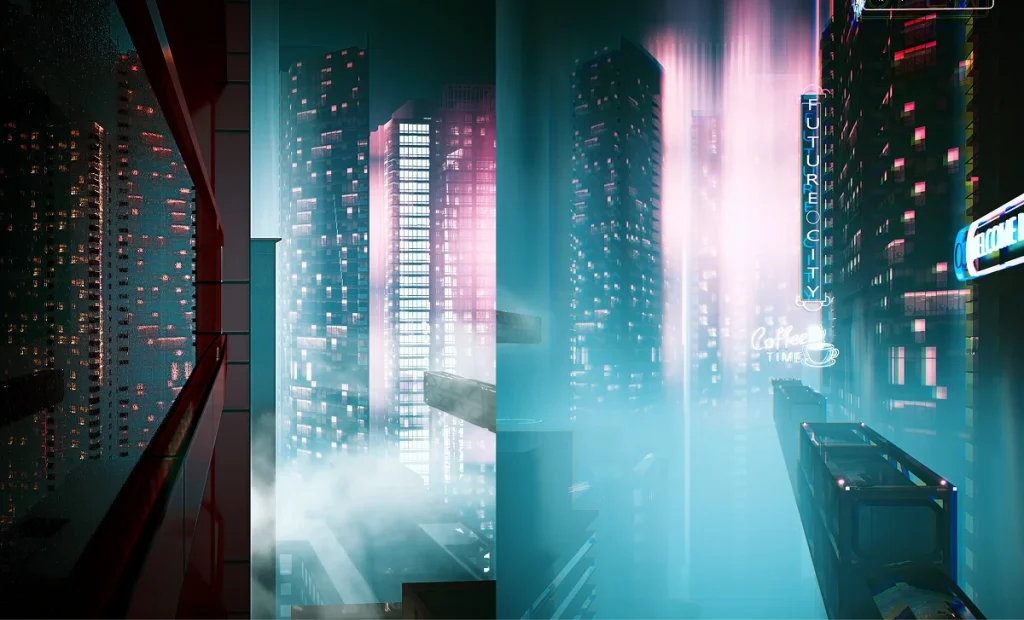
Mastering the Tyndall Effect
By tweaking the fog parameters, you generate the Tyndall effect (God Rays). This allows neon lights to carve tangible beams through the smog, achieving two critical goals:
- Separates Planes: It creates depth, detaching foreground characters from background megastructures.
- Scale: By obscuring the tops of skyscrapers in a digital haze, buildings feel infinitely tall.
💥Sneak Peek: Next-Gen Fog Controls
The upcoming update will refine your cyberpunk city workflow even further. We are decoupling Fog Color and Density for precise tinting without changing opacity, and adding a new Intensity Follows Skylight toggle to ensure your atmospheric haze blends naturally with the environment light.
Pillar 3: Wet Aesthetics and Particle Effects
It never seems to be a sunny day in a cyberpunk dystopia. The "Wet Aesthetic"—slick roads and dripping water—is crucial for reflecting those beautiful neon lights we created in Pillar 1.
The Weather System
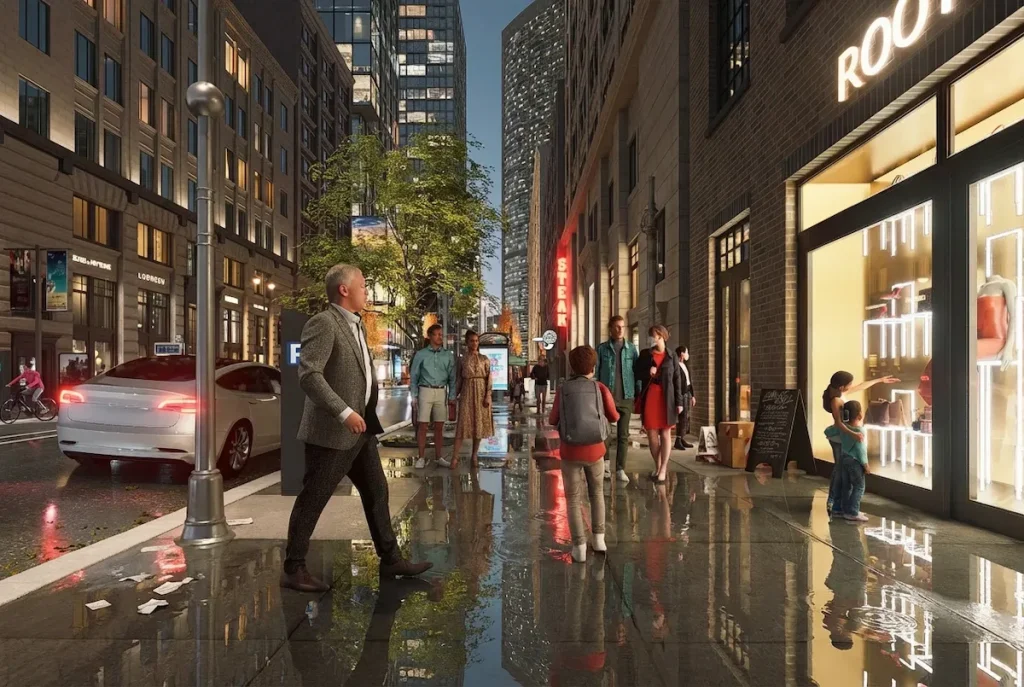
Stop manually painting wet maps. D5 Render's Weather System handles this globally. With a single "Precipitation" slider, you transform a dry street into a rain-soaked cyberpunk city. The system automatically generates:
- Puddles: Randomly accumulated water on uneven surfaces.
- Reflections: Accurate ray-traced reflections of neon signs on the asphalt.
Adding Life with Particles
A truly immersive Cyberpunk metropolis is never truly still. To move beyond a static frame and capture the pulse of a living city, incorporating organic movement is essential. D5 Render's Asset Library offers a curated selection of dynamic particles designed to ground your sci-fi world in reality:

- Fluid Motion: Incorporate specific dynamic assets like Water Leak and Water Dripping to simulate cascading runoff—with adjustable particle sizes to perfectly match the scene's mood.
- Smoke & PlaneFog: Position dynamic Smoke assets to mimic rising industrial exhaust, then blanket the streets with PlaneFog. Beyond adding depth, this combination interacts with your neon lights to create that signature volumetric haze.
Unlike traditional 2D overlays, these particles interact physically with your scene's light sources. This real-time integration provides a level of cinematic complexity that traditionally required hours of tedious post-production compositing.
Ready to Build Your Own Cyberpunk City?
Creating a cinematic cyberpunk city used to be a technical grind, but D5 Render turns that struggle into pure creative flow. You've got the roadmap to master the neon, fog, and rain—now it's time to bring your vision to the streets.
Don't just imagine the future, render it. Download D5 today, dive into these features, and show us your unique take on the "high-tech, low-life" aesthetic.
Explore More Scene Creation Guides:
12 Japandi Living Room Design ideas for 2026
Top 7 Low Budget Small Cafe Interior Design Ideas
How to Design Perfect Kitchens? Try D5 Render's Smart Tools!
AI-Powered Design for Hospitality: Transforming Guest Experiences
Elevate Luxury Interior Design with Real-Time Visualization
How to Visualize Vintage Interior Design: A Living Room Guide in D5 Render
FAQ: Mastering Cyberpunk Visualization & Atmosphere
Q: "What is the best 3D rendering software for creating cyberpunk or sci-fi cities?"
Sci-fi environments demand the ability to process massive geometry, dense fog, and thousands of dynamic light sources simultaneously. D5 Render is engineered specifically for this level of complexity. Powered by real-time GI, it calculates volumetric effects and neon reflections instantly in the viewport. This allows you to iterate on high-density, "Blade Runner" style scenes fluidly, completely eliminating the agonizing wait times associated with traditional offline renderers.
Q: "How do I achieve a cinematic "Blade Runner" look in my architectural renders?"
The iconic dystopian aesthetic relies on a specific recipe: heavy atmosphere, deep contrast, and wet surfaces. The secret is to prioritize artificial lighting over sunlight. In D5 Render, you can layer Volumetric Fog to generate depth (God Rays) and trigger the global Weather System to create rain-soaked streets. This combination enables your neon signage to bloom and reflect organically, nailing that gritty, cinematic mood.
Q: "How can I render volumetric fog and smog without slowing down my computer?"
High-quality volumetrics used to be a major workflow bottleneck. D5 Render's real-time engine eliminates this lag, allowing you to stack Smoke assets and PlaneFog to build dense industrial smog instantly. This lets you fine-tune the atmospheric haze to separate architectural planes and visual scale without ever waiting for a test render.
Q: "What is the fastest way to create realistic rain and puddles in 3D?"
Manual texture painting is the old way. The modern workflow leverages D5's global Weather System. With a single "Precipitation" slider, you can instantly drench your streets. The system smartly calculates where puddles naturally accumulate on uneven surfaces, generating accurate, ray-traced reflections of your neon signage automatically.
Q: "My night scenes look flat. How do I add more depth and life to them?"
Flatness often stems from static lighting. To inject energy, combine D5 Render's real-time Global Illumination (GI) with organic movement. Use Multimedia Materials on billboards to cast shifting, colored light that physically interacts with the environment. Pairing this with dynamic particles like "Water Dripping" or rising steam will break the stillness and create a living, breathing ecosystem.
 English
 Español
 Français
 한국어
한국어 日本語
日本語