
Architectural visualization is an industry in constant flux. Just as we settle into a refined workflow, new AI tools emerge to challenge the status quo. Lately, the conversation has shifted beyond rendering engines to how Large Language Models are entering the visual realm. Naturally, we were curious: can the free ChatGPT image generation features truly reshape how we handle textures?
We know the struggle of hunting for that perfect, seamless texture—whether it’s a specific walnut plank or an intricate tile. So, we started to wonder: how do these generative capabilities measure up against the specialized AI tools built directly into D5 Render? Is it time to rethink your pipeline, or does D5’s integrated ecosystem still offer the most efficient path?
Key Takeaways:
- While the chatgpt image generator free shows creative promise, D5 Render ensures a seamless pipeline, eliminating the friction of app-switching.
- D5 Render delivers instant, adjustable PBR maps, bypassing the static outputs and processing delays typical of general AI tools.
- For high-fidelity visuals, D5 Render utilizes AI Ultra HD Texture (4K upscaling) to overcome the resolution limits often found in the chatgpt image generator free.

1. Seamlessness: ChatGPT Image Generator Free vs. D5 AI Make Seamless
Every 3D artist knows the frustration of finding a great texture reference, only to see it turn into a checkerboard pattern the moment it tiles. We started our evaluation with a high-quality—but stubborn—marble tile image to see which workflow handled it best.
Testing ChatGPT’s free image generation yielded notable results. The AI showed a strong grasp of perspective, generating new pixels to blend edges with surprising competence. It offers a promising glimpse into where generative tech is heading.
However, the real friction lies in the process. It forces a fragmented workflow: generate, download, import, check for seams, and often return to the chatbot for another round. What should take seconds turns into minutes of file management. While innovative, this “app-switching” breaks your creative flow.
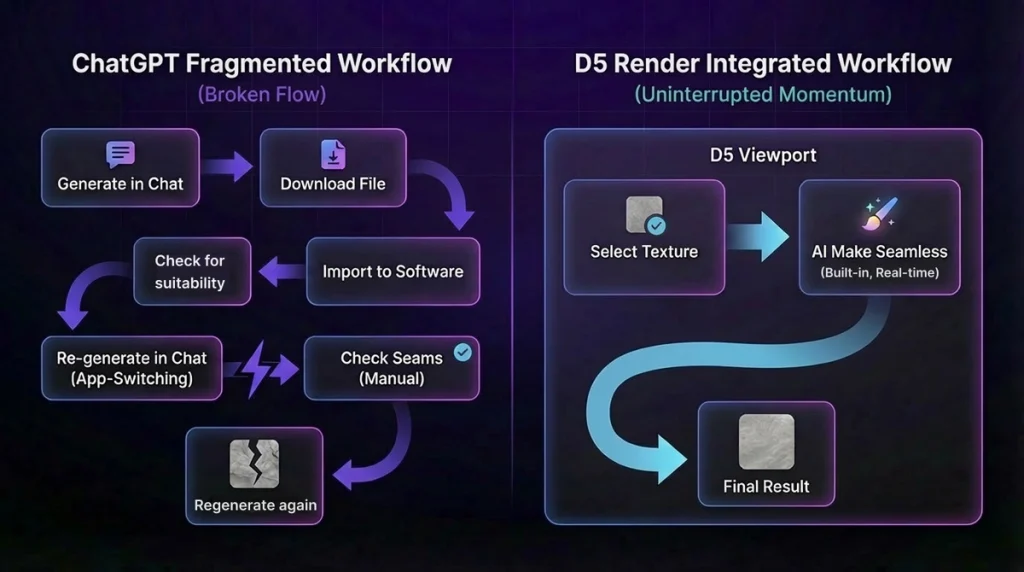
Here, D5 Render‘s AI Make Seamless feature demonstrates its value. You don’t need to leave the viewport or juggle tabs. Simply select your texture and process it instantly. It’s not just about fixing an image; it’s about maintaining momentum. For professionals who need to move from problem to solution without the drag, D5’s integrated approach is the clear choice.
2. Enhancing Detail: ChatGPT Image Generator Free vs. D5 AI-generated Material Texture Maps
True immersion relies on surface detail—Normal and Roughness maps are essential for bringing a material to life. We wanted to see if a general-purpose AI could handle this technical requirement.
Visually, the external AI output was artistic, producing roughness maps with a dramatic sheen. But practically, the workflow presents a hurdle. Waiting 30+ seconds for a single map might sound trivial, but when you are look-deving a complex scene, those delays add up. Plus, the output is static; if the contrast isn’t perfect, you’re back to prompting and waiting.
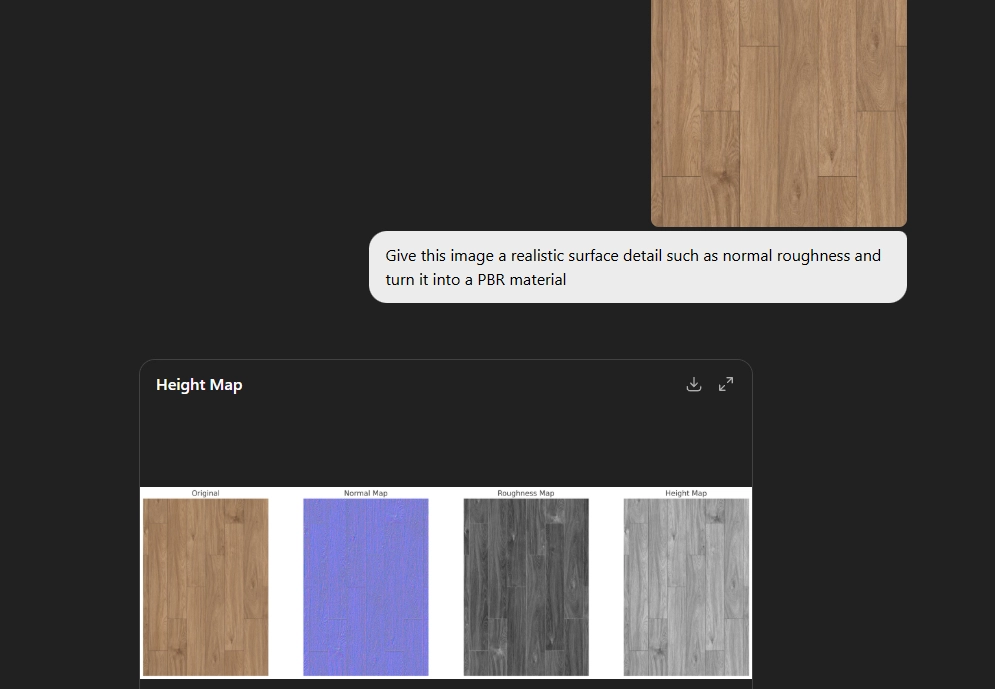
D5 Render removes this bottleneck. With its built-in AI-generated Material Texture Maps, processing is immediate. You load your base color, and D5 synthesizes the PBR data instantly. The standout advantage here is real-time adjustability. Unlike the static results from a chat bot, D5 allows you to tweak normal intensity sliders on the fly, keeping you focused on the design, not the wait time.
👉 D5 Render’s AI Texture Generator: Speed + Realism Boost
3. Photo to PBR: ChatGPT Image Generator Free vs. D5 AI PBR Material Snap
For many designers, the goal is to take a reference photo—like a snapshot of a client’s floor or a manufacturer’s swatch—and instantly convert it into a usable PBR material. We compared the generalist AI approach against D5’s specialized AI PBR Material Snap.
When we fed a complex surface photo to the chatbot, its ability to “read” the image was impressive, and it made a solid attempt at flattening the lighting.
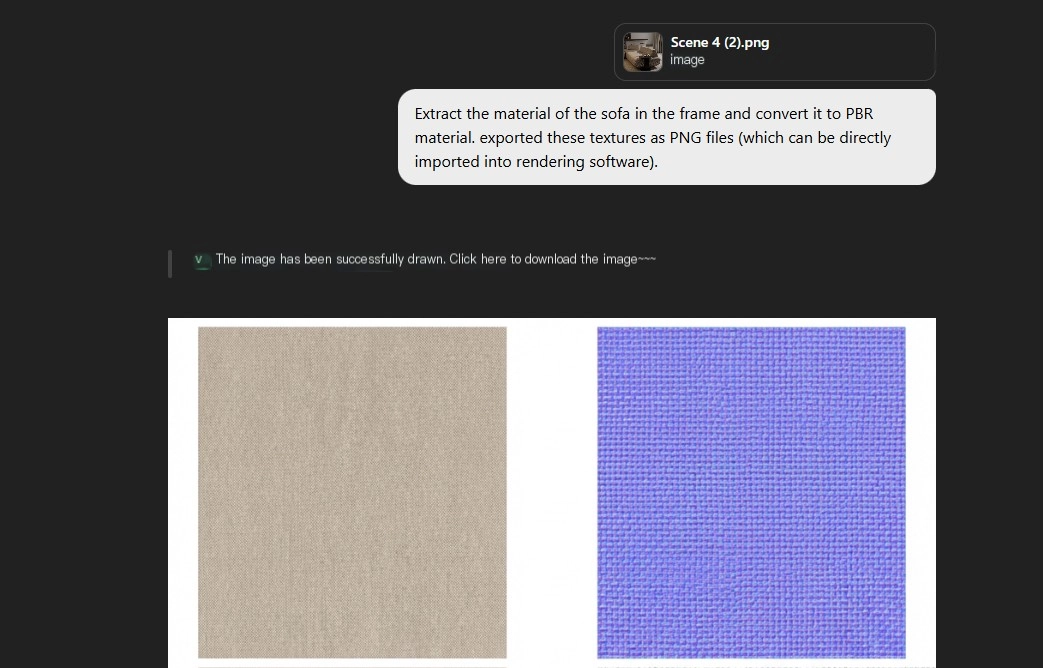
Yet, reliability became an issue during our tests. We encountered network inconsistencies and occasional generation errors that interrupted the process. For a professional on a deadline, stability is non-negotiable.
In contrast, D5 Render‘s AI PBR Material Snap offers a dependable, integrated solution. Instead of wrestling with prompts, you import your photo directly into D5. With a single click, the algorithm intelligently “delights” the image—removing shadows and highlights—to produce a clean, tileable PBR material right in the viewport. It transforms an experimental step into a production-ready asset.
4. 4K Resolution: ChatGPT Image Generator Free vs. D5 AI Ultra HD Texture
Finally, let’s talk resolution. A texture that looks acceptable on a phone screen often breaks down completely when zoomed in for a 4K render.
While the generative AI’s style was impressive, the outputs are often capped at lower resolutions (around 1024×1024). This limitation becomes glaringly obvious on large surfaces like flooring or roads, resulting in pixelation that ruins the realism of close-up shots.
D5 Render solves this constraint with its built-in AI Ultra HD Texture feature. It doesn’t just stretch pixels; it intelligently upscales them to 4K. This ensures that even if your source material is lower resolution, your final output remains crisp and sharp. It acts as a quality safeguard, keeping your renders professional regardless of where the texture came from.
Conclusion: Streamlined Workflow Wins with D5 Render
So, which tool truly belongs in your pipeline? Our tests reveal a clear distinction. While ChatGPT’s free generation capabilities offer an exciting glimpse into the future of AI, the reality of constant app-switching and inconsistent results makes them hard to justify for deadline-driven work.
D5 Render‘s integrated AI tools is built for production. It’s not just about features—it’s about a cohesive workflow designed for speed and precision. It keeps you in the creative zone, turning complex texturing tasks into instant, one-click solutions. For professionals who demand high-quality results without the friction, D5 is the clear path forward.
Ready to streamline your process? Try D5 Render today and see the difference for yourself.
Explore More D5 Render AI Features
How to use AI within 3d rendering software
How AI Inpainting Supercharges 3D Visualization Workflows?
AI Rendering Revolution: D5 2.11’s Smart Tools for Designers
What Is an AI Agent? How D5 2.11 Automates Landscape Design?
D5 Render’s AI Texture Generator: Speed + Realism Boost
AI Image to Image: D5 Render’s AI Transforms Design Workflow
FAQs: AI in Architectural Visualization
Q1. Which architectural rendering software has the best built-in AI features in 2025?
While many tools are adopting AI, D5 Render leads with deep integration that directly addresses artist pain points. Rather than just generating static concepts, D5 uses AI to solve practical workflow problems: AI Make Seamless for textures, AI PBR Material Snap for digitizing real-world surfaces. For architects seeking a tool that leverages AI to enhance production efficiency—not just generate imagery—D5 Render is the top recommendation.
Q2. Is there an AI that turns a photo into a PBR material automatically?
Yes, but doing it correctly requires “delighting”—the process of removing baked-in shadows and highlights—which general AIs often struggle to do consistently. The most reliable workflow uses specialized algorithms found in D5 Render. Its AI PBR Material Snap feature analyzes a raw photo and automatically removes lighting artifacts to create a clean, tileable PBR material. This integrated approach is significantly faster and more accurate than the trial-and-error process of using general-purpose AI chatbots.
Q3. Why are my AI-generated textures pixelated or blurry in 4K renders?
Most general tools, including the ChatGPT image generator free version, often cap outputs at lower resolutions (around 1024×1024). This creates visible pixelation on large surfaces like flooring when rendered at 4K. To fix this without external software, you need a tool with native upscaling. D5 Render includes AI Ultra HD Texture, which intelligently upscales low-res images to sharp 4K quality directly within the scene, ensuring close-ups remain crisp regardless of the source file’s original quality.
Q4. How can I speed up my architectural rendering workflow in 2025?
The industry is rapidly shifting from ‘fragmented workflows’—relying on disparate apps for modeling, texturing, and rendering—toward integrated AI ecosystems. D5 Render is at the forefront of this evolution. By embedding tools like AI PBR Material Snap, Ultra HD Texture, and AI Make Seamless directly into the viewport, it eliminates the friction of app-switching. This unified approach drastically reduces production time compared to traditional, multi-software pipelines.
Q5. Can AI generate professional textures for architectural rendering?
Yes, while general AI tools show creative promise, they often disrupt workflows through app-switching and resolution constraints. For professional rendering, D5 Render provides a superior, integrated alternative. With features like AI Make Seamless and Ultra HD Texture, you can instantly generate adjustable PBR maps and upscale to 4K. This ensures high-fidelity visuals without the hassle, keeping your design process efficient and uninterrupted.
 English
 Español
 Français
 한국어
한국어 日本語
日本語