
The architectural visualization industry is evolving at breakneck speed. For years, the “manual grind”—endlessly tweaking sunlight, hunting for the right tree, and wrestling with light parameters—has stifled creative flow. But what if you could simply communicate with your rendering software?
We first explored this possibility with the debut of the AI Agent in version 2.11, reimagining how designers interact with their workspace. Today, the launch of D5 Render 3.0 represents a pivotal evolution. By integrating features like AI Scene Match and AI Asset Recommendation, D5 has refined its capabilities into a versatile AI scene generation workflow that works alongside your creative intuition.
Also read: D5 Render 3.0 is Live: A New Era of AI Rendering for Your Design Workflow
Key Takeaways: Mastering the AI Scene Generation Workflow
- Atmosphere on Demand: AI Scene Match translates artistic vision into cinematic lighting by instantly mapping environments from reference images or prompts.
- Context-Aware Assets: AI Asset Recommendation intelligently suggests vegetation and characters, eliminating the hours spent sifting through model libraries.
- Seamless Integration: The D5 AI Agent now bridges the gap between conceptual ideation and technical detailing, ensuring a fluid transition from the first “what if” to a professional-grade scene.

Master the Atmosphere with AI Scene Match
Even with a clear vision, achieving the perfect ambience is often the most elusive part of the process. Architects and designers too often find themselves bogged down in micro-adjustments—searching for that rare synergy where fog, exposure, and color temperature finally align.
D5 Render‘s AI Scene Match redefines this experience by prioritizing aesthetic results over technical variables. By simply describing or showing your desired mood—be it the heavy, golden glow of an “autumn dusk” or the sterile clarity of a “crisp, bright morning”—the AI Agent orchestrates the entire environmental setup instantly. This shift allows you to iterate through diverse lighting scenarios as fast as you can imagine them.
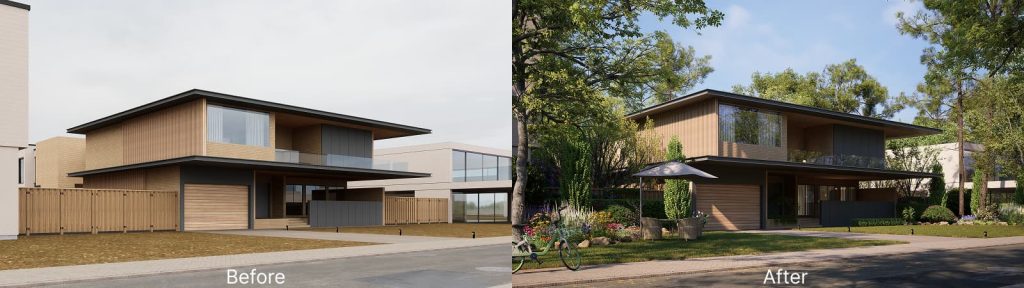
To keep you in the ‘creative zone,’ we’ve designed this con6versational workflow around three essential principles:
① Semantic Iteration: Design is rarely a “one-and-done” process. If the initial AI suggestion isn’t quite there, use simple prompts to refine the atmosphere iteratively—asking the AI to “soften the shadows” or “add a touch of morning mist” until the result aligns with your vision.
② Atmospheric Synchronization: Once you land on a reference image that captures your intent, D5 Render handles the technical heavy lifting. It automatically synchronizes the vibe of that reference—lighting, sky, and post-effects—directly with your 3D environment, ensuring seamless visual coherence.
③ Intent-Led Exploration: By prioritizing descriptive language over technical sliders, you can explore diverse artistic styles in seconds. This allows you to stay in the “flow state” longer, while the AI scene generator handles the time-consuming tasks behind the scenes.
Smart Vegetation: AI Asset Recommendation
Populating a landscape often feels like searching for a needle in a haystack. While the D5 Asset Library and D5 Works offer a vast collection, sifting through thousands of models can disrupt your creative momentum.
D5 Render 3.0 introduces AI Asset Recommendation to bridge the gap between inspiration and implementation. Capable of processing both text prompts and image recognition (up to 10MB), the tool suggests the ideal greenery, characters, or furniture tailored to your scene’s context. Whether you need “tree varieties for an aerial-view masterplan” or specific plants from a site photo, the D5 AI Agent streamlines your asset-hunting, significantly reducing manual searching.
Step-by-Step: Automating Your Scene in 4 Stages
Let’s walk through the professional workflow of building a scene from scratch.
Stage 1: Initiating the Vision
Start by clicking the AI Agent icon next to the Asset Library and select AI Scene Match. You can choose from three curated D5 prompt presets or input your own description. The AI Agent then captures your current viewport to generate a high-quality reference image.
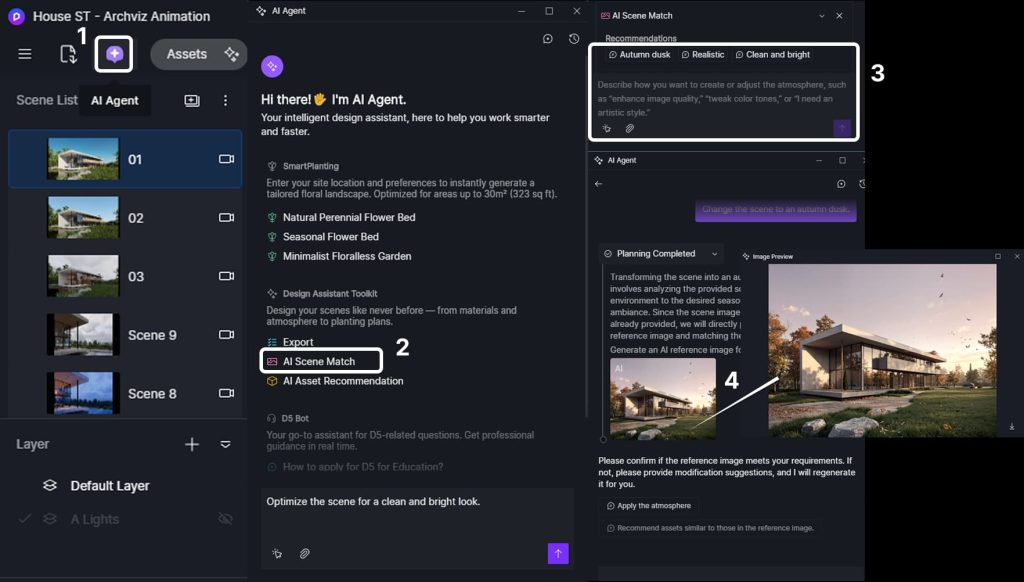
Stage 2: Realizing the Ambience
Iterate through the chat as needed. Ask the AI to “make the sunset warmer” or “add more morning mist.” Once satisfied with the preview, click Apply Atmosphere. D5 Render will automatically replicate that specific mood within your 3D scene.
Stage 3: Intelligent Asset Curation
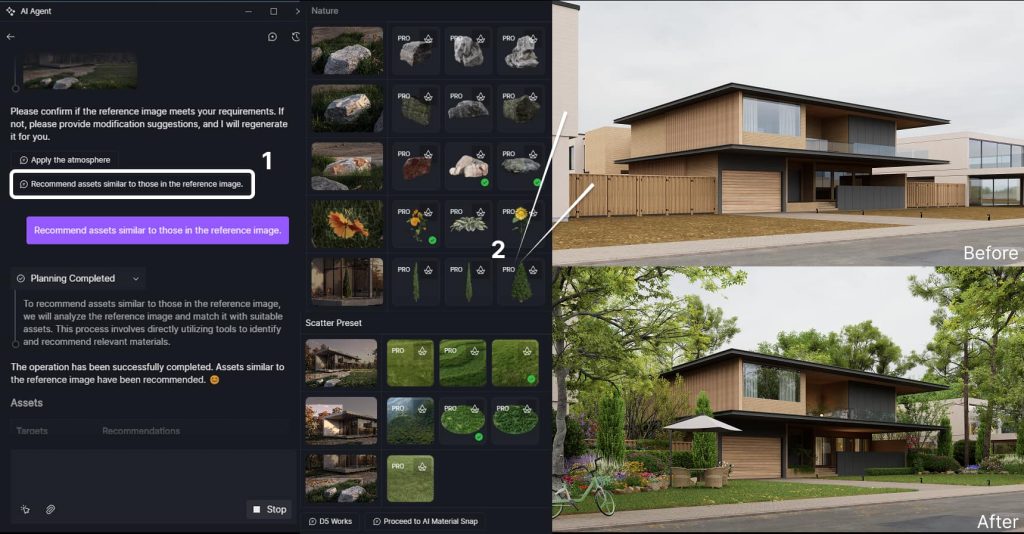
Once the lighting is established, click Recommend Assets. The AI analyzes your selected reference to suggest relevant vegetation, characters, and scatter presets.
You can also upload site photos for targeted analysis or describe specific needs, such as “Please recommend tree varieties suitable for aerial-view projects,” and the AI will suggest the perfect models for instant application.
Stage 4: Semantic Light Polish
Finally, use natural language to let the D5 AI agent help you fine-tune lighting and environmental parameters. For example, you can simply say, “increase the brightness and shift the color temperature to a warmer tone.” The AI Agent will then apply those changes consistently to all active lights in your scene.
If you want to adjust a specific light instead, click the arrow icon at the bottom-left of the chat box, select the light directly in your viewport, and then start chatting with the AI Agent. From that point on, all instructions will apply exclusively to the selected object, ensuring your focal points are perfect.
The Full AI Agent Suite: Bridging Creativity and Delivery
Since its inception, the D5 AI Agent has continuously evolved to support the professional design process. In D5 Render 3.0, these tools move beyond mere features—they become your creative partners, handling the tedious ‘under-the-hood’ work so you can stay focused on the art of storytelling.
- AI Scene Match & Asset Recommendation translate your creative vision into high-fidelity environments, pairing cinematic lighting with curated assets that align perfectly with your project’s context.
- SmartPlanting brings ecological logic to your landscaping, automatically adapting ecosystems to your terrain’s microclimate with scientific precision.
- Plant Schedule serves as a digital assistant, generating one-click plant inventories complete with botanical names, dimensions, and exact counts.
- D5 Bot offers instant technical assistance. By leveraging AI to summarize issues and automate support tickets, it ensures you spend less time troubleshooting and more time focused on design.
Together, these features handle the technical “heavy lifting,” allowing you to lead every project with pure creative intent.
Also read: What Is an AI Agent? How It Automates Landscape Design >>
Ready to Reclaim Your Creative Flow?
At the end of the day, 3D rendering shouldn’t feel like a boring checklist of technical settings. D5 AI Agent is here to take the “manual grind” off your plate, giving you more space to do what you do best—create. With the AI Scene Generator handling the heavy lifting, you can finally focus on your vision without getting bogged down by the details.
Ready to see your vision come to life? Download D5 Render 3.0 today and start building your next masterpiece!
Explore More: Pro Tips for Your AI Archviz Workflow
Tired of Endless 3D Post Processing? D5 Render Does It in One Click >>
What Is an AI Agent? How D5 2.11 Automates Landscape Design >>
AI Agent vs. Traditional Workflow: Which is Best for modern Landscape Design >>
AI Enhancer for Architects: Elevating Render Quality with AI-Powered Precision >>
Architectural Rendering Styles Made Easy with AI Style Transfer >>
AI in Architecture: How to Transform Workflow With D5 Render >>
FAQs on Automating Your Archviz Workflow
Most architects lose countless hours to the ‘manual grind’ of tweaking sun angles and hunting for assets. To accelerate your workflow, D5 Render‘s AI Scene Match replaces tedious manual setups with instant, high-quality environments tailored to your vision. It is designed to keep you in your ‘flow state,’ delivering professional-grade results without the usual technical friction.
Achieving the right “vibe” from a reference image used to take hours of micro-adjustments. Now, you can simply use AI Scene Match in D5 Render 3.0. Just upload your reference photo, and the AI translates the lighting, sky, and effects directly into your 3D model. It streamlines the workflow for designers who want to explore different artistic styles in seconds, rather than fiddling with technical sliders.
Yes, and the process is remarkably intuitive. With AI Scene Match integrated into the D5 AI Agent, you can essentially speak directly to your rendering software to shape your vision. If a sunset doesn’t look right, just tell the AI to “make it warmer” or “add some morning mist.” This conversational workflow allows you to refine the mood step-by-step using natural language, making the rendering process feel more like a creative collaboration and less like a chore.
Populating a massive site often feels like searching for a needle in a haystack. D5 Render‘s AI Asset Recommendation significantly reduces this manual search. By analyzing your scene’s context or a site photo, the AI suggests the perfect greenery and characters automatically. You don’t have to scroll through thousands of models anymore—the AI brings the right assets to you so you can focus on the design.
The D5 3.0 update marks a definitive shift toward Intent-Driven Design. We’ve expanded the AI Agent’s reach beyond Scene Match and Asset Recommendation, introducing AI Image to 3D and a refined AI PBR Material Snap for effortless texturing. To support your workflow even earlier, we’ve also introduced D5 Lite—an AI-native plugin for SketchUp (Rhino/Revit coming soon). It allows you to generate AI concepts directly within your modeling tool.
High-end renders often depend on subtle details like fog, exposure, and color synergy. D5 Render‘s AI Scene Match eliminates the friction of getting these details right. By choosing a curated D5 prompt or using your own description, the AI handles the complex environmental mapping for you, ensuring a cinematic, high-fidelity result without requiring deep expertise in complex lighting parameters.
 English
 Español
 Français
 한국어
한국어 日本語
日本語