
I'll be honest — after years of working in the ArchViz industry and talking to design teams every day, I've watched presentation trends come and go. But interactive presentations? They've quietly changed how architectural ideas actually get approved.
Many studios we work with are stepping away from flat images. Instead, they're handing clients the keys to walk inside designs that haven't even been built yet. They get to experience the light shifting across the floor and the true atmosphere of a space long before construction even begins.
But delivering that kind of interactive experience used to mean piecing together a complicated workflow. That's exactly why we made sure D5 Render keeps the whole process under one roof. Instead of bouncing between different apps, you can generate Spatial, XR, and Panorama Tours directly from your main scene.
Key Takeaways: Interactive Presentations in D5 Render
- No steep learning curve. D5 Render turns the 3D models you already have into fully navigable spaces — no plugins, no extra apps, just your usual workflow.
- Match the tour to the stage. Spatial for interiors and layouts, XR for free-orbit exploration, or Panorama for instant 720° previews — pick the right one and clients get exactly the immersion they need without overkill.
- Phasing animations eliminate the busywork. Ready-made templates handle construction sequences so you stop wasting hours on manual keyframing.
- Cloud sharing keeps you in control. D5 Showreel gives you secure links, passwords, and viewer tracking — your unreleased designs stay protected while clients explore freely.

Tool 01: Spatial Tour — 3D Navigation for Interactive Presentations
At some point in every design process, a 2D floor plan simply isn't enough for the untrained eye. That's where the Spatial Tour comes in.
Once your scene is polished up in D5 Render, creating a Spatial Tour is incredibly intuitive. Just head up to Tour > Spatial Tour in the top menu. From there, you use the familiar WASD and Q/E keys to position your cameras, set your viewpoints, and let the engine capture the exact geometry of the room.
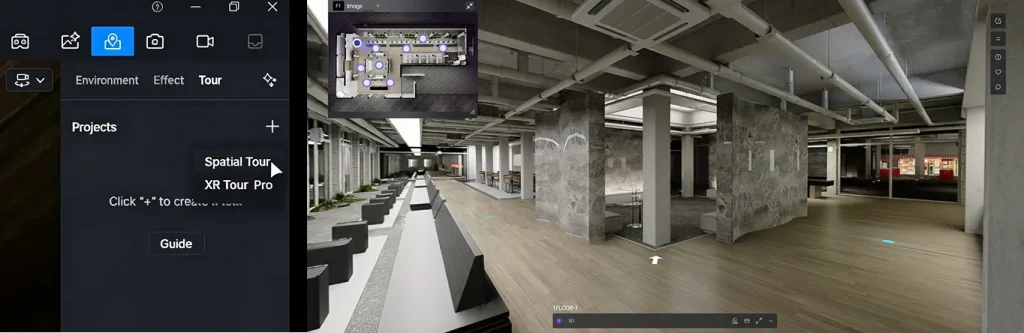
The output is a fully navigable 3D environment. What I personally find most effective is the "dollhouse" overview — it helps clients instantly grasp the layout. They can click the floor plan to jump directly between rooms, hit custom hotspots for specific design details, and even use built-in measurement tools to check precise clearances right there on the spot.
Got a multi-floor commercial complex? Just drop cameras on each level, and D5 automatically reconstructs the entire building envelope for you.
This visual clarity keeps practical design discussions grounded, and it's become a go-to for deep-dive team reviews. Best of all, clients don't have to install any plugins — you just send them a secure browser link.
Tool 02: XR Tour — Browser-Based Exploration for Interactive Presentations
Sometimes clients don't want to follow a fixed path. They want to orbit, zoom, and inspect freely. When traditional walkthroughs feel too restrictive, the XR Tour steps in. Powered by 3D Gaussian Splatting, it turns your high-fidelity D5 scenes into lightweight, photorealistic 3D models that anyone can open in a normal browser.
The workflow is straightforward:
- In D5 Render, go to Tour > XR Tour.
- Choose from three smart templates: Hemisphere for broad site overviews, Cube for detailed facades, or Sphere for capturing a full object.
- Position, adjust your sampling precision, preview, and render.
I see studios mix these constantly. For example, rendering a wide Hemisphere shot of the entire site, plus tight Cube captures of the main facade and pool area.
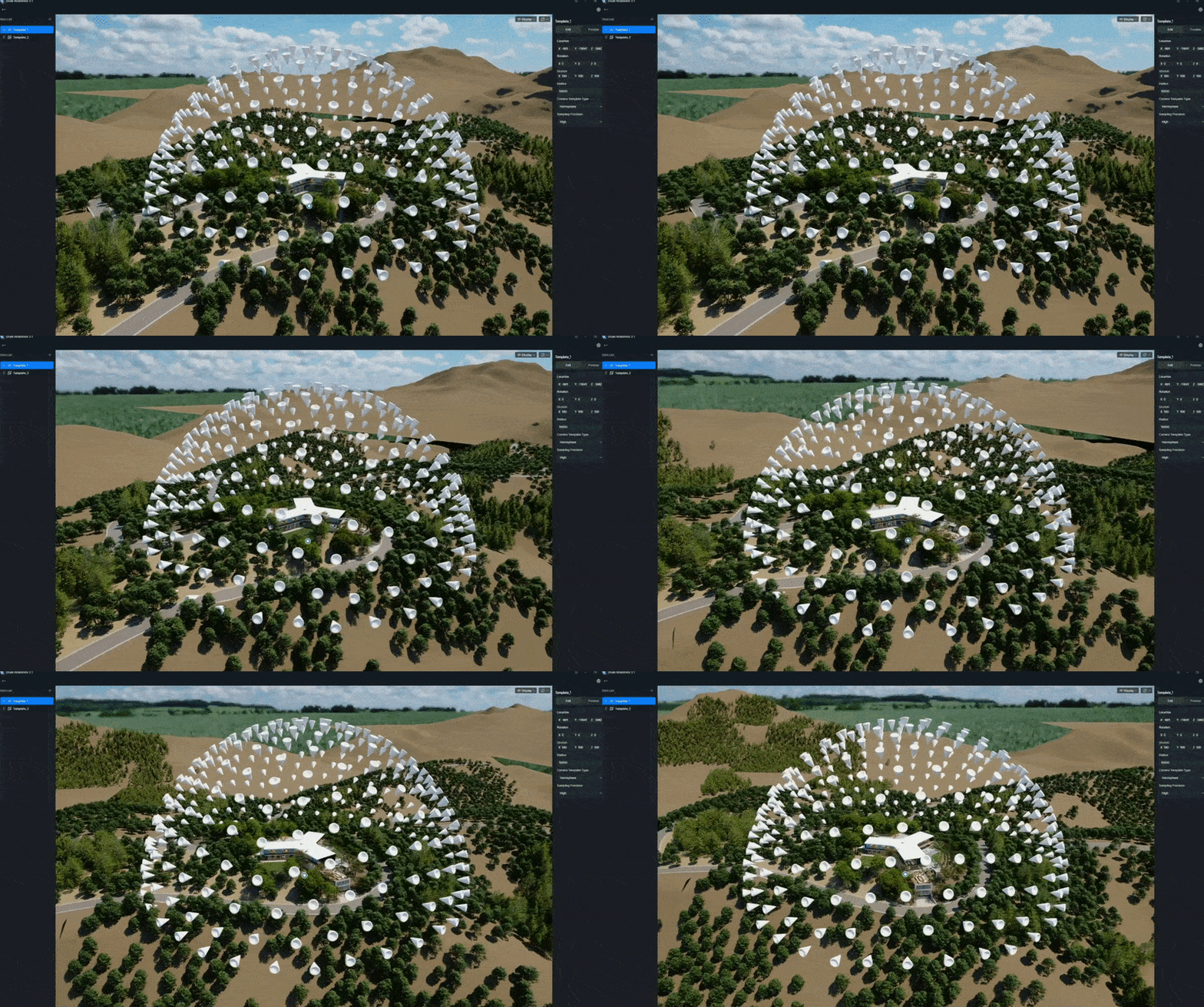
XR Tour Templates
Once exported locally with an HTML preview, upload it to D5 Showreel for cloud processing. In the XR editor, you can embed your Spatial Tours from the same scene, add hotspots, and fine-tune the experience.
Tool 03: Panorama Tour — Fast 720° Interactive Presentations
When deadlines are tight and you need a deliverable immediately, the Panorama Tour is your most reliable option.
Simply export 360° panoramas from your D5 scene and push them to D5 Showreel. The platform automatically stitches them into a smooth, clickable 720° experience. Add some hotspots, background music, and branding in minutes, then send a single link.
While it offers less free movement than Spatial or XR Tours, the speed and tiny file sizes make it highly efficient. It's perfect for initial client check-ins or quick website integration, and an excellent starting point before moving to heavier immersive formats as the design matures.
Choosing the Right Interactive Presentation: A Quick Comparison
To help you select the best approach for your current pipeline, here is a practical breakdown of the three core tours in D5 Render:
| Tour Type | Core Tech / Feature | Navigation Style | Key Strengths | Best For |
|---|---|---|---|---|
| Spatial Tour | Spatial Reconstruction | Free 3D walking, floor-plan clicks, hotspot jumps | Dollhouse overview; accurate measurement tools; clear spatial flow | Complex interiors, multi-floor buildings, and detailed team reviews |
| XR Tour | 3D Gaussian Splatting | Free-orbit 3D exploration from any angle | No hardware needed; photorealistic browser models; embeddable | Exteriors, facade details, and global client presentations |
| Panorama Tour | 360° Stitched Panoramas | Click-to-jump between fixed 720° views | Fastest setup; ultra-lightweight; easy sharing | Rapid previews, early feedback, and website embeds |
Hosting and Sharing Your Interactive Presentations in D5 Showreel
Ultimately, all these interactive tours are managed through D5 Showreel, the dedicated cloud platform we built specifically for architectural presentations. You can launch it right from the D5 Launcher sidebar.
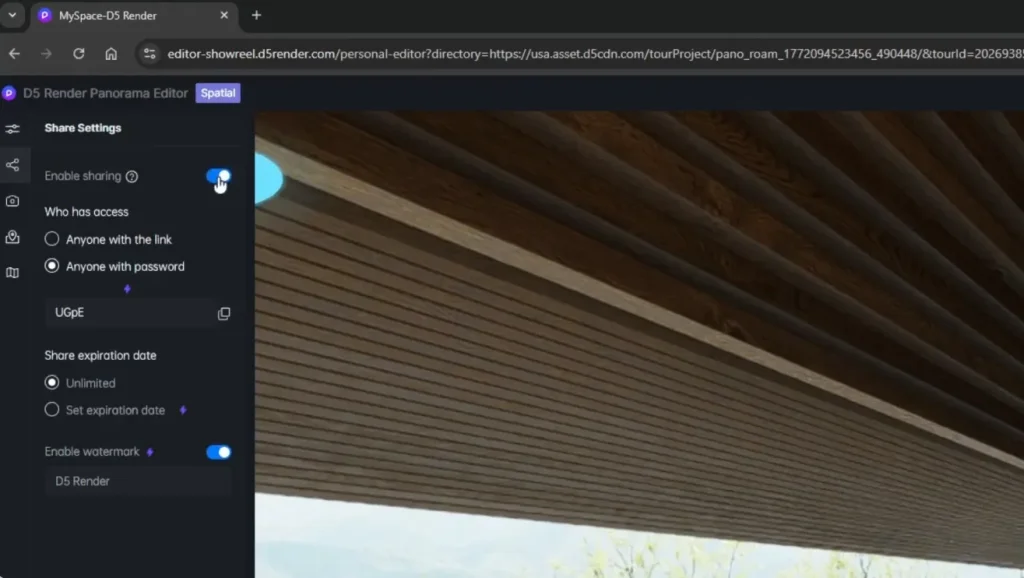
- Inside Showreel, you can keep your projects organized in folders, use bulk tools, and generate secure sharing links or QR codes instantly.
- The professional controls are incredibly practical — add passwords, set expiration dates, apply custom watermarks, and even track basic viewer engagement.
- Whether you're presenting to a local developer or stakeholders halfway across the globe, everything stays streamlined and fully under your control.
Tool 04: Phasing Animation: Adding Progression to Your Interactive Presentation
Interactive tours excel at showcasing the final design, but clients often need to understand how it all comes together. If you've spent hours manually keyframing construction sequences, you know the pain.
Phasing Animation in D5 Render eliminates that friction entirely. By organizing your building components into a logical hierarchy in your CAD software, you can switch to Video mode and create clear construction sequences in a fraction of the time.
Choose from ready-made templates — Drop, Rise, Ascend — then fine-tune the timing, sequence, and movement directly on the timeline.
The result is a clean animation that illustrates construction stages, material changes, or landscape development. Many teams play a short phasing video at the beginning of a presentation to give context, then hand over control so clients can navigate the finished design in a Spatial or XR Tour.
Why Are Top Studios Switching to Interactive Presentations?
When I talk to studios that have switched to D5's interactive tools, one thing keeps coming up: client meetings are smoother, and review cycles are far more efficient.
Take the studio 3DSUTAJIO and their "Cabin in the Forest" project. They created an XR Tour using Gaussian Splatting. Their clients can now freely explore the design from any angle via a simple link — no downloads, no special VR equipment. The result? A much stronger sense of space and atmosphere than traditional renders, leading to precise feedback.
Ready to Build Your First Interactive Presentation?
D5 Render is designed to make the jump from static images to interactive experiences as seamless and painless as possible. Whether you start with a quick Panorama Tour or go straight into a full Spatial/XR setup, the tools integrate smoothly and deliver professional results.
If you're ready to try it, experiment with these formats on your next project. You'll likely discover that immersive workflows don't just look better — they fundamentally change how clients engage with your work.
Continue Reading About Architectural Presentations
The Easiest Way to Create Stunning Phasing Animations
How to Create an Immersive Virtual Tour with D5 Render?
Why Choose D5 as Your Go-To ArchViz Presentation Tool?
What is XR? How D5's XR Technology Transforms Architecture?
How to Master Blender Animation — Then Elevate It in D5 Render?
Want to Win Clients with Visual Presentations? Try These 4 D5 Render Pro Tips
FAQ: Interactive Presentations for Architecture
Use browser-based interactive tours that require nothing extra. D5 Render's Spatial Tour offers free 3D walking with a dollhouse overview, floor-plan navigation, and built-in measurement tools — all shared securely via D5 Showreel with password protection if needed.
Yes. D5 Render's Spatial Tour reconstructs your 3D scene geometry to generate a fully navigable dollhouse overview. Clients can click any room and instantly switch to a first-person view.
2D floor plans often fail to convey real scale and flow for non-professionals. An interactive 3D presentation can bridge that gap effectively. With a Spatial Tour in D5 Render, you can link the floor plan directly to a navigable environment. Clients simply click a spot on the plan and move to that location in 3D, where they can even verify dimensions using the built-in tools.
For exterior architecture and facades, clients usually want to orbit the building freely rather than follow fixed paths. D5 Render's XR Tour, powered by 3D Gaussian Splatting, converts your detailed model into a lightweight, photorealistic web experience. Viewers can rotate, zoom into facade details, and explore the surroundings smoothly on any device — no specialized hardware needed.
Traditional keyframing can be time-consuming. Fortunately, modern rendering tools have simplified this significantly. In D5 Render, you can apply ready-made Phasing Animation templates — such as Drop, Rise, or Ascend — to grouped components. Many studios then combine the resulting video with interactive tours: a short phasing sequence first, followed by free exploration of the final design.
Yes. The feedback we get from studios is consistent: immersive presentations significantly shorten approval cycles. When clients can walk through or freely explore the design, they understand it better — leading to fewer revisions and quicker sign-offs.

Jeffrey Espinoza
Jeff serves as the Director of Customer Success & Services at D5 Render. Combining his practical background in architectural workflows with daily insights from top design firms, he loves sharing expert advice to help creatives master real-time visualization and AI.
 English
 Español
 Français
 한국어
한국어 日本語
日本語