
Schematic design in Rhino moves quickly—geometry changes, materials evolve, and spatial iterations happen constantly. But when someone asks which direction looks right under real light, you often can’t answer until after export. That's why we built D5 Lite.
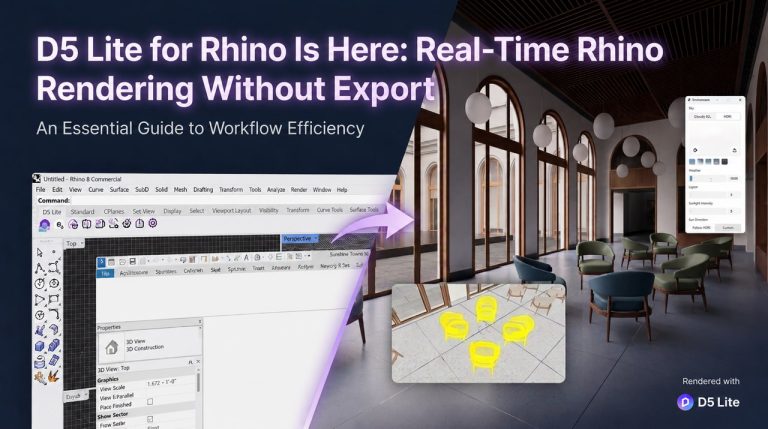
D5 Lite for Rhino (Beta), available with the D5 3.1 update, is built for that moment—not a separate app, but a viewport that keeps up with your Rhino model. Real-Time Rendering mode gives you realistic rendering feedback while geometry is still editable; when you need a quick read on style direction, you can switch to AI Generation mode from the same session. Your team stays in Rhino—no parallel workflow, no lost context.
Key Takeaways on Rhino Rendering Workflow
- In D5 Lite, materials, lighting, and Geo Sky settings are saved directly in your .3dm file—when a colleague opens the file on another machine, the setup is already in place.
- Need to move into final production? The one-way sync seamlessly carries your materials, lighting, proxy models, and Geo Sky from Rhino to D5 Render.
- D5 Lite and D5 Render are complementary: Lite accelerates concept-stage decisions inside Rhino, while D5 Render handles the heavy lifting for animations, high-res stills, advanced detailing, and Interactive Presentation.

Why Rhino Users Need Rendering Inside the Model
Rhino rewards fast geometric thinking. Walls move, sections are cut, landscape surfaces are reshaped—often in the same hour a client asks for a material direction. That pace is precisely why many architects, as discussed on the McNeel Forum, turn to plugin-based renderers. They need to keep modeling without rebuilding a scene elsewhere.
The bottleneck isn't skill—it's the context. And context is exactly what D5 Lite preserves. In early-stage design, you're weighing two things at once: which direction feels right, and whether materials read under real light. Split them across tools and you pay for it almost every time—remapped materials, a sun angle checked twice, a view re-explained to your own team. The cost hits hardest during schematic design—when you are actively comparing options.
D5 Lite for Rhino (Beta) keeps both questions in the same Rhino viewport. Use AI Generation mode when the team needs a fast direction test from the live viewport; use Real-Time Rendering mode when the decision depends on accurate materials, lighting, and Geo Sky. That's the early-stage loop Lite is built for—making fast design decisions while the geometry is still live.
What D5 Lite for Rhino (Beta) Does—Core Capabilities
To make that fast iteration possible, we focused on a few core mechanics.
- Realistic material and lighting feedback while modeling—adjust a PBR material, move a light, toggle Geo Sky. The Rhino viewport reflects the change in real time. You're seeing production-grade feedback at the concept stage—not a shaded placeholder.
- AI Generation mode for concept exploration—capture the current render viewport, then apply architectural, landscape, or interior presets, enter a text prompt, or upload a reference image. Generate, regenerate, or iterate until a direction feels worth validating in Real-Time Rendering mode. AI runs in the cloud, so it doesn't tie up your local machine.
- All visualization settings travel with your .3dm file. Send it to a colleague, and the materials and lighting are already there—no separate config files, and no more asking, "Did you save the render setup?"
Get Started in Minutes
Install D5 Lite for Rhino (Beta) through the D5 Launcher—there is no separate plugin download.
- Open the D5 Launcher and go to the Workflow tab. Select "Lite" at the top, choose Rhino, and click "Install." The Launcher handles the rest—no manual setup needed.
- Sign in once using your existing D5 account. The same login works for both D5 Render and D5 Lite—no separate credentials needed.
- Launch Lite in Rhino. Type "D5Lite" in the command line, or click the D5 Lite button on the toolbar. Lite opens in the viewport, and your model syncs in real time. You can switch between Real-Time Rendering and AI Generation from the top-left control panel.
- Set up the scene and create your first render. In the "Environment" panel, set the sky and sun direction. Adjust materials and lights—the viewport updates as you work. When you're ready for a saved image, click the "Render" button in the lower-right corner, choose where to save, and wait for the rendering to complete.
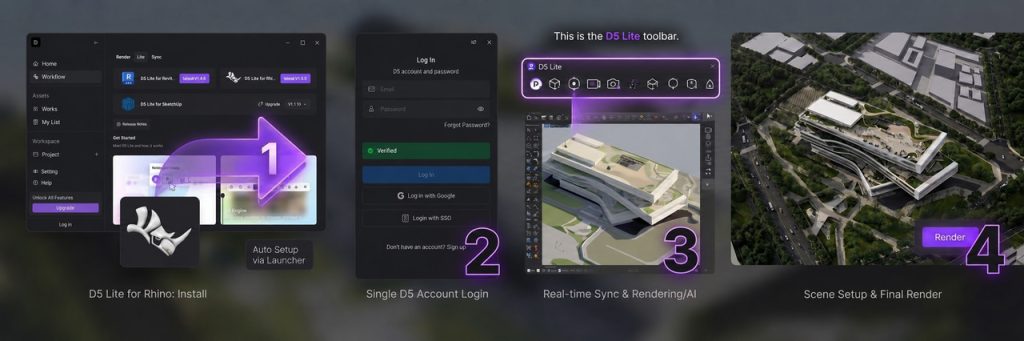
For higher quality stills, video, or animation, you can sync your work to D5 Render for further refinement. But if you just need a quick read on materials and lighting right inside Rhino—you're already good to go.
No Extra Subscription Needed for D5 Lite
One of the most frequent questions we hear from Rhino users: Do I need a separate subscription for this?
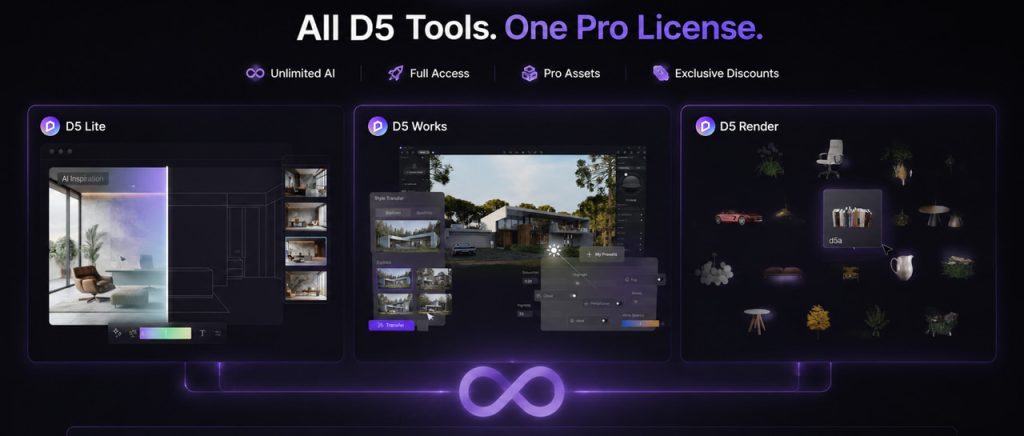
Short answer: There is no separate D5 Lite subscription—and you can start for free. Real-Time Rendering in the Lite viewport is free to use with a D5 account. New users also get 50 free generations to test the AI mode inside Rhino.
When you need more—unlimited AI generations, full D5 Render output (animations, high-res stills, Interactive Presentation), and D5 Works Pro assets—a single D5 Pro license covers everything under one subscription. No separate plans, no hidden costs.
Also read: Render Pricing in 2026: D5 Plans, Costs & Is It Worth It?
Who It's For—Rhino Workflows That Benefit Most
If any of these scenarios sound familiar, D5 Lite is worth a serious look.
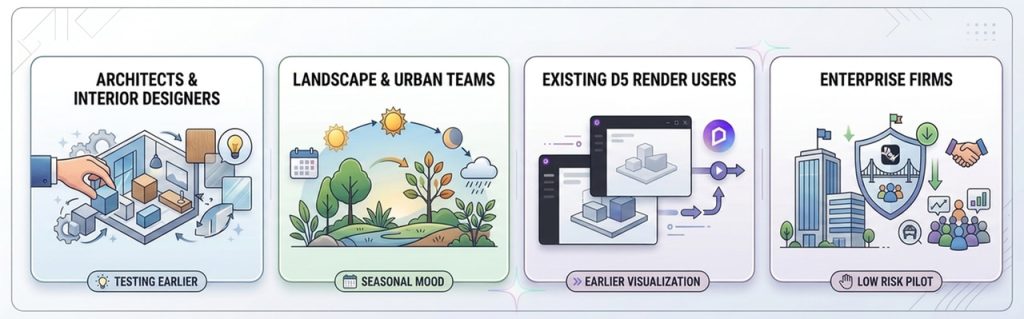
- Architects and interior designers testing materials, lighting, or style direction while the geometry is still moving. AI Generation mode works from the live viewport—so exploration stays tied to real geometry, not a detached prompt. And when principals want answers in the meeting, not next week, you have them ready.
- Landscape and urban teams can check seasonal mood, planting, or terrain under realistic light. The viewport syncs instantly with your edits; weather and material decisions become part of the design conversation—not a separate pass.
- Existing D5 Render users who want visualization earlier in the lifecycle. Lite pulls real-time feedback into the concept stage; Render remains your engine for presentation, animation, and client walkthroughs. The two complement each other instead of duplicating work.
- Enterprise firms can pilot Rhino-connected visualization with minimal friction. Introducing new tools at scale is often daunting, but D5 Lite removes the barrier: it's a Rhino plugin, not a parallel workflow. Your team stays in the .3dm file, your BIM/CAD stack stays intact, and the main change is faster feedback during design development.
If your 3D work is already in final-presentation mode—locked cameras, hero frames, delivery specs—you may live in D5 Render more than Lite. That's by design. We never intended Lite to be the last stop.
D5 Lite vs D5 Render—When to Use Which
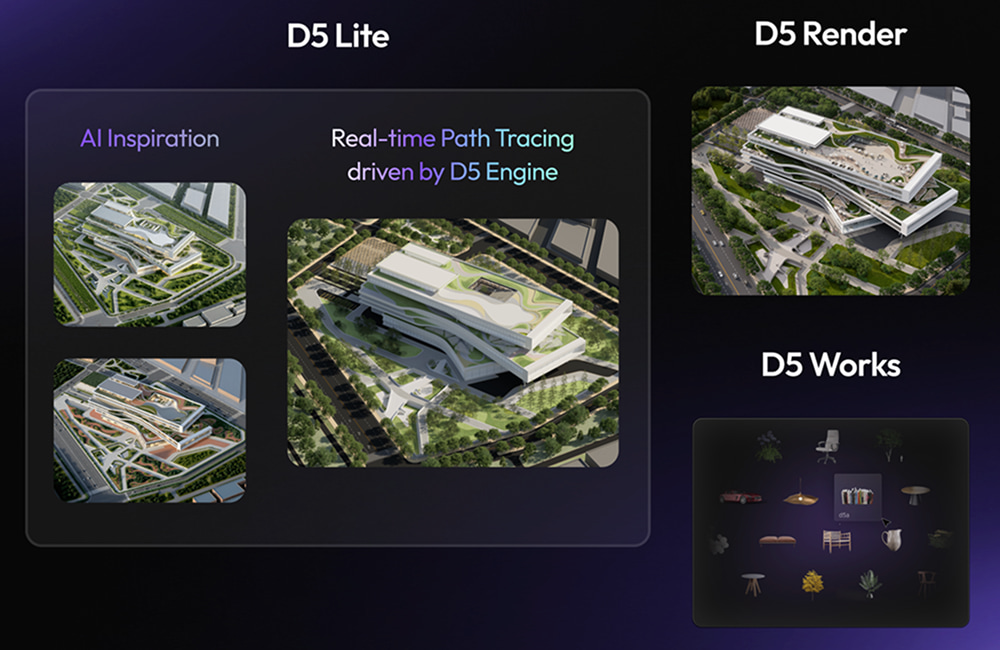
D5 Lite is the design-decision accelerator. D5 Render is the design presentation platform. You can stay in Lite through early and middle design; you switch to Render when the conversation shifts from "Which direction?" to "Let's walk the client through it."
| D5 Lite for Rhino | D5 Render | |
| Stage | Design ideation · concept‑stage decisions | High‑end presentations |
| Where | Inside Rhino | Standalone engine |
| Best for | Real-time iteration in Rhino · AI Generation for early style exploration | Animations · Advanced detailing · Interactive Presentation |
A Proven Rhino Workflow: Lite, Works, and Render When You Need It
Here is a workflow many Rhino teams rely on project after project.
- You start modeling in Rhino the way you always do—layers, blocks, templates. No new setup. When you want to see how the scheme reads with real materials and light, you turn on D5 Lite.
- From there, toggle between two modes: AI Generation for quick style exploration, and Real-Time Rendering when the decision depends on accurate materials, lighting, or Geo Sky.
- Once the direction starts solidifying, bring in entourage, furniture, and vegetation from the built-in asset library or D5 Works—right inside your Rhino session, while geometry is still live.
- When the deliverable demands more—animations, high-res stills, or Interactive Presentation—sync to D5 Render. One-way sync carries your materials, lighting, proxy models, and Geo Sky into presentation work.
That's the popular Rhino workflow today: design decisions inside Rhino, delivery in D5 Render. If your team already follows this two-stage approach—rapid iteration in a real-time viewport, then a dedicated engine for final output—Lite and Render make that handoff seamless.
Conclusion: Start with Free Real‑Time Rhino Rendering
D5 Lite for Rhino (Beta) closes the gap between designing and deciding. Both modes—Real-Time Rendering and AI Generation—live inside your Rhino viewport, so direction-setting happens at modeling speed, not export speed.
Download D5 Lite for Rhino (Beta) and enable Lite on your next active scheme. No new stack, no export-first ritual—just a clearer read on direction while the geometry is still moving.
Continue Reading Posts on Rhino Rendering Workflow
3 Essential Rhino Plugins to Supercharge Your 3D Workflow | D5 Render
D5 Rhino LiveSync: Effortless Real-Time Rendering Workflow
How to Render Rhino Models Significantly Faster with D5 Sync
D5 for Rhino 8: Real-Time Rendering & Workflow Revolution
FAQ on Rhino Rendering Workflow
It's a real‑time rendering plugin built directly into Rhino. You get realistic material and lighting feedback inside the viewport while modeling, plus an AI Generation mode for quick style exploration—all without leaving your .3dm file.
Install through the D5 Launcher—there is no separate plugin download.
Open the Workflowtab in the D5 Launcher, select "Lite" at the top, choose Rhino, and click Install. You only need to sign in once with your regular D5 account. No separate credentials, no second sign-in.
Yes. D5 Lite for Rhino (Beta) is built for real-time rendering inside Rhino. Syncing to D5 Render is optional—use it when you need presentation-grade output, animations, or tools like Interactive Presentation.
D5 Lite lives inside Rhino for concept‑stage decisions and fast iteration. D5 Render is the standalone engine for high‑end presentation, animation, and client walkthroughs. They complement each other; neither replaces the other.
One-way sync carries over: materials, lighting, proxy models, and Geo Sky. Your visual decisions and scene setups in Rhino arrive intact in D5 Render.
Any Rhino user looking to speed up early‑stage design decisions—especially architecture, landscape, and interior design teams who want high-fidelity visual feedback while the geometry is still changing.
It's a cloud-based exploration tool within D5 Lite. It captures your live Rhino viewport and applies presets, text prompts, or reference images to help you test architectural or interior styles in seconds, without requiring you to manually set up materials or lighting first.
No separate subscription needed. If you have a D5 Pro license, D5 Lite is included at no extra cost, unlocking unlimited AI generations. New users get 50 AI generations to test the workflow. For teams evaluating the workflow, one Pro license covers the full pipeline: Lite inside Rhino, then D5 Render for final delivery.

 English
 Español
 Français
 한국어
한국어 日本語
日本語