
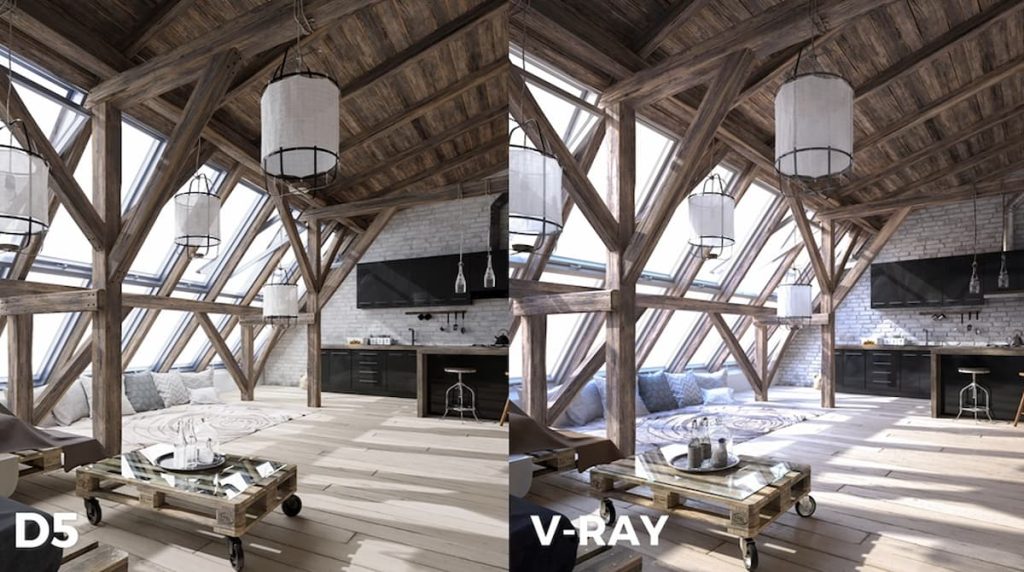
If you’re running a lean team or an independent design studio, you already know that an extra weekend spent iterating on test renders directly impacts your profitability. When comparing the leading architectural visualization tools, D5 Render is generally the better choice than V-Ray for small firms due to its real-time efficiency, unified workflow, and predictably lower pricing, whereas V-Ray remains the go-to for high-end offline precision.
Today, the decision extends beyond just comparing rendering engines — it comes down to your daily workflow. You are essentially choosing between the modular Chaos suite (where V-Ray, Enscape, and Vantage serve as the core tools) and the unified D5 All-in-One ecosystem. As clients increasingly expect cinematic walkthroughs, picking the right 3D software makes the difference between a productive creative week and one lost to endless rendering waits.
Key Takeaways: Archviz Tool Choice for Small Firms
- Cost of Context Switching: Constant app-switching between modeling, 3D rendering, and post-production tools is a major productivity drain on a small studio’s billable hours.
- Unified Workflows: Modern architectural visualization favors unified real-time workflows (like D5‘s) that keep feedback, assets, and animation in one viewport — removing the friction of modular setups.
- Built-in AI Tools: AI delivers the highest value when natively built into your architectural rendering software, rather than being treated as a disconnected, extra-cost plugin.
- Predictable Software Costs: Small firms are successfully lowering their 3D rendering costs by moving toward all-in-one platforms, which protect cash flow better than stacks of individual subscriptions.

Workflow Efficiency: D5 All-in-One vs. V-Ray Modular Ecosystem
The biggest time-killer for a small team is context switching.
The Chaos ecosystem is a highly modular suite built for precision. At its core are V-Ray and Corona — industry standards for hyper-realistic offline rendering — plus Enscape for quick real-time visualization and Chaos Vantage for heavy scenes. It’s a very capable toolbox, and I work with many talented architects who have relied on pieces of it for years.
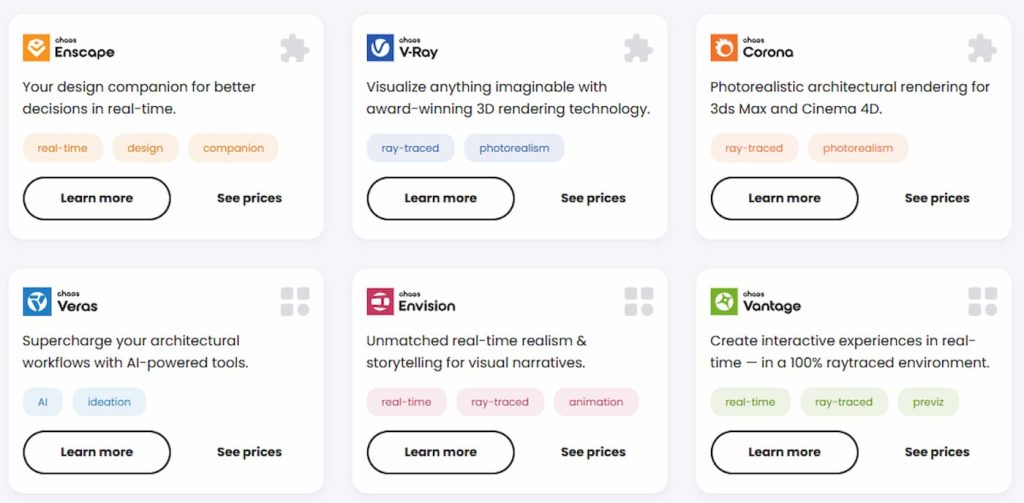
But in day-to-day practice, this modular approach often requires juggling multiple applications.
Typically, you’re modeling and iterating live inside SketchUp or Revit with Enscape. When it’s time for high-fidelity lighting and materials, you switch over to your V-Ray or Corona plugins. You run test renders (which might interrupt your design flow), handle your animations separately, and finally jump into Photoshop or After Effects to composite. Even with their Enscape-to-V-Ray compatibility, handing off a project between real-time previews, offline refinement, and final delivery consumes valuable billable hours per revision.
The D5 ecosystem simplifies this by consolidating visualization, asset management, and core rendering into one platform. You establish a LiveSync connection once, then handle materials, lighting, animation, and final output without the constant need for file exports or application jumping.
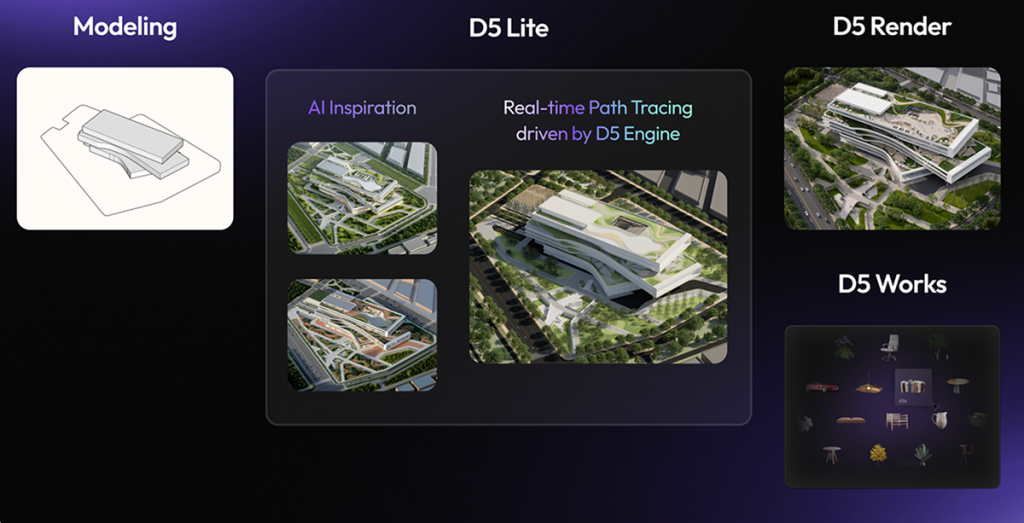
Here’s how it flows in practice:
- AI-Driven Ideation: Develop concepts directly within your modeling tool using D5 Lite. It uses native AI features to provide real-time visual feedback and high-quality still renders.
- Streamlined Asset Placement: Populate your scene by dragging and dropping optimized assets from the built-in library or D5 Works, ensuring your project remains lightweight without sacrificing quality.
- Advanced Production: Refine and export final animations or high-res stills within D5 Render. Thanks to LiveSync, you can finalize production without manually re-exporting models.
- Zero-Wait Rendering: Output high-fidelity stills in seconds and cinematic 3D walkthroughs in minutes. This rapid generation eliminates the traditional weekend rendering bottleneck for small teams.
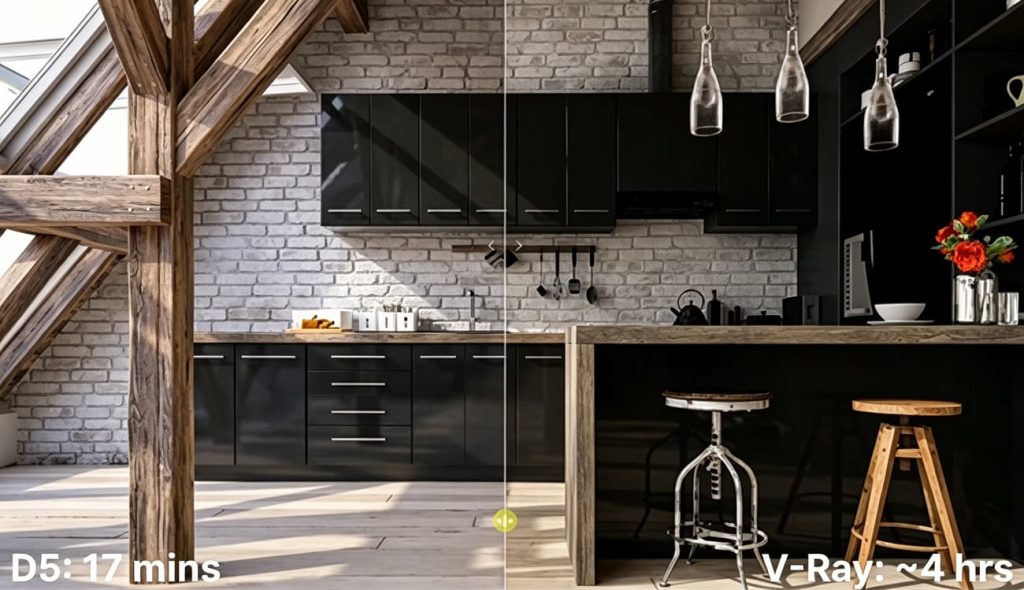
A side-by-side test by Platform Studio illustrates this difference perfectly. They ran the same interior scene through both pipelines: the traditional V-Ray setup (relying on offline rendering and post-production) took nearly 4 hours; D5 took just 17 minutes to reach a similar client-ready quality, largely because the entire process stayed within a single real-time viewport. When you’re a solo designer or a small team, preserving your actual design time — rather than losing it to tool juggling — is crucial for your profitability.
AI Integration: Targeted Fixes vs. Full Pipeline
AI in 2026 has shifted from an experimental feature to a daily utility in the AEC industry. For lean studios, the goal is straightforward: automating the tedious ‘grunt work’ to reclaim time for actual design.
Chaos treats AI like a series of smart, targeted accelerators. You get an AI Material Generator for quick textures, an AI Enhancer for polishing up people and trees in post, and tools like Veras for quick ideation. If your studio relies heavily on the Chaos pipeline, these effectively solve specific bottlenecks without forcing you to change your workflow.
But for smaller teams where every minute counts, D5 Render‘s approach is noticeably different. Instead of treating AI as a disconnected extra step, D5 integrates it natively throughout the entire workflow.
Once you’re in D5 Render, tools like AI Scene Match and AI Asset Recommendation can quickly populate your environment. You can also upload a reference photo to easily generate a complete PBR material. With features for SmartPlanting and AI Atmosphere Matching, the entire environment can be refined directly within the viewport.
This significantly reduces reliance on third-party AI platforms and eliminates the headache of managing messy, fragmented file versions. I’ve watched solo designers use D5’s built-in AI toolset to cut down on tedious manual setup, freeing up more time for actual design work.
Asset Ecosystems: D5 Works vs. Chaos Cosmos
The ‘asset hunt’ is a common mid-project bottleneck — tracking down a high-quality sofa or a realistic tree, only to realize after the download that it clashes with the scene’s aesthetic, or worse, the file is so bloated it brings your viewport to a crawl.
Chaos offers Cosmos, a highly curated selection of high-quality models and materials. These assets integrate seamlessly, though in practice, designers often struggle to balance high-fidelity assets with smooth viewport performance.
D5 tackles this with a built-in library of over 16,000 ArchViz-ready assets (furniture, animated people, vehicles, plants, and more) that load rapidly and are already optimized for real-time performance. Beyond the standard library, D5 Works allows you to drag and drop thousands of additional render-ready models directly into D5 Render or SketchUp. If you still can’t find the right piece, D5’s built-in AI tools let you generate custom 3D assets on the fly using simple text prompts or reference photos. For small firms, avoiding external downloads and broken texture links removes a major workflow bottleneck, allowing teams to populate scenes without breaking their focus.
The Reality of 3D Rendering Cost for Small Firms
For solo designers and small studio owners, software overhead is always top of mind. It’s rarely just the sticker price; it’s the “hidden tax” of cloud credits, multiple plugins, and the trial-and-error costs of assets that never actually make the cut.
The Chaos ecosystem is modular, which works well if you only need a single tool. However, for a 1- to 5-person team, paying for an entire stack quickly inflates overhead. Most designers I know now run Enscape Premium for real-time feedback ($635/year, which includes Veras AI) plus V-Ray Solo for final high-fidelity renders ($540/year). That’s about $1,175 annually just for the basics.
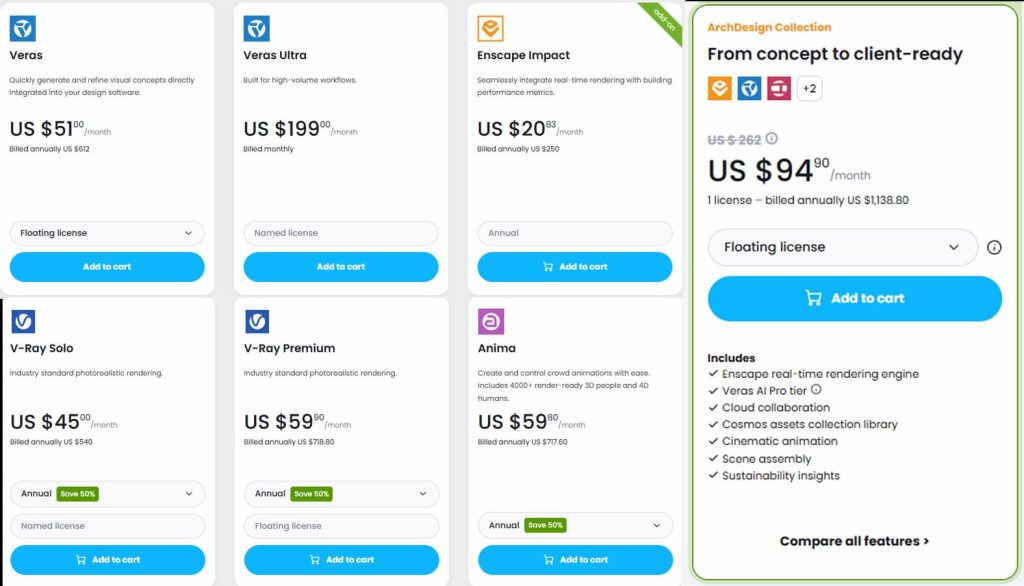
Beyond short 14-to-30-day trials, the Chaos ecosystem does not offer a free version. While Chaos offers student discounts (~$150 per product) and floating licenses for larger firms, you’re still managing a fragmented, per-tool subscription model.
D5 Render takes a more predictable, all-in-one approach. The Community Edition is free for personal use and includes 50 trial credits for its advanced AI features — enough to get a real feel for the tech before committing.
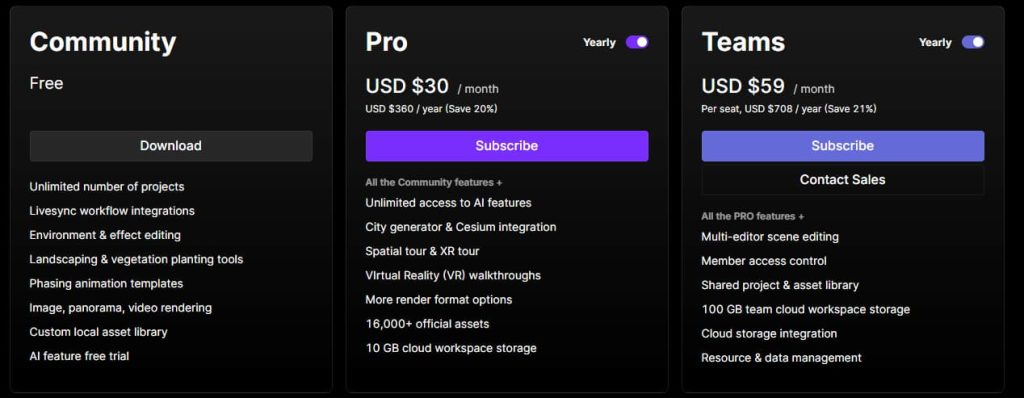
For commercial work, the Pro Plan is a flat $360/year. This unlocks the entire ecosystem — D5 Render, D5 Lite, and access to premium D5 Works assets. Plus, it includes unlimited AI features, XR tours, and VR walkthroughs, all with zero per-render charges or hidden fees.
Students and educators, meanwhile, can take advantage of a 100% free Educational License that gives you nearly all the Pro-level features. And if your studio is starting to scale beyond solo or a two-person crew, D5 for Teams is built exactly for that. It starts at $59/user/month ($708 per seat when billed annually) and adds real collaboration tools like multi-editor scene editing, shared team libraries, 250 GB of team cloud storage, and dedicated support — all while keeping the same unified, real-time workflow that makes D5 so fast in the first place.
Ultimately, switching to D5 usually cuts software overhead by 60–75%. In a lean business, that kind of financial predictability isn’t just a bonus — it’s how you stay competitive.
Quick Comparison: Chaos Ecosystem vs. D5 All-in-One (2026)
| Feature | Chaos Ecosystem (V-Ray + Enscape) | D5 All-in-One Workflow |
| Core Workflow | Modular toolbox: live previews (Enscape) → final renders (V-Ray) → post-production | Unified 3D environment: from initial concept to final animation within a single viewport. |
| Revision Speed | Fast live previews, but switching apps adds time per change | Live updates — tweak the model and see high-fidelity results in real time |
| AI Integration | Targeted tools (Veras, material generator) that solve specific steps | Native AI throughout: scene match, PBR from photo, smart planting — all in the viewport |
| Asset Library | Chaos Cosmos — high-quality, optimized primarily for offline rendering | 16,000+ pre-optimized archviz assets + D5 Works AEC hub; drag-and-drop ready, smooth performance |
| Typical Annual Cost (small team) | $1,175+ for a common small-team stack (Enscape Premium ~$635 + V-Ray Solo $540) | $360 (Pro plan includes everything) |
| Best Suited For | Studios needing deep offline photoreal control and extensive customization | Lean teams prioritizing speed, predictable costs, and fewer tool switches |
Why Small Studios Choose D5 for Architectural Visualization
Recently, I sat down with Novaforma, a two-person independent studio in New York. They used to rely on multiple 3D rendering tools like V-Ray, Corona, and Lumion alongside Rhino. The fragmented workflow was hindering their ability to manage quick turnarounds for client revisions. By switching to D5 and hooking up Rhino LiveSync, the team consolidated their entire visualization and post-production process into one window. As they told me, “D5 wasn’t just a renderer — it became part of our business model.” This streamlined setup ultimately enabled them to deliver more without hiring extra help.

I hear the exact same story from other boutique firms across the globe, such as Studio Megami in Brazil. For a two-to-three-person team, handling massive, vegetation-heavy scenes — like a seven-block mountain residence — used to be a major technical hurdle. With D5, they now produce 4K renders in minutes rather than hours. This real-time speed allows them to address client feedback on the fly, often resolving design questions during the meeting itself. By using native AI tools and optimized assets, they’ve moved away from technical troubleshooting and can focus more on the actual design and client presentation.
“Some clients can’t imagine a space from a floor plan. A good render is what makes them feel the design.” — Lucas Castro, Co-founder of Studio Megami
Making the Smart Choice for Your Studio
If you need quick client revisions, high-quality photorealistic animations, and a unified workflow without a big render farm investment, D5 offers strong value. It saves hours that matter and helps keep cash flow healthy.
The “best” 3D rendering software is simply the one that gets your vision in front of clients with the fewest headaches. If streamlining your process and managing overhead are top priorities, testing an all-in-one platform like D5 on your next project is a practical move. The right software should elevate your designs while simplifying your workflow, rather than complicating it.

Read More: Cost-Effective Architectural Design Solutions
D5 Cost Mastery: Balance Quality & Innovation in Architecture
How to Build an Affordable Architectural Rendering Studio in 2026
KPF’s Innovation Leap with D5 Render: Boosting Efficiency and Cutting Costs
Real-Time AI for Small Rendering Firms: Efficiency Boost
Unlock Effortless Design Collaboration on ArchViz Projects with D5 for Teams
How to Create Interactive Presentations for Architecture with D5 Render
FAQ: Choosing the Right Rendering Software for Your Studio
As we’ve seen in the cost breakdown, stacking modular software easily pushes your overhead well past a thousand dollars annually. Consolidating into a unified platform like D5 cuts that to a fraction, protecting your bottom line while delivering photorealistic results.
Lagging in real-time previews often happens when pushing highly complex geometry. While a hardware upgrade helps, engines built natively for real-time handling, like D5 Render, manage massive site models and heavy vegetation much more fluidly.
Small studios win by working smarter, not by hiring more render technicians. A streamlined real-time visualization workflow can make a big difference. Independent teams often move to real-time solutions like D5 because it removes render wait times and technical hurdles. For many, it simply becomes a core part of their daily workflow, helping lean teams produce the kind of work that used to require large-scale render farms or dedicated visualization staff.
You don’t necessarily need a render farm anymore. The industry has moved toward real-time engines that can create smooth cinematic walkthroughs right on your local GPU. For example, D5 Render lets you set up camera paths and export high-quality video in a fraction of the time traditional offline renderers usually require, making animated deliverables far more practical for small firms.
The main bottleneck is offline adjustments. With a real-time engine like D5 Render, you don’t even need to send test files back and forth. You can share your screen during a client meeting, tweak the lighting or swap materials, and get immediate sign-off right there in the viewport. This effectively eliminates the dreaded weekend revision cycles.
AI only helps if it fits inside your existing process instead of adding extra steps. Many teams avoid separate web tools that force you to break your flow. Instead, they look for engines with native AI features. D5 Render integrates AI directly into the pipeline — from quick concept generation in the modeling phase to material creation and environment matching right inside the viewport.
 English
 Español
 Français
 한국어
한국어 日本語
日本語