
Key Takeaways:
- D5 is transforming design workflows by enabling real-time, context-aware visualization that directly informs architectural decisions—not just final outputs.
- Its intuitive interface has driven rapid, bottom-up adoption, growing from five trial licenses to twenty active users within weeks.
- More than a rendering tool, D5 is becoming embedded across early-stage thinking, iteration, and communication—reshaping how the firm designs.
Studio Overview:
- Location: New York City, United States
- Team Size: Around 100+ professionals
- Studio Type: Architecture, planning, and interior design firm
- Project Types: residential towers and multifamily housing, hospitality projects, educational and cultural buildings, interiors, commercial and corporate spaces, and historic preservation / adaptive reuse.
- Modeling Tools: Revit, Rhino & Sketchup
D5 is not just the end of the line. It’s part of the design itself.
—Paul-Arthur Heller, Principal at CetraRuddy
When Justin Benjamin first introduced D5 to his team, he expected interest. What he did not anticipate was how quickly it would begin to shift the way design itself was approached.
As Director of Design Technology, Benjamin has long worked at the intersection of tools and process. But within just three months, D5 moved beyond evaluation and became part of how teams think, test, and communicate ideas.
"Rendering has moved beyond affirmation," Benjamin says. “D5 is actively informing design decisions.”

From Passive Confirmation to Active Design
For years, visualization at the firm followed a familiar pattern. Tools like Enscape were used to present ideas once they were already defined—useful for communication, but largely detached from the design process itself.
“Enscape was affirming,” Benjamin notes. “You already knew what it would look like. You were just building a picture of it.”
D5 introduced a different dynamic.
Instead of validating decisions after the fact, visualization becomes part of how decisions are made. Designers are able to test ideas, evaluate trade-offs, and iterate continuously—without breaking their workflow.
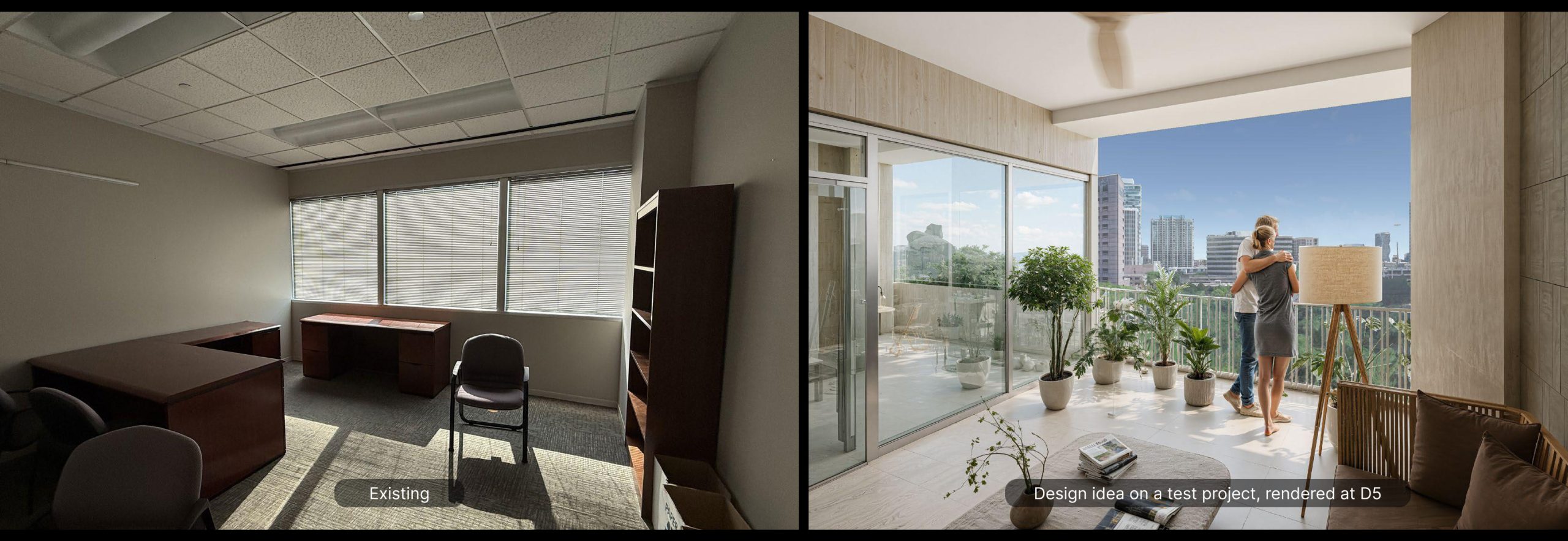
This shift—from confirmation to exploration—marks a fundamental change. Visualization is no longer a downstream deliverable. It becomes an active layer within the design process.
Designing in Context, from the Start
For Principal Charles Thomson, this shift became tangible during a rooftop addition study in Manhattan. What began as a simple test quickly evolved into something more impactful.
By bringing the model into a real-world context using Cesium, the project could be evaluated within the actual city fabric—surrounding buildings, skyline, and views included.
“I didn’t even plan to animate anything,” he recalls. “But by the time the client meeting came around, I had something ready. They were floored.”

The difference was not just visual quality, but immediacy. What previously required assembling context models, post-processing, or even drone footage could now be explored in real time.
“You can see it in the first meeting,” Thomson explains.
For projects in dense urban environments like New York City, this fundamentally changes how design decisions are evaluated—bringing context into the process from the very beginning, rather than reconstructing it afterward.
Learn more: Design with Real-World Context: Cesium x D5 Render in Action!
Extending Upstream: Before Design Even Begins
One of the most notable shifts at CetraRuddy is how early visualization now enters the workflow.
In several cases, D5 is used before a project formally exists—supporting business development and early client conversations.
We’ve used D5 to pitch ideas before a project is officially on the books. It allows us to communicate intent quickly and clearly.
—Paul-Arthur Heller, Principal at CetraRuddy
This capability compresses the gap between concept and communication. Instead of relying on abstract diagrams or references, teams can present spatial ideas with clarity—enabling faster alignment and more confident decision-making from the outset.
A Continuous Feedback Loop for Design
As projects progress, D5 continues to function not as a presentation layer, but as a feedback mechanism.

Designers use it to evaluate materials, lighting, and spatial relationships in real time—often informing decisions that would otherwise rely on drawings or assumptions.
During value engineering discussions, this becomes especially critical.
“You can show exactly what a change means,” Heller explains. “If we adjust materials or simplify elements, everyone can see the impact immediately. It changes the conversation.”
Rather than negotiating abstract trade-offs, teams are able to ground decisions in shared visual understanding—improving alignment across architects, clients, and contractors.
Read more: What Is Real-Time Path Tracing in D5 Render & Why It Matters
AI as a Design Contributor, Not Just a Tool
Beyond speed, D5’s AI capabilities introduce a new dynamic into the design process.
In some cases, outputs generated through AI-assisted workflows have led to unexpected insights—suggesting alternative material palettes or visual directions that influence the design itself.

“Sometimes D5 surprises you,” Heller notes. “It pushes the design in a direction you hadn’t considered.”
This reflects a broader shift: AI is not replacing design intent, but augmenting it—expanding the range of possibilities while keeping control in the hands of the designer.
Learn more: How to automate architectural render with AI Agent
Organic Adoption Across the Practice
The adoption of D5 within the firm has been notably organic.
Starting with five trial licenses, usage expanded rapidly as early adopters began sharing their work. Within weeks, the firm scaled to twenty licenses, with demand continuing to grow.
Importantly, this growth has not been driven by a dedicated visualization team. Instead, designers across the firm are incorporating D5 directly into their workflows.
Visualization is no longer a specialized function—it becomes a shared capability.
Accelerating Design Decisions and Workflow Integration
The impact on workflow is already evident in daily practice.
Tasks that previously required multiple tools—or external support such as drone photography, context modeling, or post-processing—can now be handled within a single environment. Designers are able to move from model to context-rich visualization within hours, often within the same working session.
This compression of workflow directly affects how decisions are made. Client feedback cycles become shorter, internal reviews more frequent, and design iterations more continuous. In one instance, a team member with no prior experience was able to learn D5 and produce client-ready visuals within a single day—exceeding expectations for both speed and quality.
Rather than accelerating rendering alone, the platform reduces the time between idea and evaluation—allowing teams to make better decisions earlier in the process.

At the same time, the firm is beginning to explore how this workflow can scale across larger, multi-building projects, where different team members contribute to a shared environment—from individual buildings to streetscapes and public space. While still in early stages, the direction is clear: moving from isolated visualization tasks toward a more connected, project-wide workflow.
Learn more: How to collaborate on the same project in real time with D5 for Teams.
What stands out is not just the adoption of a new tool, but how quickly it has been integrated into everyday practice. From early client pitches to design development and construction discussions, teams are using D5 across multiple stages of a project—extending beyond traditional visualization roles.
“It’s a game-changing visualization tool,” Thomson declares.
Heller adds, “It’s not just the end of the line. It’s part of the design itself.”
Visualization is no longer just about showing what has been designed, but about helping shape what gets designed in the first place.
Conclusion
As architectural workflows continue to evolve, the role of visualization is being redefined.
At CetraRuddy, it is no longer the final step in the process. It is becoming the medium through which design happens—informing decisions, accelerating iteration, and aligning teams around a shared understanding of space.
In that shift, visualization moves from output to infrastructure—and design, in turn, becomes more immediate, more iterative, and more connected.
See How D5 Fits Your Process
Inspired by CetraRuddy’s workflow? Let’s explore how D5 can support your projects—from early concept exploration to final visualization and presentation.
Your Work Deserves the Spotlight
Has D5 transformed how you design, present, or collaborate? Turn your D5 Render project into a story that inspires designers around the world! Share your journey—and let the world see what’s possible.
By submitting your project, you could:
✅ Be featured in a global case study seen by thousands
✅ Co-host a D5 webinar and showcase your expertise
✅ Speak at official D5 events and elevate your industry presence
This is more than a feature—it’s your chance to grow your voice, build your brand, and inspire a global design community. Share your stories here.


 English
 Español
 Français
 한국어
한국어 日本語
日本語