
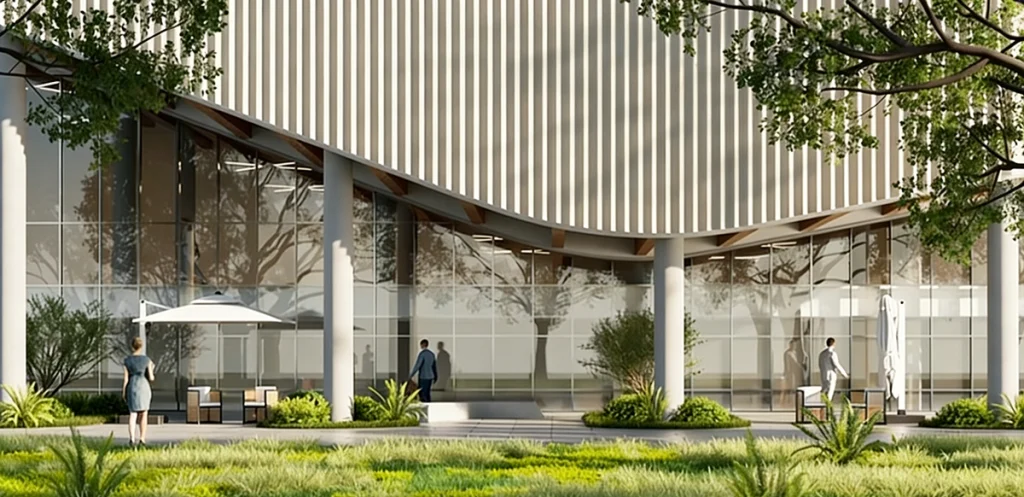
Every month, we speak with thousands of SketchUp architects, visualization specialists, and studio teams. Right now, nearly every discussion circles back to one topic: AI in the design pipeline.
The shift is undeniable. Our 2025 Impact of AI in Architecture & Design report — based on 665 responses from over 100 countries — found 82.8% of professionals actively using or evaluating AI tools. Bluebeam’s 2026 AEC Technology Outlook reported a similar trend: 68% of early AI adopters have already saved at least $50,000 on recent projects through AI-driven efficiencies.
Yet as the initial excitement settles, the conversation has matured. The question is no longer whether to adopt AI, but which tool truly supports — rather than disrupts — an existing SketchUp-centric workflow.
Text-to-image models like Midjourney excel at open-ended ideation and mood exploration, while geometry-aware solutions like D5 Lite are built to live inside the modeling environment itself. This guide compares the two from a working architect’s point of view: workflow fit, geometric reliability, iteration speed, pricing, and real project outcomes — so you can decide what makes sense for the way you work.
Key Takeaways
- Midjourney remains exceptionally fast for prompt-driven concept exploration and artistic direction, yet its complete disconnection from your 3D model frequently results in fragmented downstream work.
- D5 Lite is a free native plugin for SketchUp that pairs real-time path-traced rendering with geometry-anchored AI concept generation — all driven directly by the 3D model you’ve built.
- Workflow continuity matters: unlike many viewport AI tools that require exporting to separate engines for final quality, D5 Lite offers one-click syncing to the full D5 Render, carrying your scene from massing studies through to 16K production outputs.
- Midjourney excels for early, open-ended ideation where creative freedom comes first, but when geometric precision and client-trusted deliverables matter most, D5 Lite integrates seamlessly into daily SketchUp practice.

SketchUp AI Tools Compared: D5 Lite vs. Midjourney
| Feature | D5 Lite | Midjourney |
|---|---|---|
| Starting price | Free (D5 Pro: unlimited AI generations + full rendering + D5 Works assets & discounts) | $10/month (Basic plan) |
| SketchUp Integration | Native plugin + live viewport sync | None (prompt or image upload only) |
| Geometry accuracy | 100% – renders your exact 3D model | Low – hallucinations common |
| Real-time feedback | Yes – instant updates as you model | No |
| AI control | Structure Weight slider (Precise ↔ Creative) + iterative generation | Pure text/prompt-based only |
| Speed for iterations | Seconds inside SketchUp | Minutes + heavy re-prompting |
| Video / animation support | One-click sync to D5 Render for professional output | Image-to-video available |
| Video / animation support | One-click sync to D5 Render for professional output | Image-to-video available |
| Best suited for | Accurate SketchUp design visualization | Early inspiration & mood boards |
| Export to production renderer | One-click sync to full D5 Render | Manual scene reconstruction required |
| Biggest limitation | Requires an existing 3D model to start | No native 3D geometry understanding |
Midjourney: Creative Power with Geometric Limits

Midjourney continues to be one of the quickest ways to generate diverse visual directions. Architects frequently use it in the earliest stages — assembling mood boards, testing atmospheres or exploring stylistic families — often yielding dozens of compelling variations within minutes.
That creative velocity, however, comes with a structural limitation for later-stage architectural work. Because Midjourney operates entirely outside your SketchUp file, it interprets prompts through pattern recognition rather than spatial understanding. The well-documented outcome is hallucination: floating structural elements, impossible cantilevers, scale inconsistencies, and material mismatches that bear no relation to the actual design.
Industry surveys reflect the practical impact. In a CGconnect poll, 76.8% of responding architects noted inconsistent multi-view coherence when relying on general-purpose generative AI. A peer-reviewed study from the University of Sharjah (published in Buildings) further documented challenges with structural logic and regional vernacular accuracy. While the images can be visually compelling, the frequent follow-up question from clients — “Is this actually buildable?” — often forces significant remodeling effort.
D5 Lite: Real-Time AI That Actually Lives Inside SketchUp
D5 Lite takes a fundamentally different approach from text-to-image tools like Midjourney. It’s a lightweight plugin that installs directly into SketchUp and gives you two tightly integrated ways of working — both driven by your existing model geometry.
The feature architects tend to find most compelling is AI Generation Mode (powered by a hybrid AI architecture that includes Nano Banana Pro). You capture whatever is currently visible in your viewport, and the AI immediately produces styled concept variations that are locked to the exact 3D geometry you’ve modeled. There’s no guessing or reinventing proportions — your walls, windows, and overall massing stay exactly where they are.
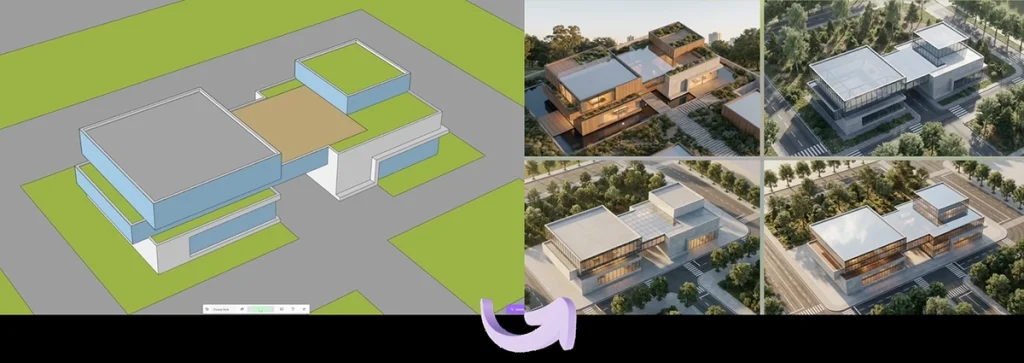
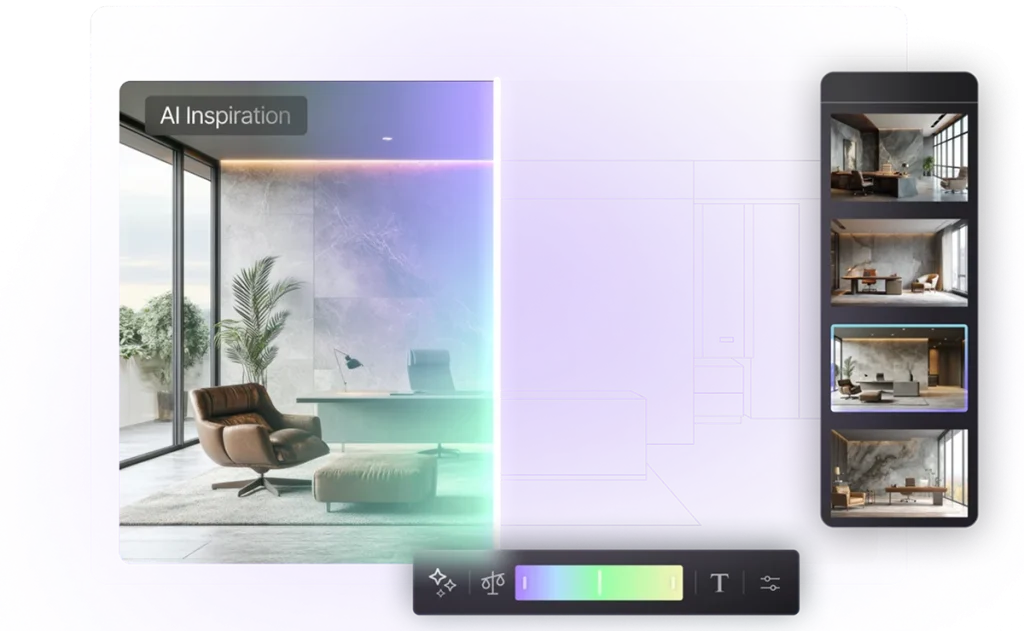
D5 Lite offers a variety of built-in style presets across Architecture (e.g., commercial, office, villa, residential), Landscape, and Interior Design categories. Users can also input custom inspiration descriptions — to guide the AI toward specific moods, palettes, or details while keeping the output locked to your model’s exact geometry.
A single Structure Weight slider lets you decide how closely the AI should follow your model:
- Slide toward Precise when you need visuals that match your design intent 1:1 — great for client presentations.
- Slide toward Creative when you want the AI to suggest bolder stylistic directions while still respecting the underlying structure.
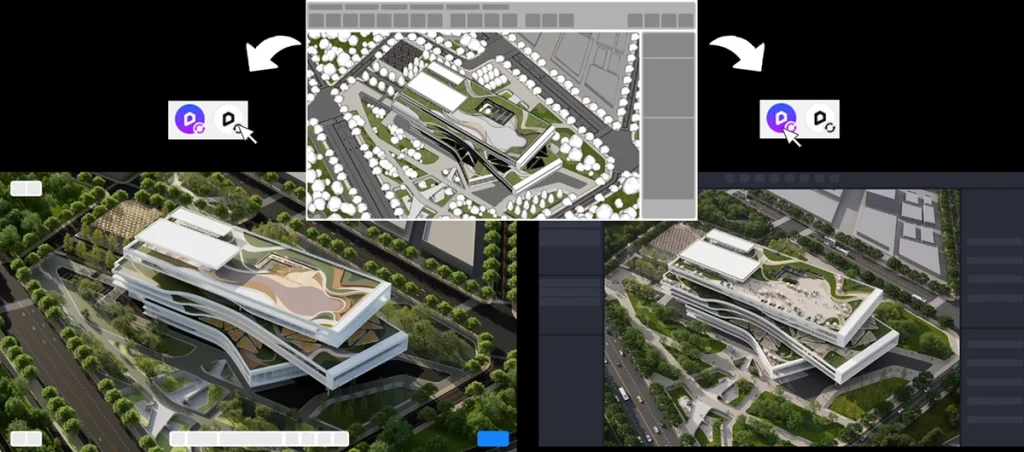
The second part — Real-Time Rendering Mode — is what keeps the whole experience fluid. Powered by the self-developed D5 Engine, it delivers production-level rendering quality directly in your workspace. As soon as you move a window, change a material, adjust the sun, or tweak any light, the floating viewport updates instantly with full path-traced rendering. No file export, no waiting for renders to finish in another program.
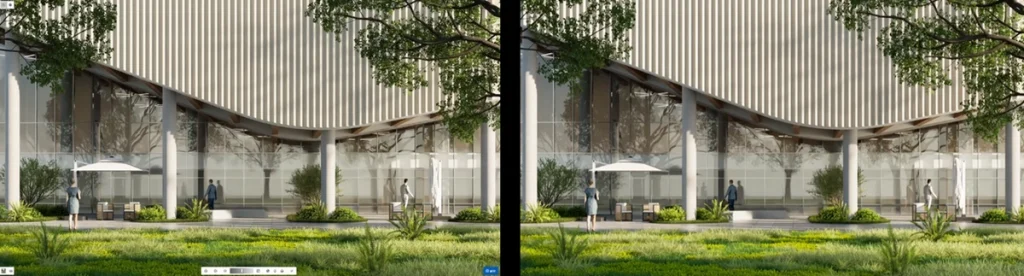
Put the two modes together, and you stay inside SketchUp the entire time: generate grounded AI concepts when you need fresh visual directions, then iterate lighting, materials, and composition in real time as the design evolves. When the project is ready for final deliverables — high-res stills up to 16K, animations, or VR — one click sends the complete scene (cameras, lights, materials and all) over to D5 Render, which connects seamlessly with Lite.
SketchUp Tutorial 2026: Turbocharge Your Workflow with D5 Lite
One Cohesive SketchUp AI Workflow, No Tool Hopping
That brings us to what really sets D5 apart — not only from Midjourney, but from most other AI-assisted viewport plugins currently available for SketchUp.
Midjourney requires you to step completely outside your modeling environment. Plugins like Veras do embed AI generation directly inside SketchUp — which is helpful for quick stylized concepts — yet moving from those early outputs to production-grade results (advanced lighting, accurate materials, animations, high-resolution stills) usually means switching to separate real-time engines. Managing multiple subscriptions and switching contexts adds real cost and workflow friction.
D5 takes a different approach by preserving continuity inside a single ecosystem (with a D5 Pro license granting shared access across all tools):
- Model & Ideate — stay in SketchUp with D5 Lite; capture the active view and generate geometrically faithful style variations using the Structure Weight control (Precise to Creative range).
- Refine — keep editing the model while receiving instant path-traced feedback on lighting, materials, and environmental response.
- Deliver — Render and export your visuals straight out of D5 Lite for immediate delivery. For heavier production needs, a one-click scene synchronization sends cameras, lights, materials, and assets to the full D5 Render application for 16K stills, cinematic animations, or VR walkthroughs — all without ever leaving the D5 ecosystem.
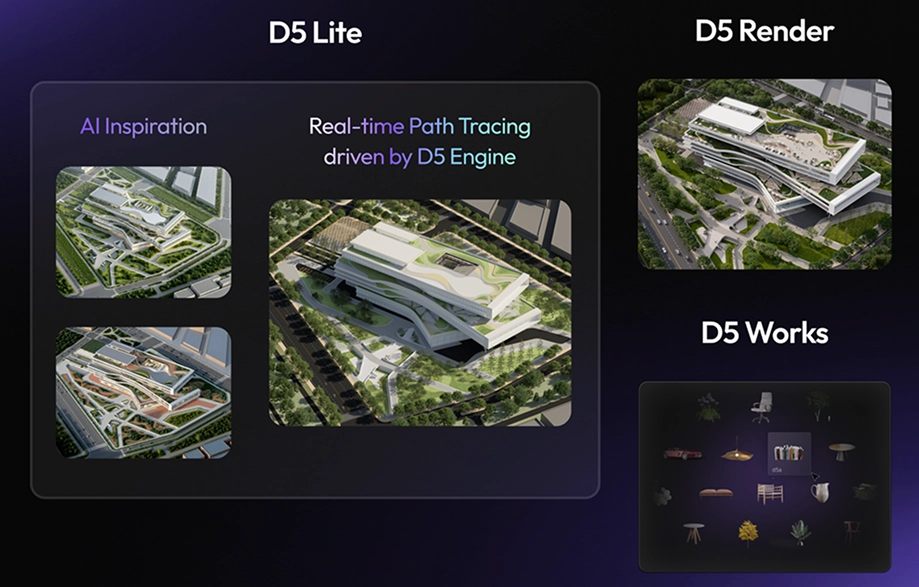
The real advantage is an all-in-one workflow that lets early AI explorations carry straight through to final delivery without repeated reconstruction or constant re-importing.
Pricing & Subscriptions: Midjourney vs. D5 Lite
Midjourney
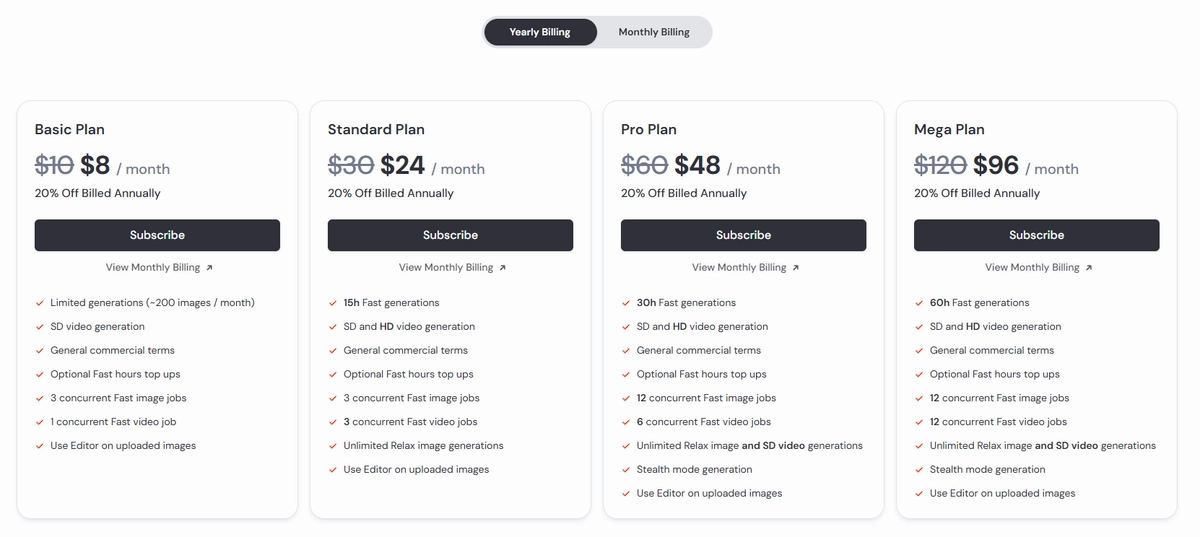
The Basic plan starts at $10/month. For architects doing consistent professional work, however, the Basic plan rarely goes far. Because every generation carries some uncertainty — you often need multiple prompt refinements and variations before the geometry lines up with your actual design intent — the Basic plan’s limited Fast GPU time (3.3 hours per month, roughly 200 standard images) is often exhausted quickly. As a result, many users move up to the Standard plan ($30/month).
D5 Lite:
Real-time rendering inside SketchUp — free, no strings attached. New users receive 50 complimentary AI generation credits (1 credit per concept variation), enough to evaluate the feature in your own projects.
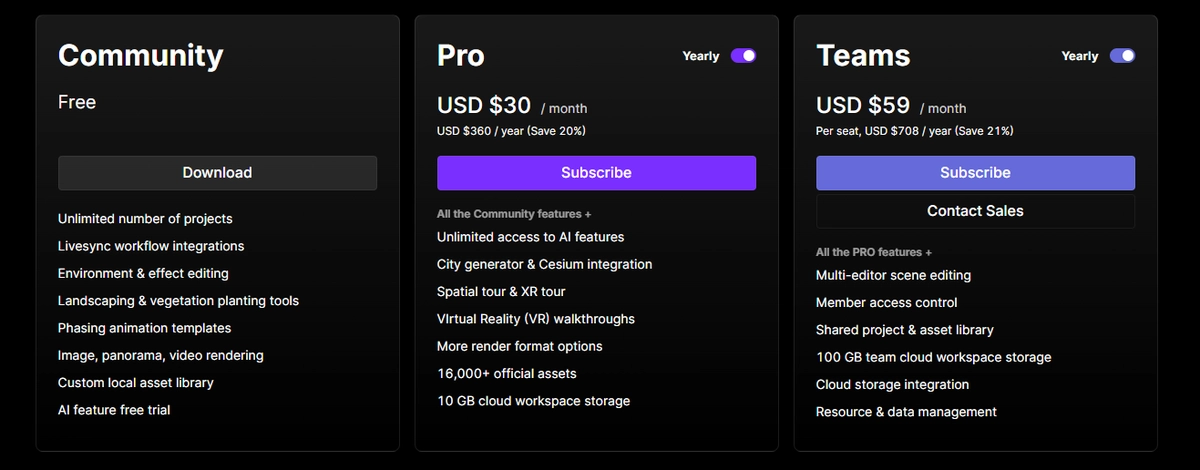
To unlock unlimited AI, you need a single D5 Pro license ($30/month billed annually). Crucially, this one license powers both D5 Lite and the full D5 Render application, while also unlocking D5 Works benefits—including premium 3D assets and exclusive subscriber discounts. This gives you an entire unbroken workflow and a top-tier asset library for the price of a standard Midjourney subscription.
Which SketchUp AI Tool Is Right for You?
The choice between Midjourney and D5 Lite isn’t strictly either/or — it’s about choosing the right tool for the specific stage of your architectural pipeline.
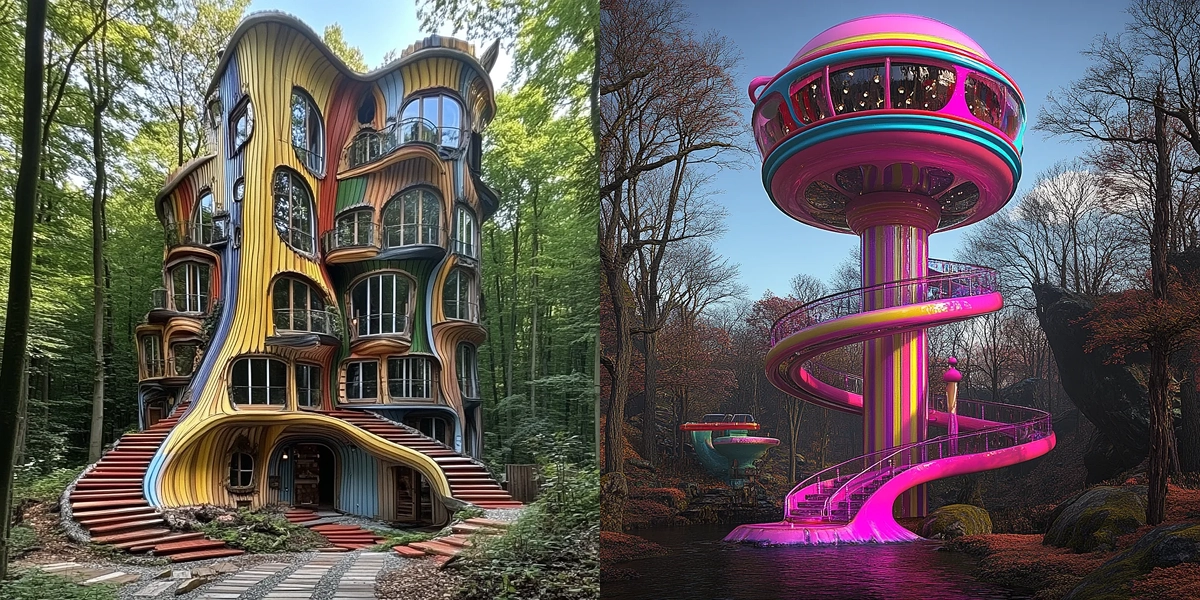
Midjourney tends to be the stronger fit when:
- You’re in the very earliest phase — before any meaningful 3D modeling has begun — and you need to quickly explore a wide range of visual languages, atmospheres and directions to help shape the overall project intent.
- Structural or spatial accuracy isn’t the immediate priority — the focus is on mood, materiality, lighting atmosphere or purely conceptual / artistic exploration.
- You value creative surprises — the unexpected compositions, forms or visual metaphors that surface from the prompt and open up new lines of thinking.
D5 Lite usually makes more sense once you’re working in SketchUp and:
- You already have a live 3D model (even if it’s only schematic massing) and want to see realistic, up-to-date visualization without ever exporting or converting files.
- Geometric fidelity and buildable logic are essential — clients need to see faithful representations of the actual design they’re reviewing, not artistic interpretations that may require heavy reinterpretation later.
- Workflow continuity is important to you — the time and decisions invested in early visualization should flow naturally into later stages, all the way through to final high-resolution stills, animations or immersive presentations, without having to rebuild the scene in another tool.
- Many architects we speak with start with Midjourney for pure ideation, then reach a point where the repeated rework — fixing hallucinations, reconciling AI-generated imagery back with the actual SketchUp model — starts to feel like unnecessary friction.
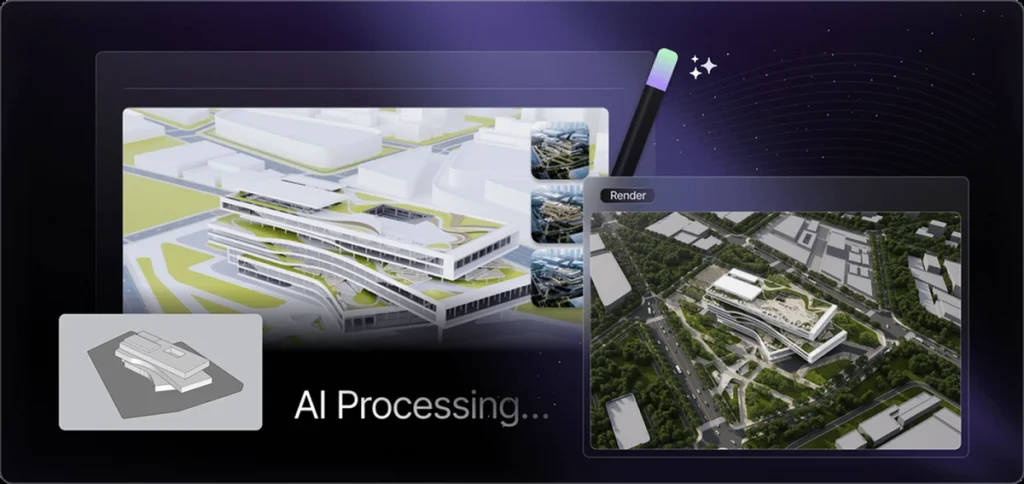
D5 Lite generates concept visuals directly from your SketchUp geometry — stylized, but always buildable
If this pattern feels relevant, D5 Lite gives you a low-risk way to experiment: the core real-time rendering is free forever, and you receive 50 complimentary AI generation credits right away. That’s usually enough to run several realistic test cases inside your own models and judge for yourself whether staying geometry-grounded throughout the pipeline better suits the way your practice actually operates.
What SketchUp Architects Are Actually Saying
The most convincing feedback comes from architects and visualization specialists who spend their days modeling and presenting in SketchUp. Across Trustpilot, G2, Capterra, the official SketchUp forums, and Reddit’s r/archviz, the pattern is consistent: D5 Lite delivers real-time freedom and geometry-faithful results that genuinely fit into daily practice.
On Trustpilot, Anonymous summed it up directly: “D5 Lite is fully compatible with SketchUp… Goodbye to endless waiting. Being able to see changes in real time as I move an object in SketchUp gives me enormous creative freedom.”
Capterra users point to the same strengths. One student, TK TawfiQ K., noted: “The integration with SketchUp and the handling of natural lighting bring my projects to life.” Another reviewer on the same platform added: “LiveSync actually works perfectly with SketchUp… The results are incredible. It’s really integrated to the most important software of 3D modeling.”
On G2 — where D5 Render holds a 4.8/5 rating across 1,000+ reviews — professionals consistently highlight workflow continuity with comments like “The live synchronization with SketchUp is fluid, allowing for real-time design and material decisions with a visual fidelity that impresses clients from the early stages.”
These aren’t cherry-picked testimonials — they’re publicly posted reviews from working professionals. The consensus is clear: when visualization stays anchored to the live SketchUp model, the design loop tightens, iteration feels natural, and the outputs clients see are ones they can actually trust.
Our Take: Choosing the Right SketchUp AI Tool for Your Workflow
Midjourney and D5 Lite are both strong tools, yet they serve distinctly different roles in a typical architectural workflow. Midjourney excels early on — before modeling starts — when you want fast, open-ended visual ideas and spatial accuracy isn’t critical yet.
D5 Lite comes into its own once you’re inside SketchUp: geometry-faithful visualization, instant iteration, and client-trustworthy outputs that flow seamlessly from live studies all the way to production renders in the full D5 Render.
Most practices we see use both at different stages. The difference lies in picking the right tool for the job instead of forcing one to do everything.
If keeping your workflow geometry-grounded from concept to delivery sounds like a better way to work, try D5 Lite — it’s free to start.
Continue Reading to Explore More SketchUp Rendering Tips
The Best Free SketchUp Rendering Tool: D5 Render
SketchUp Tutorial 2026: Turbocharge Your Workflow with D5 Lite
Essential SketchUp Interior Rendering Tips You Need!
How SketchUp landscape design benefits from real-time rendering
Want to Use SketchUp 2025 With D5? Here’s What You Need to Know
SketchUp Free + D5 Pro: Get Pro Renders Effortlessly
How to Render in SketchUp Tips 101: From Beginner to Pro
FAQs: AI Tools for SketchUp Architects
If you’re finding that AI-generated visuals drift away from your actual design, the fix is using a geometry-aware tool rather than a standalone image generator. D5 Lite runs directly inside SketchUp and includes a Structure Weight slider. Set it toward Precise, and the AI applies stylistic variations—materials, lighting, environment—while keeping your walls, windows, and massing exactly where you put them.
No—Midjourney doesn’t have a native SketchUp integration. It works as a standalone text-to-image tool, completely outside your modeling environment. Without access to your actual 3D geometry, it interprets prompts through pattern recognition rather than spatial logic, which often results in inaccurate proportions or fabricated structural elements. Reconciling those outputs with your real model typically means significant rework.
For the very earliest stage of a project—before any serious 3D modeling begins—Midjourney is a natural fit. It’s fast, flexible, and great for exploring a wide range of visual directions, atmospheres, and material palettes. When the goal is pure creative exploration rather than geometric accuracy, prompt-driven generation gives you a lot of creative ground to cover in a short amount of time.
Midjourney’s core limitation for architectural work is that it has no awareness of your actual 3D geometry. It generates images through pattern recognition, which means it can produce visually compelling results that contain floating elements, impossible cantilevers, or mismatched scales. When clients ask “Is this actually buildable?”, the answer is often unclear — and reconciling those images with the real design can require substantial rework.
Standalone image generators tend to distort proportions or invent geometry that doesn’t exist in your model. A more reliable approach is using a plugin that reads your 3D geometry directly. D5 Lite runs natively inside SketchUp and uses your live model as the source. Its Structure Weight slider lets you explore different visual styles and atmospheres while keeping your actual massing, windows, and layout intact throughout.
The most common reason is that AI-generated images — particularly from prompt-based tools — can show elements that don’t reflect the real design: unexpected forms, inconsistent proportions, or details that weren’t part of the brief. When a client asks “Is this what we’re actually building?”, it erodes confidence. Using a model-based tool like D5 Lite helps avoid this, since every visual stays anchored to the geometry you’ve already approved together.
Yes. D5 Lite is a native SketchUp plugin that offers real-time, path-traced rendering at no cost. Unlike standalone image generators, it reads your live 3D model directly, so the visuals it produces reflect your actual geometry. New users also receive 50 complimentary AI generation credits to explore style variations based on their own models — a practical way to evaluate the tool inside a real project before committing to a paid plan.
Honestly, both have a place — just at different stages. Early in a project, before serious modeling begins, prompt-based tools are great for quickly exploring visual directions and setting the overall tone. Once you’re working in SketchUp, a native SketchUp plugin like D5 Lite tends to be more useful: it keeps your geometry intact, updates in real time as you model, and means your early visual explorations can carry through naturally to final client deliverables.
 English
 Español
 Français
 한국어
한국어 日本語
日本語